
A growing operations-heavy company was running its entire business on a tangle of shared spreadsheets. Within a few months of replacing them with a custom web portal, the team cut hours of manual data entry each week, reduced order errors sharply, and finally got reporting they could trust. Here is a representative account of how that kind of project unfolds.
Note: This is a composite case study based on typical Vadimages projects. The client is representative rather than a single named company, and the figures below are illustrative of the outcomes we commonly see, not a guaranteed result. When we have a named client story cleared for publication, we will link it from our case studies page.
The situation
The client was a US-based small business in a service-and-fulfillment industry, with roughly 30 employees across operations, sales, and accounting. Like many SMBs, they had grown up on spreadsheets. What started as one tidy tracking sheet had multiplied into a dozen linked workbooks living in a shared drive: an order log, an inventory sheet, a customer list, a scheduling tab, a pricing sheet, and several personal copies that individual team members maintained "just to be safe."
Spreadsheets are wonderful for getting started. They are free, familiar, and flexible. But past a certain size, that flexibility becomes a liability. The company was processing several hundred orders a week, and every order touched three or four sheets. Nobody could say with confidence which version of a number was current. The owner described it as "running the business on trust and copy-paste."
The challenge
When we sat down with the team, a familiar set of problems surfaced. These are the symptoms that usually tell us a business has outgrown spreadsheets:
- Duplicate and manual entry. The same order details were re-keyed into multiple sheets. A single new customer might be typed in four separate places, which meant four chances to introduce a typo.
- No real permissions. Everyone with the share link could see and edit everything, including pricing and margins. A stray click could overwrite a formula that half the business depended on, and often did.
- Version chaos. "Final_v3_USE_THIS_ONE.xlsx" is a punchline for a reason. People emailed copies around, edited offline, and reconciled by hand later.
- No workflow or accountability. Nothing enforced that an order moved from received to fulfilled to invoiced in order. Steps were skipped, and there was no record of who changed what or when.
- Painful reporting. Month-end meant one person spending most of a day stitching sheets together with lookups to answer basic questions like "how much did we ship last month, and to whom?"
- Fragile and unscalable. The whole system depended on two people who understood how the formulas connected. If either was out sick, work slowed to a crawl.
The cost was not just annoyance. Errors were reaching customers as wrong quantities and mis-priced invoices, which cost money to fix and eroded trust. And the business simply could not grow on this foundation, because every new order added friction rather than fitting into a system built to absorb it.
How we approached it
We did not start by writing code. We started by understanding the work. Our process on a project like this is deliberately front-loaded with discovery, because the most expensive software mistake is building the wrong thing quickly.
- Discovery and process mapping. We spent time with each team, watched how orders actually moved through the business, and mapped the real workflow, including the informal workarounds people had invented. We collected every spreadsheet and documented what each column truly meant.
- Defining roles and rules. Together we identified who should be able to do what: which fields sales could edit, what only accounting should touch, and what the owner needed to see across everything. This became the permission model.
- A small, shippable first version. Rather than attempting a year-long rebuild, we scoped a focused first release around the single most painful workflow: order intake and fulfillment. Get that right, prove the value, then expand.
- Iterative build with the team in the loop. We shipped working slices every couple of weeks and put them in front of real users. Their feedback reshaped the design before anything was set in stone.
- Data migration, carefully. We wrote import routines to bring years of spreadsheet history into the new system, cleaning and de-duplicating as we went, so nothing valuable was lost.
This is the same philosophy behind our tagline: we build for humans and optimize for growth. Software that ignores how people actually work gets abandoned no matter how clever it is.
What we built
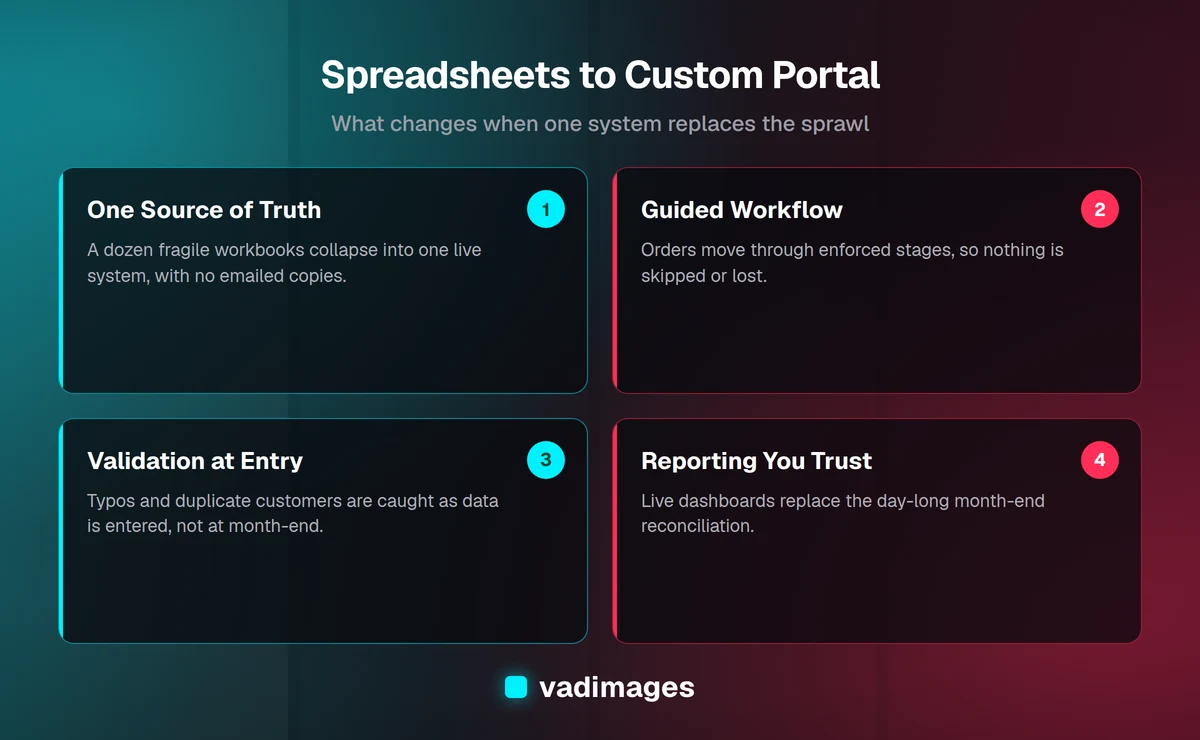
The result was a custom web portal that replaced the spreadsheet sprawl with a single source of truth. Everyone worked in the same live system through their browser, with no installs and no emailed copies. The core pieces were:
- Role-based access. Sales, operations, accounting, and management each got a view scoped to their job. People saw what they needed and could edit only what they were responsible for. Sensitive numbers like margins were visible only to those who should see them.
- A guided workflow. Orders moved through defined stages, and the portal enforced the sequence and captured the required details at each step. Nothing fell through the cracks because the system would not let it.
- Validation at the point of entry. Instead of catching typos at month-end, the portal validated data as it was entered: required fields, sensible ranges, and no duplicate customers. A record was entered once and reused everywhere.
- Reporting and dashboards. Managers got live dashboards and one-click reports for the questions they asked constantly, such as volume by period, status of open orders, and top customers. The day-long month-end reconciliation disappeared.
- A full audit trail. Every change was recorded with who, what, and when. Questions that used to start arguments now had a definitive answer.
- Notifications and handoffs. When an order reached a stage another team owned, the right people were notified automatically, replacing a stream of "did you see my message?" pings.
Under the hood it was a straightforward, maintainable web application: a proper database instead of scattered files, a clean interface built for the people using it every day, and secure hosting. Nothing exotic. The value was not in fancy technology; it was in fitting the software precisely to how this particular business ran.
The rollout
A good tool badly introduced still fails, so we treated rollout as its own phase. We ran the new portal alongside the spreadsheets for a short overlap period so the team could build confidence without risk. We trained each group on their part of the system in short, role-specific sessions rather than one overwhelming firehose. And we stayed close during the first few weeks to fix rough edges quickly and adjust wording, defaults, and shortcuts based on how people actually used it.
Because the team had helped shape the portal throughout the build, it did not feel like a system imposed on them. It felt like theirs. That sense of ownership is the single biggest predictor of whether a new internal tool sticks, and it is why we involve users from day one rather than unveiling a finished product at the end.
The results
Within the first few months of going live, the representative outcomes looked like this:
- Around 10 to 15 hours a week of manual data entry eliminated across the team, as duplicate entry disappeared and reports generated themselves. That time went back into serving customers and growing the business.
- Order-related errors cut by roughly 80 percent, because validation caught mistakes at entry and there were no longer competing versions of the truth.
- Month-end reporting dropped from most of a day to minutes, and the numbers were trusted because everyone knew they came from one system.
- Onboarding new staff got dramatically easier. A new hire learned a guided workflow instead of inheriting a decade of undocumented spreadsheet lore.
- The business could finally scale. Adding volume no longer meant adding proportional chaos; the system absorbed growth instead of buckling under it.
The less measurable win mattered just as much: the owner stopped worrying about whether the numbers were right. Decisions got faster because the data was trustworthy. These figures are illustrative of the kinds of outcomes we typically see on projects like this; your results depend on your specific processes, data, and volume.
Frequently asked questions
When is it time to replace spreadsheets with a custom portal? A good signal is when multiple people edit the same data, when you keep several versions in sync by hand, when reporting takes hours, or when spreadsheet errors are reaching customers. If your business would be at real risk if one key spreadsheet were corrupted, you have outgrown the tool.
Why not just buy off-the-shelf software? Sometimes that is the right call, and we will tell you honestly when it is. But packaged software forces your process into its assumptions. A custom portal fits how you actually work, integrates with the tools you already use, and does not carry monthly per-seat fees that grow forever. For businesses whose workflow is a competitive advantage, custom usually wins.
How long does a project like this take? A focused first version targeting your most painful workflow often lands in a couple of months, then grows from there. We deliberately ship a useful slice early rather than disappearing for a year.
What does it cost? Vadimages projects start at $5,000 and up, scoped transparently to what you need. We size the first release to deliver value quickly rather than asking you to fund everything at once.
Will we lose our spreadsheet history? No. We migrate your existing data into the new system, cleaning and de-duplicating along the way, so your history comes with you.
The bottom line
Spreadsheets are a great way to start a business and a risky way to run one at scale. When duplicate entry, version chaos, and untrustworthy reports start costing you real time and money, a custom portal that matches how your team actually works pays for itself in recovered hours and prevented errors. The pattern in this representative case study, from discovery to a focused first release to a confident rollout, is one we follow on projects of every size.
If your team is drowning in spreadsheets, we would be glad to map your workflow and show you what a portal built around it could do. Start a conversation with our team on our contact page.