
Most small and mid-sized businesses using AI for small business 2026 are not building anything futuristic. They are quietly plugging a handful of AI tools into support, content, and paperwork to save a few hours a week, and the ones seeing real returns started small and measured everything.
There is a wide gap between the AI headlines and what actually happens inside a 12-person plumbing company, a regional accounting firm, or a two-location retail shop. This is a practical, non-hype look at how SMBs really use AI right now: what works, what quietly gets abandoned, what it costs, where the privacy risks hide, and how to get started without betting the business on it.
What does "using AI" actually mean for a small business in 2026?
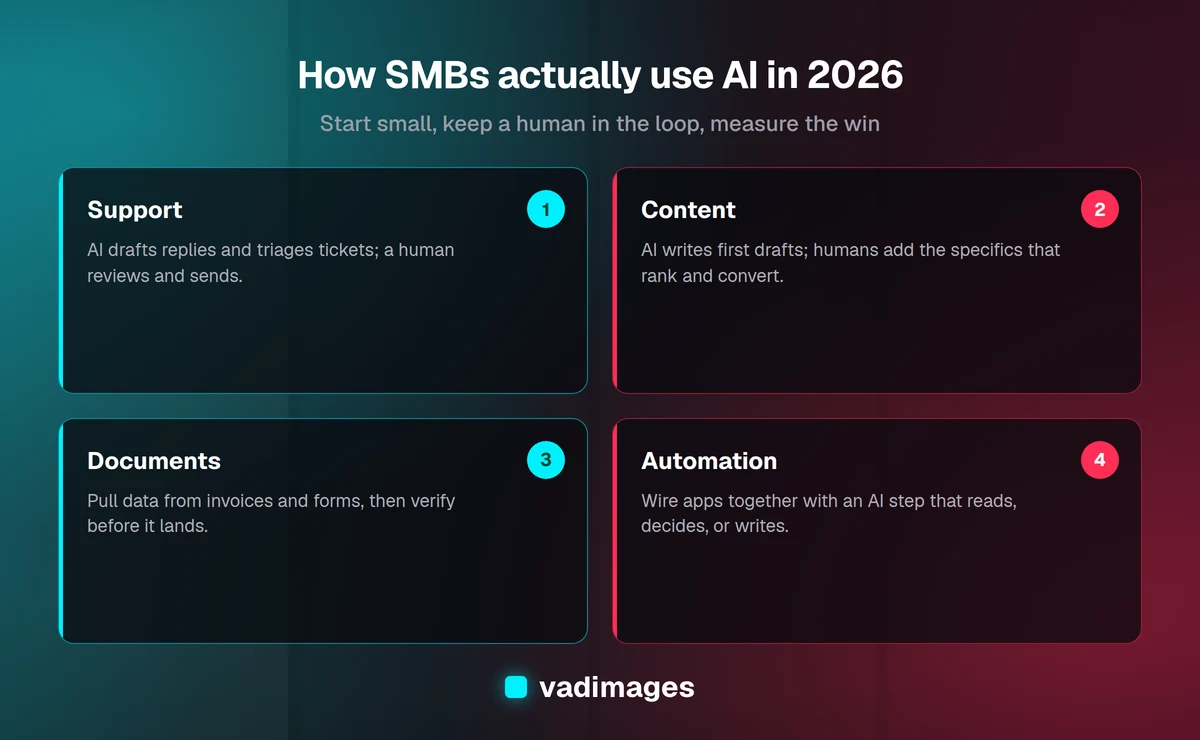
For most SMBs, "using AI" does not mean training custom models or hiring data scientists. It means using AI features that are already baked into tools they pay for, plus one or two standalone assistants. The work falls into a few recognizable buckets:
- Customer support: AI drafts replies, summarizes long email threads, and handles first-line questions on the website.
- Content and marketing: first drafts of blog posts, product descriptions, social captions, and email newsletters.
- Lead scoring and sales: ranking inbound leads, summarizing calls, and drafting follow-ups.
- Document processing: pulling data out of invoices, receipts, contracts, and PDFs.
- Internal assistants: a private chatbot that answers staff questions from company documents.
- Automation: connecting apps so a form submission, an email, or a payment kicks off the next step automatically.
The pattern that separates winners from tire-kickers is boring but consistent: they aim AI at a specific, repetitive task with a clear before-and-after, rather than "adopting AI" as a company-wide initiative.
How are SMBs using AI for customer support?
Support is where most SMBs get their first real win, because the volume is high and the tasks are repetitive. In practice, three uses dominate.
First, reply drafting. Instead of a chatbot that answers customers directly, many teams use AI to draft a response that a human reviews and sends. A landscaping company might feed the customer's email plus its own pricing sheet into an assistant and get a polished draft in seconds. The staffer edits and sends. Response times drop, tone stays consistent, and nobody is left staring at a blank reply box.
Second, ticket triage and summarization. AI reads a messy thread and produces a two-line summary plus a suggested category and priority. This alone saves managers real time when they are routing dozens of messages a day.
Third, website chat for common questions: hours, location, return policy, appointment booking. This works well when it is grounded in the company's actual documents and hands off to a human the moment it is unsure. It works badly when it is turned loose to improvise, which is how businesses end up with a bot confidently quoting the wrong price.
What works: human-in-the-loop drafting and tightly-scoped FAQ bots. What doesn't: fully autonomous bots handling billing, refunds, or anything with legal or financial consequences.
Does AI content actually work for marketing?
Yes, with a firm ceiling. AI is genuinely good at first drafts, outlines, repurposing one piece of content into five formats, and beating the blank page. A café owner can turn a paragraph of notes into a month of social captions in ten minutes. An HVAC company can draft a dozen service-page variations to start from.
Where it fails is unedited publishing at scale. Search engines and, increasingly, AI answer engines reward content that shows real experience, specific detail, and a point of view. Generic AI text has none of that, and a flood of it can actively hurt a site. The businesses winning here use AI to draft and a human to add the specifics, the local knowledge, and the honest opinion. That is the same philosophy behind our own SEO and GEO services: AI accelerates the work, humans supply the judgment that makes it rank and convert.
A realistic content workflow in 2026 looks like this: human picks the topic and angle, AI produces a structured draft, human rewrites the weak parts and adds examples, then a second AI pass checks clarity and grammar. The result ships in half the time without reading like a robot wrote it.
How are SMBs using AI for lead scoring and sales?
Sales teams at smaller companies rarely have a dedicated analyst, so AI fills a gap. Common uses include ranking inbound leads by how likely they are to close based on the form details and past patterns, summarizing a recorded sales call into notes and action items, and drafting personalized follow-up emails that reference what the prospect actually said.
The value is not magic prediction; it is consistency and speed. A two-person sales team can follow up faster and forget fewer leads. The caution: lead scores are suggestions, not verdicts. Treat a low AI score as a nudge, not a reason to ignore a customer, and never feed sensitive customer data into a tool you have not vetted.
What about document processing and paperwork?
This is one of the highest-return, lowest-drama uses of AI for SMBs, and it gets far less attention than chatbots. Businesses drown in semi-structured documents: invoices, receipts, purchase orders, timesheets, insurance forms, contracts. AI is strong at reading these and pulling out the fields that matter.
Concrete examples include an accounting firm extracting line items from client receipts into a spreadsheet, a construction company pulling totals and dates off subcontractor invoices, and a clinic turning intake forms into structured records. Done well, this replaces hours of manual data entry and reduces typos.
The rule that keeps it safe: verify before it hits a system of record. AI extraction is accurate most of the time, not all of the time, and a mis-read invoice total that flows straight into accounting is a real problem. The reliable pattern is AI extracts, a human confirms the exceptions the system flags as low-confidence, and only then does the data land. This is the kind of workflow we build in custom automation and internal tools for clients who process the same documents every single day.
What is an internal AI assistant, and do SMBs really use them?
Increasingly, yes. An internal assistant is a private chatbot that answers employee questions using the company's own documents: the employee handbook, SOPs, product specs, past support tickets. New hires ask it how to process a return instead of interrupting a manager. Field techs ask it which part fits which model.
The technology behind this is usually retrieval-augmented generation, where the assistant looks up relevant company documents and answers from them rather than from general knowledge. That grounding is what makes the answers trustworthy and, critically, keeps the assistant from inventing policies that do not exist. For a 20-to-200-person company, a well-built internal assistant quietly removes a surprising amount of repetitive "how do I do this again?" friction.
Where does automation fit in?
Automation is the glue, and it is often where AI delivers the most durable value because it removes work permanently instead of just speeding it up. The trend in 2026 is combining classic automation (when X happens, do Y) with an AI step in the middle that reads, decides, or writes.
Examples that are common and genuinely useful:
- A new contact form submission is summarized by AI, scored, and routed to the right salesperson automatically.
- Incoming invoices are read, the data is extracted, and a draft entry is created in the accounting system for approval.
- Every support email is tagged by topic and sentiment so managers can spot problems early.
- Meeting recordings are transcribed, summarized, and the action items are turned into tasks.
None of these are flashy. All of them remove recurring manual steps that used to eat an hour here and an hour there.
What does AI actually cost a small business in 2026?
Less than most owners expect to start, and more than they expect if they scale carelessly. A realistic picture:
- Per-seat AI assistants typically run roughly $20–$60 per user per month. For a small team, that is a modest, predictable line item.
- AI features inside existing tools (your help desk, CRM, or accounting software) are often bundled or a small add-on, which makes them the cheapest place to start.
- Usage-based API costs for custom automations are usually small per task but can add up at volume, so they need monitoring.
- The real cost is setup and change management, not the software. A custom internal assistant or document pipeline is a project with a build cost; the tool subscription is the cheap part.
The honest framing we give clients: start with cheap, off-the-shelf AI to prove value on one workflow, then invest in custom builds only where the numbers justify it. Custom development at Vadimages starts at $5,000, and we will tell you when an off-the-shelf tool is the smarter buy.
What are the real risks, especially around privacy?
The risks are manageable but real, and ignoring them is how small companies get burned.
Data privacy is the big one. When you paste customer data, financial records, or proprietary information into a consumer AI tool, you need to know whether it is used to train models and where it is stored. The safe practice: use business or enterprise tiers that contractually exclude your data from training, and write a short internal policy about what can and cannot be pasted into AI tools. If you handle health, financial, or regulated data, verify compliance (such as a signed agreement covering that data) before anything sensitive goes near a tool.
Accuracy and hallucination come next. AI can state wrong things confidently. That is fine for a first draft and dangerous for a final answer to a customer or a number in your books. Keep a human in the loop wherever a mistake has real consequences.
Over-reliance and skill erosion are quieter risks. Teams that let AI handle everything can lose the ability to catch its mistakes. And vendor lock-in matters: build so you can switch tools without rebuilding everything.
How should an SMB actually start with AI?
Start small, pick one painful workflow, and measure. A sensible first 90 days:
- Pick one repetitive, high-volume task that a person does every day, like drafting support replies or entering invoice data.
- Try the AI already in a tool you own before buying anything new. Many businesses discover their help desk or accounting software already has the feature.
- Run it with a human in the loop for a few weeks and track one number: hours saved, response time, or error rate.
- Write a one-page AI policy covering what data is off-limits and which tools are approved.
- Only then consider a custom build for the workflow that proved its value, where an off-the-shelf tool cannot go far enough.
This sequence keeps risk low, cost low, and gives you evidence before you spend real money. The businesses that struggle are the ones that skip straight to a big custom project without proving the value first.
Frequently asked questions
Is AI worth it for a small business in 2026? For most, yes, if it is aimed at a specific repetitive task. The wins come from saving hours on support, content, and paperwork, not from a single dramatic transformation.
What is the cheapest way to start using AI? Turn on the AI features already included in tools you pay for, such as your help desk, CRM, or accounting software, before buying anything standalone.
Is my data safe if I use AI tools? It depends on the tier. Business and enterprise plans usually exclude your data from training and offer stronger controls. Read the terms, use business tiers for anything sensitive, and set an internal policy.
Will AI replace my employees? In practice, SMBs use AI to remove repetitive tasks so a small team can do more, not to cut headcount. The realistic outcome is faster work and fewer dropped balls.
Do I need a developer to use AI? Not to start. Off-the-shelf tools cover most first use cases. You need a developer when you want a custom assistant, a document pipeline, or automations tied to your own systems.
The bottom line
In 2026, the SMBs getting real value from AI are not the ones chasing hype. They picked one repetitive task, used tools they already had, kept a human in the loop, watched the privacy details, and expanded only where the numbers proved out. Start small, measure honestly, and invest in custom builds only where they clearly pay off.
If you want help figuring out which workflow to automate first, or you are ready to build a custom internal assistant or document pipeline that fits your business, we can help. Reach out through our contact page. We build for humans, optimize for growth.