
The clearest legacy system modernization signs are rising maintenance costs, mounting security risk, vendor support that has ended, systems that refuse to integrate, slow performance, and difficulty hiring people who will touch the code. If two or more of these describe your situation, the software is no longer just old — it is actively holding the business back, and the cost of waiting is climbing every quarter.
A "legacy system" is not simply software that is old. Plenty of decade-old systems run beautifully and should be left alone. A legacy system is one where the technology has started to work against you: it is expensive to keep alive, risky to change, hard to staff, and unable to keep pace with what the business needs next. This article walks through the warning signs, the real risks of putting off a decision, the main modernization paths, and how to start without betting the company on a rewrite.
What exactly counts as a legacy system?
A system earns the "legacy" label when maintaining it costs more value than it delivers, or when it blocks changes the business needs to make. That can be a custom application built on a framework that no longer receives updates, an off-the-shelf product the vendor has stopped supporting, a database version that is past end-of-life, or a tangle of spreadsheets and manual steps that grew into a mission-critical process nobody planned. Age is a hint, not the diagnosis. The real questions are: Can we still change it safely? Can we still hire for it? Is it still secure? Does it still fit how we work? When the answers turn to "no," you are looking at legacy software regardless of the calendar.
What are the signs it's time to modernize your legacy system?
Most businesses do not decide to modernize because of a single dramatic failure. They decide because several smaller signals pile up until the pattern is impossible to ignore. Here are the warning signs that show up most often.
- Maintenance costs keep rising. You are paying more each year just to keep the system running — specialized contractors, extended-support contracts, aging hardware, or one engineer whose entire job is keeping the old thing alive. When "keep the lights on" eats the budget you would rather spend on new capabilities, the math has already turned against you.
- Security risk is growing. The platform no longer receives security patches, runs on an operating system that is past end-of-life, or depends on libraries with known, unfixable vulnerabilities. Every month it stays in production is a month of exposure — and if you handle customer data, payments, or health information, that exposure carries real legal and reputational weight.
- Support has ended. The vendor discontinued the product, the original developer is gone, or the framework community has moved on. When something breaks, there is no one to call and no documentation that matches reality. You are the support team now, whether you signed up for that or not.
- It won't integrate with anything. Modern tools expect clean APIs. Your legacy system offers a nightly CSV export, a screen-scrape, or nothing at all. Every new tool — a CRM, an analytics platform, a payment processor — requires a custom, brittle bridge. Data lives in silos and staff copy it by hand between systems.
- It's slow, and getting slower. Reports take minutes to load, batch jobs run overnight and sometimes into the workday, and the system buckles under the traffic your growth now produces. Performance problems that once were annoyances are now bottlenecks that shape how the business operates.
- You can't hire for it. The languages, frameworks, or platforms involved are niche or obsolete. Good engineers do not want to work on them, and the ones who can are expensive and scarce. Onboarding a new developer takes months because the knowledge lives in one person's head, not in documentation.
- It blocks growth. This is the most important sign and the easiest to overlook. Every time you want to launch a product, enter a market, add a channel, or change a workflow, the answer from engineering is "the system can't do that." When your software dictates strategy instead of enabling it, modernization has stopped being optional.
One of these on its own may be manageable. Two or three together, trending in the wrong direction, is the pattern that says it is time to plan a change.
What are the risks of waiting too long?
Deferring modernization feels safe because nothing breaks today. The risk is that the cost of doing nothing compounds quietly until a forced, expensive scramble replaces what could have been a calm, planned project.
- Key-person risk. If one person understands the system and they leave, retire, or simply want to move on, you can lose the ability to change or even reliably operate the software overnight. This is one of the most common ways a manageable situation becomes an emergency.
- A single point of catastrophic failure. Old hardware fails. Unsupported software hits a bug with no patch. When there is no support path and no one who understands the internals, a routine outage can turn into days of downtime and lost revenue.
- Security incidents. Unpatched systems are exactly what attackers look for. A breach brings direct costs, regulatory penalties, and a hit to customer trust that outlasts the technical cleanup.
- Compounding technical debt. Every workaround built on top of a fragile system makes the eventual change harder and more expensive. The longer you wait, the bigger and riskier the project becomes.
- Opportunity cost. While your team spends its energy propping up the old system, competitors on modern platforms ship faster, integrate more easily, and adapt to the market more quickly. The gap widens even when nothing visibly breaks.
The honest framing is this: you are already paying for the legacy system, just in maintenance, risk, and missed opportunities rather than in a line item labeled "modernization." Waiting does not avoid the cost. It defers it and adds interest.
What are the main modernization options?
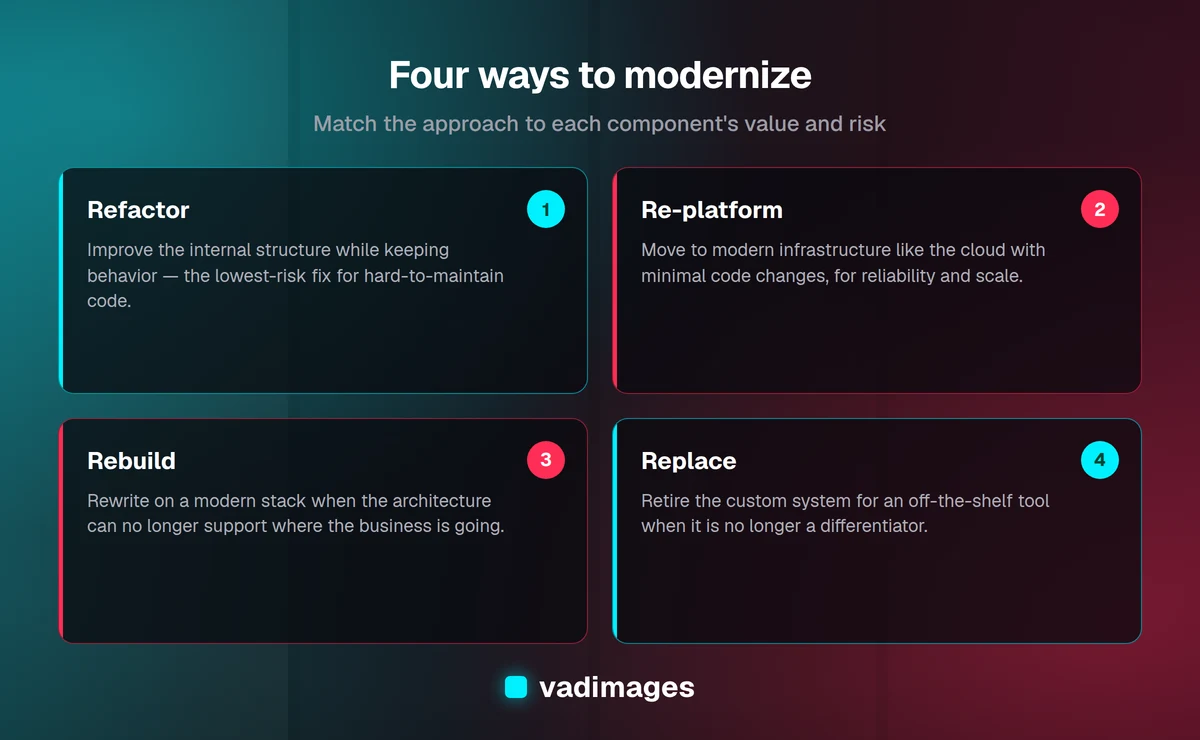
Modernization is not a single move, and "throw it all away and start over" is rarely the right first answer. There is a spectrum of approaches, and the right one depends on how well the current system works, how much of it is worth keeping, and how much risk you can absorb.
- Refactor. Keep the system's behavior but improve its internal structure — clean up the code, upgrade the framework, split a monolith into more manageable pieces. This is the lowest-risk option and works well when the software still does what you need but has become hard to maintain.
- Re-platform. Move the system to modern infrastructure — for example, from an aging on-premise server to the cloud — with minimal code changes. You get better reliability, scalability, and security without a full rewrite. Often a sensible first step.
- Rebuild. Rewrite the system on a modern stack while preserving the parts of its design that still make sense. This is the right call when the current architecture cannot support what the business needs and no amount of refactoring will get it there. It is more effort and more risk, so it deserves careful planning.
- Replace. Retire the custom system and adopt an off-the-shelf product. This makes sense when what you built is no longer a competitive differentiator and a mature commercial tool now does the job better and cheaper. Not everything needs to be custom.
Choosing among these is a business decision as much as a technical one. The question is not "what is the newest technology" but "what delivers the most value for the least risk, given where the business is going."
What is the strangler pattern, and why does it matter?
The scariest thing about modernization is the "big bang" rewrite: spend a year building a replacement in parallel, then flip a switch and hope everything works. These projects are notorious for running over budget, missing requirements the old system quietly handled, and failing at cutover.
The strangler pattern is the safer alternative, and it is how most successful modernizations actually happen. Instead of replacing everything at once, you build new functionality around the edges of the old system and gradually route work to the new components. Over time the new system takes over more and more responsibility until the legacy system can be switched off — one piece at a time, with the ability to stop or roll back at every step. The name comes from strangler fig vines that grow around a tree and slowly replace it.
In practice this often means putting a modern interface or API layer in front of the old system, then rebuilding one capability at a time behind it — a reporting module this quarter, a customer-facing workflow the next. Each piece delivers value on its own, and you are never one risky cutover away from disaster. For most SMBs, incremental modernization is not just less risky; it is the only version that reliably finishes.
How do you start modernizing safely?
The goal at the start is not to pick a technology. It is to understand what you have, what it costs you, and what the business actually needs — so the modernization plan solves real problems rather than chasing novelty.
- Take an honest inventory. Document what the system does, what depends on it, where the data lives, and which parts are genuinely business-critical versus rarely used. You cannot plan a safe transition around a system you do not fully understand — and legacy systems are full of undocumented behavior that matters.
- Quantify the real cost. Add up maintenance, support contracts, downtime, workarounds, and the value of things the business cannot do because of the current system. This gives you an honest baseline and a clear way to weigh the investment against the status quo.
- Prioritize by business value and risk. Identify the pieces that are most expensive, most fragile, or most limiting, and target those first. Early wins build confidence and free up resources for the next step.
- Choose the right approach per component. You do not have to treat the whole system the same way. Some parts can be refactored, some re-platformed, some replaced with off-the-shelf tools, and some rebuilt. Match the approach to the value and risk of each piece.
- Modernize incrementally. Use the strangler pattern to deliver value in stages, keep the business running throughout, and preserve the ability to adjust as you learn. Protect the work with tests and monitoring so you catch regressions before your customers do.
A good partner can help you run this assessment objectively — without the sunk-cost attachment that makes it hard to evaluate your own system honestly. If you want a technical read on where your software stands, our software development and modernization services are built around exactly this kind of staged, low-risk transition.
How much does legacy modernization cost?
It depends on scope, but the useful reframe is to compare it against what you are already spending. Modernization is an investment with a return: lower maintenance costs, reduced risk, faster delivery of new features, and the ability to integrate and scale. A focused re-platform or a first strangler-pattern slice is a far smaller commitment than a full rebuild, which is one more reason to start incrementally rather than wait for a forced, all-at-once replacement. At Vadimages, engagements start at $5,000 and up, and we scope them transparently so you know what you are paying for and what it will deliver before work begins. You can read more about how we work before reaching out.
Frequently asked questions
Is an old system automatically a legacy system? No. Age alone is not the problem. A system becomes "legacy" when it is expensive to maintain, risky to change, hard to staff, insecure, or unable to keep up with the business. A stable, well-understood, still-supported system that does its job is not a modernization candidate just because it is old.
Should we rebuild everything from scratch? Usually not, at least not all at once. Full rewrites are the highest-risk path. In most cases a mix of refactoring, re-platforming, selective replacement, and incremental rebuilding delivers more value with far less risk. Reach for a full rebuild only when the current architecture genuinely cannot support where the business is headed.
Can we modernize without disrupting daily operations? Yes — that is the entire point of the strangler pattern. By replacing the system piece by piece and routing work to new components gradually, you keep the business running throughout and avoid a high-stakes cutover.
What if only one person understands our system? Treat that as an urgent signal, not a comfort. Key-person risk is one of the most common ways a manageable situation becomes an emergency. Start documenting the system now and plan modernization before that knowledge walks out the door.
How do we know which approach is right for us? Start with an honest assessment of what the system costs you and what the business needs it to do. The right approach — refactor, re-platform, rebuild, or replace — falls out of that analysis, and it may differ from one component to the next.
The bottom line
Legacy systems rarely fail on a schedule you choose. They accumulate cost, risk, and limitation quietly until a forced, expensive scramble replaces what could have been a calm, planned upgrade. If rising maintenance costs, security exposure, ended support, integration walls, slow performance, hiring struggles, or blocked growth describe your situation, the warning signs are already here. The good news is that modernization does not have to mean betting the business on a risky rewrite — a staged, strangler-pattern approach lets you reduce risk and deliver value one step at a time. If you want an honest assessment of where your legacy system stands and a practical, low-risk path forward, reach out at https://vadimages.com/contact. We build for humans and optimize for growth.