
Every business has one. The task nobody wants to own, that shows up every single week, that quietly eats a full day of someone's time and gives almost nothing back. It is rarely glamorous — reconciling two systems that refuse to talk, copying numbers from email into a spreadsheet, rebuilding the same report from scratch, chasing the same approvals in the same order. It works, technically. But it works by burning hours that a growing company cannot spare.
This is a representative automation case study: the story of how one small business took a recurring ten-hour weekly task and cut it down to under an hour, without buying an expensive platform or laying anyone off. It is the kind of project we run constantly at Vadimages, and the pattern behind it is more repeatable than most owners expect. If you have a task that feels like a tax on every week, the moves below are the ones that tend to eliminate it.
The situation
The client was a US-based small business — a distribution company with about 25 employees, the kind of operation that had grown faster than its tools. Their most painful recurring job lived in the operations team: every week, someone had to assemble a consolidated order-and-inventory report by hand. It pulled data from an e-commerce store, a warehouse spreadsheet, and a supplier portal, then reconciled the three into a single view the owner used to decide what to reorder and how to staff the coming week.
Note: This is a composite case study based on typical Vadimages projects. The client is representative rather than a single named company, and the figures below are illustrative of the outcomes we commonly see, not a guaranteed result. When we have a named client story cleared for publication, we link it from our case studies page.
On paper it was "just a report." In practice it consumed roughly ten hours a week — most of a full working day — from an operations coordinator whose time was worth far more spent talking to customers and suppliers. Worse, because the work was manual, it was error-prone and impossible to hand off. When that one person took vacation, the report either did not get done or got done badly, and the owner made his reorder decisions half-blind.
Where the ten hours actually went
Before automating anything, we did what we always do: we watched the work happen and timed each piece. Owners are often surprised by where the hours actually hide. In this case the ten hours broke down roughly like this:
- Exporting and cleaning data (about 3 hours). Downloading CSVs from three systems, deleting junk columns, fixing date formats, and standardizing product names that were spelled differently in each source.
- Matching records by hand (about 3 hours). The three systems used different product codes, so the coordinator matched them using a lookup sheet she maintained herself — the single most fragile part of the whole process.
- Building the report (about 2 hours). Copying the reconciled numbers into a formatted template, updating charts, and writing a short summary for the owner.
- Checking and fixing (about 2 hours). Hunting down the inevitable mismatch where the totals did not tie out, which usually traced back to a typo made three hours earlier.
This breakdown mattered enormously, because it told us the expensive part was not the report itself — it was the reconciliation. Any automation that skipped the manual matching would recover most of the time. That focus is what turns a vague wish to "automate reporting" into a project with a clear, affordable scope.
How we approached it
We did not start by writing code, and we did not start by shopping for software. We started by understanding the work, because the most expensive automation mistake is building the wrong thing quickly. Our process on a project like this is deliberately front-loaded with discovery.
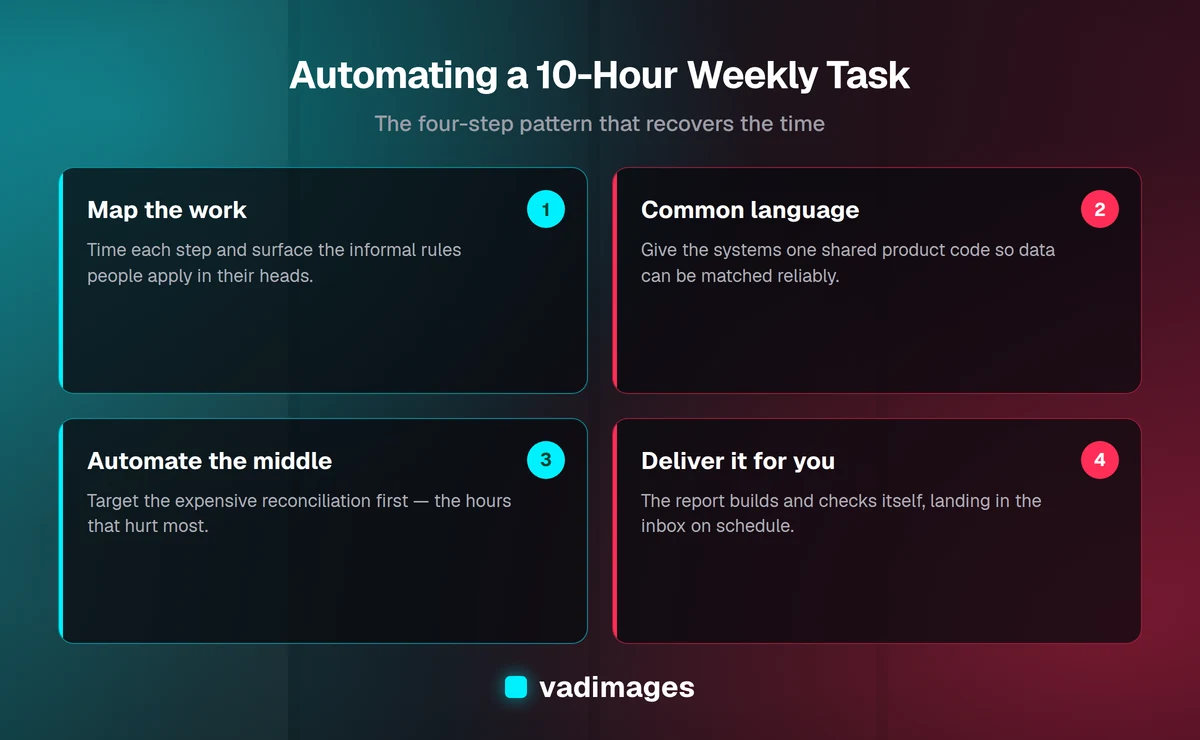
- Map the real workflow. We documented every source, every rule the coordinator applied in her head, and every edge case she handled by instinct. Those informal rules are usually the difference between an automation that works and one that gets abandoned.
- Fix the data model first. The fragile lookup sheet became a proper mapping table with one agreed product code per item. Getting the systems to speak a common language is what makes reliable workflow automation possible in the first place.
- Automate the smallest valuable slice. Rather than rebuilding everything, we targeted the reconciliation — the three expensive hours — first, proved it, then expanded outward.
- Keep a human in the loop where it counts. The owner still reviews and signs off on the reorder decisions. We automated the assembly of the facts, not the judgment.
This is the same philosophy behind everything we build: we build for humans and optimize for growth. Software that ignores how people actually work gets abandoned no matter how clever it is, which is why we involve the people doing the task from day one rather than unveiling a finished tool at the end. You can see the full sequence on our how we work page.
What we automated
The result was not a sprawling new platform. It was a small, focused piece of custom software that did four jobs reliably and then got out of the way:
- Automatic data collection. Instead of three manual downloads, the tool connected directly to the e-commerce store and supplier portal through their APIs and imported the warehouse sheet on a schedule. No more exporting, no more cleaning by hand.
- Reliable matching. The new mapping table matched products across all three systems automatically, and flagged only the genuinely new or ambiguous items for a quick human check — a task that now takes a few minutes instead of hours.
- The report, built for you. Every Monday morning the consolidated report generated itself — reconciled totals, the same charts, and a plain summary of what changed since last week — and landed in the owner's inbox before he sat down.
- Built-in checks. The system validated that the numbers tied out and raised a clear alert when something looked off, so nobody discovered a mismatch after the decisions were already made.
Under the hood it was straightforward and maintainable: a small database, a handful of scheduled integrations, and a clean interface for the one screen a person still needed to touch. Nothing exotic. The value was not in fancy technology; it was in fitting the automation precisely to how this particular business ran.
The rollout
A good tool badly introduced still fails, so we treated rollout as its own phase. We ran the automated report alongside the manual one for two weeks, comparing the outputs line by line so the team could trust the new numbers before relying on them. We trained the operations coordinator on the one screen she still owns — reviewing flagged items — in a single short session. And we stayed close for the first month to tune the matching rules and the summary wording based on how the report was actually used.
Because the coordinator had helped shape the tool throughout the build, it did not feel like a system imposed on her. It felt like hers — and it turned the part of her week she used to dread into a five-minute check. That sense of ownership is the single biggest predictor of whether an automation sticks.
The results
Within the first month of going live, the representative outcomes looked like this:
- The ten-hour task dropped to under one hour a week — a recovery of roughly nine hours, or close to a full working day, returned to the operations team every single week.
- Reconciliation errors effectively disappeared, because matching and checking were handled by rules instead of tired eyes at the end of a long process.
- The report stopped depending on one person. When the coordinator took a week off, the report still arrived on time, and anyone could handle the short review.
- Reorder decisions got faster and better, because the owner had trustworthy numbers first thing Monday instead of a best-effort estimate on Wednesday.
Put in dollars, the math was easy to justify. Nine recovered hours a week is well over four hundred hours a year of skilled time redirected from copy-paste to real work — the kind of return that pays back a focused automation project quickly. These figures are illustrative of the kinds of outcomes we typically see on projects like this; your results depend on your specific processes, data, and volume.
Would this work for your business?
The reason this automation case study generalizes so well is that the ten-hour task is almost never unique. If someone on your team spends a big chunk of every week moving data between systems, rebuilding the same report, or reconciling numbers by hand, the same four-step pattern usually applies: map the work, give the systems a common language, automate the expensive middle, and deliver the result automatically. The best candidates are tasks that are repetitive, rule-based, and painful when a specific person is unavailable.
Not everything should be automated, and part of our job is telling you honestly when a task is too judgment-heavy or too infrequent to be worth it. But recurring, mechanical work that quietly consumes a day a week is exactly where a modest investment tends to pay for itself fastest — and it is a natural first project for teams across many industries.
Frequently asked questions
How do I know which task to automate first? Pick the one that is repetitive, follows clear rules, and hurts the most when the person who does it is out. Time it honestly for a week or two — owners are routinely surprised how much a "small" task actually costs — and start there.
Do I need to replace the software we already use? Usually not. Most of the value in a project like this comes from connecting the tools you already have and automating the manual steps between them, rather than ripping anything out and starting over.
Will automation put someone out of a job? In our experience it does the opposite. It removes the drudgery from a role and frees a capable person for work that actually needs a human — customers, suppliers, judgment calls — which is where their time was always better spent.
How long does a project like this take? A focused automation targeting a single painful task often lands in a matter of weeks, not months. We deliberately ship a useful slice early rather than disappearing for a year.
What does it cost? Vadimages projects start at $5,000 and up, scoped transparently to what you need. Because we target the expensive part of the task first, a well-chosen automation often pays for itself in recovered hours within the first year. See our pricing page for how we scope and quote.
The bottom line
A recurring task that eats ten hours a week is not just an annoyance — it is a standing cost that grows with your business and a risk that lives inside one person's head. The good news is that these tasks are also the easiest wins in software. When you map the work, get your systems speaking the same language, and automate the expensive middle, a full day of manual effort can shrink to a five-minute check, with fewer errors and no single point of failure.
If there is a weekly task your team quietly dreads, we would be glad to time it with you and show you what automating it could return. Start a conversation on our contact page.