
The old system still runs your business. That is exactly what makes replacing it so nerve-racking. When the software that takes orders, tracks inventory, or bills customers is also the software you need to switch off, a migration can feel like changing the engine on a car that is still doing 60 on the freeway. The fear of downtime — hours where nobody can place an order, pull a report, or get paid — is the single biggest reason companies keep paying for tools they long ago outgrew.
Here is the reassuring part: downtime is not an unavoidable tax on modernization. It is a symptom of one specific approach — the "big bang" cutover, where you turn the old system off on Friday and pray the new one works on Monday. There is a better way. When you migrate a legacy system in deliberate, reversible slices, the switch becomes almost invisible to the people who depend on it. This guide walks through how that actually works, in plain English, so you can plan a move that protects revenue instead of gambling with it.
Why "big bang" migrations cause downtime
A big-bang migration treats the switch as a single event. You build the new system in parallel, pick a weekend, freeze the old one, copy everything over, and flip a switch. On paper it is simple. In practice it concentrates every risk into a few hours: the data copy runs long, an integration nobody remembered breaks, a report returns the wrong number, and now the whole business is stuck on software that is half-migrated and fully broken.
The problem is not the new system. The problem is that a legacy platform is never just one thing. It is a decade of accumulated logic — the discount rule someone added for a single customer, the nightly export that feeds the accountant's spreadsheet, the field that means one thing on paper and another in the code. A single cutover forces all of that to work perfectly on the first try, at once, with no room to back out. The alternative is to stop treating the migration as an event and start treating it as a process — one you can pause, verify, and reverse at any point.
Step 1: Map what you actually have before you touch anything
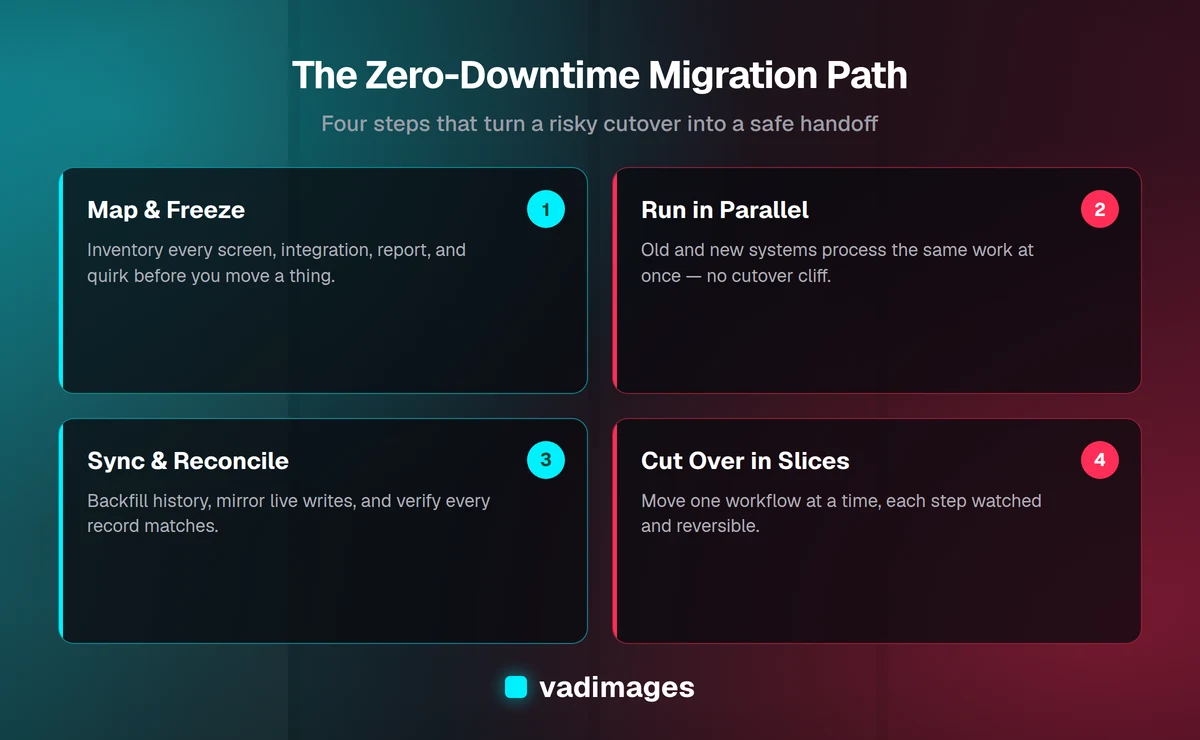
You cannot safely move what you do not understand. Before a single line of new code ships, the first job is to build an honest inventory of the current system: every screen people use, every integration that sends or receives data, every scheduled job, every report, and — critically — every quirk that only shows up at month-end or year-end. Old systems are full of undocumented behavior that the business quietly depends on, and those are exactly the things that break a rushed migration.
A good map answers three questions for each piece of the system: who uses it, what breaks if it stops, and how you would know it broke. That last question matters more than people expect. Much of the "downtime" in a bad migration is not the system being down — it is nobody noticing for two days that orders quietly stopped syncing. When you know what to watch, you catch problems in minutes instead of quarters. This mapping stage is where a partner who has done it before earns their keep; at Vadimages we start every custom software modernization by documenting the real system, not the one described in the original spec.
Step 2: Choose a migration pattern that avoids the cutover cliff
Once you know what you have, you choose how to move it. Three patterns let you avoid the all-or-nothing cliff, and most real projects combine them.
- The strangler pattern. Instead of replacing the whole system at once, you route one function at a time to the new software while the rest keeps running on the old one. Over weeks or months the new system gradually "strangles" the old one until nothing important is left on it. Each function you move is small enough to verify and, if needed, reverse.
- Parallel running. For a period, both systems process the same work at the same time. Staff keep using the old one while the new one shadows it, so you can compare outputs and prove the new system is correct before anyone relies on it.
- Phased rollout. You move one location, department, or customer segment first, learn from it, fix what you find, then expand. A problem affects one slice of the business, not all of it.
The right mix depends on your situation, and it is one of the first things worth talking through with an engineering partner. If you are still deciding whether to modernize at all, our guide on the signs it is time to modernize is a useful gut check before you commit to a pattern.
Step 3: Run the old and new systems side by side
Parallel running is the heart of a zero-downtime migration, so it is worth understanding what it looks like day to day. The new system is fully built and connected to live data, but it is not yet the source of truth. Real transactions flow into both systems. Your team continues working exactly as before on the old one, which means their daily job never stops — the single most important thing during any migration.
Behind the scenes, you compare the two. Did the new system calculate the same invoice total? Produce the same shipping label? Generate the same end-of-day report? Every discrepancy is a bug you get to fix in calm conditions, with the old system still safely in charge. By the time you are ready to cut over, you are not hoping the new system works — you have weeks of evidence that it produces the right answers on your actual business, not on test data. This is also when you train staff, because they can practice on the new system without any risk of breaking live operations.
Step 4: Migrate the data without losing a record
Data is where migrations most often go wrong, because it has to be both complete and live. You need every historical record — years of orders, customers, and transactions — moved accurately, and you need new data created during the migration to land in the right place too. Do this in three layers.
- Backfill the history. Copy the existing data into the new system's structure, cleaning and reformatting as you go. Old systems accumulate messy data, so this is your chance to fix it rather than carry the mess forward.
- Mirror the live writes. While both systems run, every new change made in the old system is also applied to the new one, so the two never drift apart.
- Reconcile and verify. Run automated checks that count and compare records on both sides. The goal is a provable statement: "every record in the old system exists, correctly, in the new one." You do not cut over until that check passes.
Done this way, there is never a moment where data lives in only one place or a window where new records could be lost. If something looks wrong, the old system is still authoritative and nothing is at risk.
Step 5: Cut over in small, reversible steps
The final switch — making the new system the source of truth — should be the least dramatic moment of the whole project, because everything before it has de-risked the decision. Even here, you go in slices. Move one workflow, one location, or one group of users to the new system as their live tool. Watch it closely for a day or two. If it holds, move the next slice. If something surfaces, you roll that one slice back to the old system, fix it, and try again — without the rest of the business ever noticing.
Keep the old system running in read-only mode for a while after the last slice moves. It costs almost nothing and gives you a safety net and a reference for any question that comes up later. Only when you are fully confident do you finally decommission it. That is what a downtime-free migration really is: not a single heroic weekend, but a series of small, boring, reversible steps, each one safe on its own.
How to keep your team working during the switch
Technology is only half of a migration; the people using it are the other half. A change that is technically flawless can still feel like downtime if staff do not know which system to use on a given day or lose confidence in the numbers. Communicate the plan early and in plain terms: what is changing, when each group moves, and where to go if something looks off. Give people a named person to raise issues with, and make it easy — a migration where problems get reported fast is a migration that stays smooth.
Timing helps too. Move the highest-risk slices during your quietest hours, not your busiest season. A retailer does not re-platform in December; an accounting firm does not cut over during tax week. Sequencing the rollout around your real calendar is a simple lever that removes a lot of pressure, and it is the kind of practical planning we build into the timeline in how we work with clients.
What a zero-downtime migration actually costs
A phased, parallel-run migration takes more calendar time than a big-bang cutover, and sometimes a little more engineering, because you are building the bridges that let two systems coexist. That is a feature, not a flaw — you are buying certainty and continuity instead of a risky weekend. The cost of the safer path is almost always smaller than the cost of the downtime, lost orders, and scrambling recovery that a failed cutover produces.
At Vadimages we are transparent about this. Custom modernization projects start at $5,000+, and the exact figure depends on how tangled the old system is, how much data has to move, and how many integrations need rebuilding — which is precisely why the mapping in Step 1 comes first. We would rather scope it honestly up front than surprise you later. You can see how we structure this on our pricing page, and browse real examples of systems we have replaced in our case studies.
Migrate without the drama
The businesses that dread migration are usually picturing the big-bang version — the one that fails on Monday morning. The businesses that migrate smoothly picture something different: a slow, deliberate handoff where the new system proves itself before it is trusted, data is verified before anyone relies on it, and every step can be undone. That is entirely achievable, whatever your industry, and it is how a legacy system should be retired.
If you are running on software you have outgrown but cannot afford to switch off, that is exactly the situation we are built for. Get in touch and we will map your current system, recommend a migration pattern that fits your business, and give you a clear, honest plan to get off the old system without the downtime.