
Website maintenance is the ongoing work of keeping your site secure, up to date, backed up, fast, and available so it keeps earning trust and business instead of quietly breaking. Think of it less as an occasional repair and more as routine care, like servicing a vehicle you depend on every day.
Most business owners treat a website as a one-time project: you design it, launch it, and move on. But a live website is software connected to the internet, and software does not stand still. Plugins release updates, browsers change, security threats evolve, and the code that ran perfectly last year starts to show its age. Without regular attention, small issues compound into outages, breaches, and lost revenue. This guide explains why ongoing maintenance matters, exactly what a good plan includes, what happens when you neglect it, and how to decide between doing it yourself and hiring a provider.
What is website maintenance, really?
Website maintenance is the collection of recurring tasks that keep a website healthy, secure, and performing well after launch. It spans several distinct areas that most people never see: applying security patches, updating the content management system and its plugins, taking and testing backups, monitoring uptime, tuning page speed, fixing broken links and errors, and keeping the site accessible and compliant. Some of this is preventive, and some of it is responsive, but the goal is always the same: to make sure your website works for every visitor, every day, without drama.
It helps to separate maintenance from two things it is often confused with. It is not the same as hosting, which is simply the server space your site lives on. And it is not the same as redesign or new development, which is building something new. Maintenance is the steady, unglamorous work in between that protects the investment you already made.
Why does ongoing maintenance actually matter?
The short answer is that a website is a living asset exposed to the public internet, and unattended assets decay. Here are the concrete reasons maintenance earns its keep.
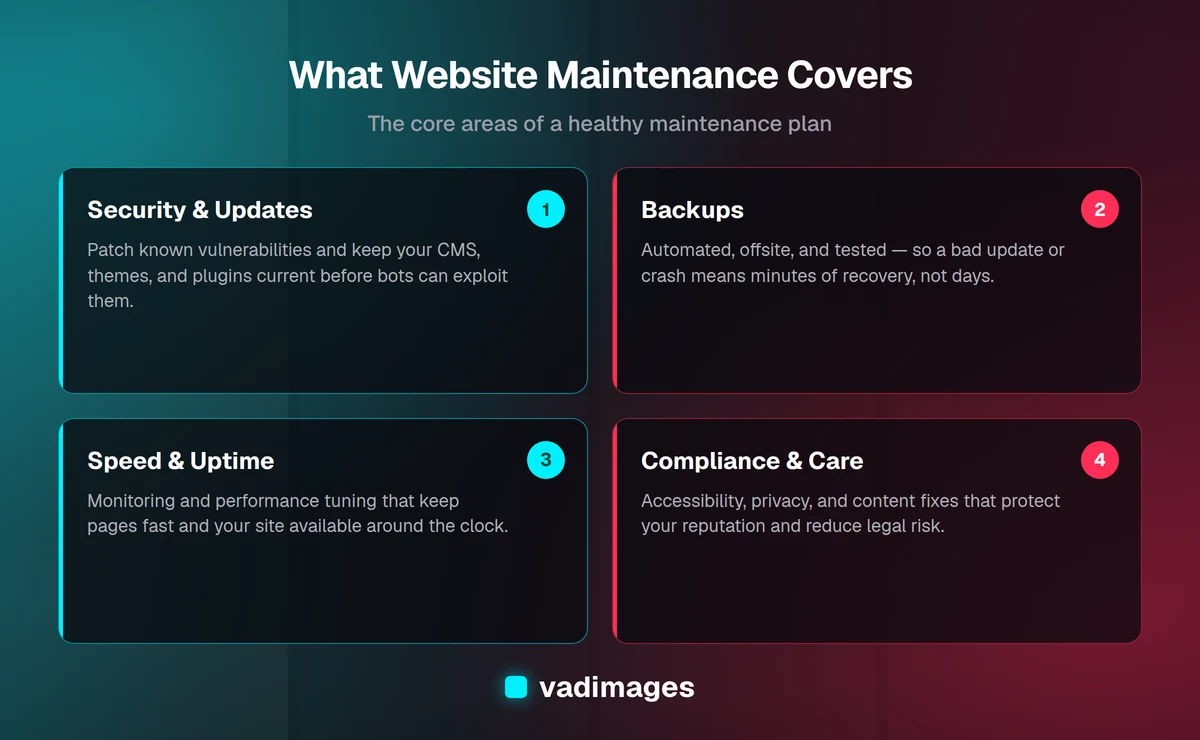
- Security. The vast majority of website hacks exploit known vulnerabilities in outdated software, not clever zero-day attacks. When a plugin or CMS releases a security patch, that release publicly announces the flaw it fixes, and automated bots begin scanning for sites that have not updated. Timely patching closes those doors before attackers walk through them.
- Software updates. Content management systems like WordPress, along with their themes and plugins, ship frequent updates. Skipping them creates compatibility drift, where one out-of-date component eventually clashes with another and something breaks, often at the worst possible moment.
- Backups. Hardware fails, updates go wrong, and mistakes happen. A recent, tested backup is the difference between restoring your site in minutes and rebuilding it from scratch over days. Backups you never test are just hope in a folder.
- Speed and performance. Page speed affects both conversions and search rankings. Over time, bloated images, accumulated plugins, and unoptimized databases slow a site down. Maintenance keeps performance tight so visitors do not bounce before they read a word.
- Uptime. If your site is down, it earns nothing and quietly damages your reputation. Monitoring catches outages fast so they get resolved in minutes rather than discovered days later by a frustrated customer.
- Accessibility and compliance. Standards like WCAG and regulations around privacy and cookies evolve. Ongoing attention keeps your site usable for people with disabilities and reduces legal exposure, which is both the right thing to do and good business.
What does a website maintenance plan include?
A serious maintenance plan is more than clicking "update all" once a month. A well-run plan typically covers the following, grouped by how often the work happens.
Continuous and daily
- Uptime and performance monitoring with alerts
- Automated, offsite backups of files and databases
- Security scanning and malware detection
- Firewall and spam protection
Weekly and monthly
- Core, theme, and plugin updates applied and tested on a staging copy first
- Broken link and error checks (including
404and500errors) - Database optimization and cleanup
- Image and asset optimization for speed
- Form and checkout testing to confirm leads and orders still flow
- A brief health report so you can see what was done
Quarterly and as needed
- SSL certificate and domain renewal checks
- Accessibility and compliance review
- Content updates, small design tweaks, and bug fixes
- Restore testing to confirm backups actually work
- Security hardening and access reviews
The exact mix depends on your platform and how critical the site is to your revenue. A brochure site for a local service business needs less than a busy e-commerce store processing hundreds of orders a week, but both need a plan.
What are the risks of neglecting maintenance?
Neglect rarely announces itself. It builds quietly until something breaks in a way you cannot ignore, and by then the cheap fix is off the table. The most common consequences include the following.
- Getting hacked. An outdated site can be defaced, loaded with malware that infects visitors, or turned into a host for spam and phishing. Google may then flag your site with a warning that scares away every visitor, and recovering that trust takes far longer than the breach did.
- Lost revenue from downtime. Every hour offline is lost sales, lost leads, and lost credibility. For an online store, that math is brutal and immediate.
- Broken features. A silently broken contact form or payment button can cost you weeks of leads before anyone notices, because nothing looks obviously wrong on the surface.
- Slow decline in search rankings. Slow load times, security warnings, and broken pages all push you down in search results, which shrinks the traffic your marketing worked to build.
- Data loss. Without reliable backups, a failed update or server crash can erase content, customer records, and orders permanently.
- Expensive emergency repairs. Fixing a compromised or badly broken site under pressure costs far more than the routine care that would have prevented it, and it always seems to happen right before a big campaign.
DIY or a managed maintenance plan?
You have two honest options, and the right one depends on your time, your comfort with technology, and how much the site matters to your business.
Doing it yourself can work for a simple site if you are genuinely disciplined. You will need to set a recurring schedule, learn to update safely (ideally on a staging copy before touching the live site), configure automated backups, and monitor for problems. The upside is lower out-of-pocket cost. The real costs are your time, the learning curve, and the risk that a routine update goes sideways when no one on hand knows how to roll it back. For many owners, the hour spent each week on maintenance is an hour not spent serving customers.
A managed maintenance plan hands the whole responsibility to a team that does this every day. You get consistent updates, tested backups, monitoring, and a professional to call when something breaks, which is exactly when DIY tends to fail. The trade-off is a predictable monthly fee. For most small and mid-market businesses that depend on their website for leads or sales, a managed plan is cheaper than it looks once you price in your own time and the cost of a single serious outage. If you want a partner who builds and maintains sites the right way, that is the core of what our web and software services are built to do.
What does website maintenance typically cost?
Pricing varies with the platform, the site's complexity, and how much hands-on work you need, but a few general ranges help set expectations. A basic plan for a small brochure site, covering updates, backups, and monitoring, commonly runs from roughly $50 to $150 a month. A mid-range plan with performance tuning, security hardening, and a monthly allowance of content and small design changes typically falls between $150 and $500 a month. Busy e-commerce sites or custom applications that need close attention and faster response times often run $500 a month and up.
Be cautious of plans that look suspiciously cheap. Very low prices usually mean the provider is only clicking update buttons with no testing, no real backups, and no one watching for trouble, which is the kind of "maintenance" that gives you a false sense of safety. At Vadimages we believe in transparent pricing, and we scope maintenance to what your site actually needs rather than selling a box that does not fit. You should always know what you are paying for and what you are getting.
How do you choose a maintenance provider?
Not all maintenance is equal, so it pays to ask pointed questions before you sign anything. Look for a provider who can clearly answer the following.
- What exactly is included, and how often? Get specifics on updates, backups, monitoring, and support, not vague promises of "peace of mind."
- Do you test updates before applying them to my live site? The right answer involves a staging environment, not crossing fingers on production.
- How often are backups taken, stored offsite, and tested for restoration? Untested backups are not a safety net.
- What is your response time when something breaks? You want a clear commitment, especially if your site drives revenue.
- Will I get a regular report of what was done? Transparency is a sign of a provider who actually does the work.
- Do I own my site, backups, and accounts? You should never be held hostage by a vendor who controls your access.
A good partner communicates in plain language, sets honest expectations, and treats your website as the business asset it is. If a provider cannot explain their process without jargon or dodges questions about ownership and testing, keep looking.
Frequently asked questions
How often does a website need maintenance? Some tasks, like monitoring and backups, should run continuously and automatically. Updates and health checks are best handled weekly or monthly, with a deeper review each quarter. The busier and more transactional your site, the more frequent the attention it needs.
Isn't my website hosting the same as maintenance? No. Hosting provides the server your site runs on. Maintenance is the ongoing care of the site itself, including its software, security, backups, and performance. A great host does not update your plugins or catch a broken contact form.
My site is built and working fine. Why pay for maintenance? Because "working fine" today is temporary. Software ages, threats evolve, and small problems accumulate out of sight. Maintenance is what keeps "working fine" true next month and next year, and it is far cheaper than emergency repairs.
Can I do maintenance myself? Yes, for a simple site and with real discipline. You will need a reliable schedule, safe update habits, automated and tested backups, and monitoring. Many owners start there and switch to a managed plan once they value their time or after their first close call.
What happens if I skip updates for a year? You accumulate risk. Known vulnerabilities pile up, compatibility issues grow more likely, and the eventual round of catch-up updates becomes riskier because so much has changed at once. Steady, small updates are far safer than rare, large ones.
The bottom line
Your website is one of your hardest-working business assets, and like any asset it needs regular care to keep delivering. Ongoing website maintenance protects your security, your search visibility, your revenue, and your reputation, and it costs far less than cleaning up after neglect. Whether you handle it yourself with real discipline or hand it to a team that does it every day, the one option that never works out is doing nothing. If you would like a maintenance plan scoped honestly to what your site actually needs, with transparent pricing and no jargon, get in touch with Vadimages and let's keep your site secure, fast, and earning. We build for humans and optimize for growth.