
Google Ads is the fastest way most small businesses can put their offer in front of people who are actively searching for it — but it's also one of the easiest places to quietly burn a budget if you don't understand what's happening under the hood. This guide to Google Ads for beginners explains, in plain English, how the system actually works: where your money goes, how Google decides whose ad shows up, and what you need to get right so that clicks turn into customers instead of just costs. No jargon for its own sake, no growth-hacking hype — just the mechanics you need before you spend a dollar.
What Google Ads really is
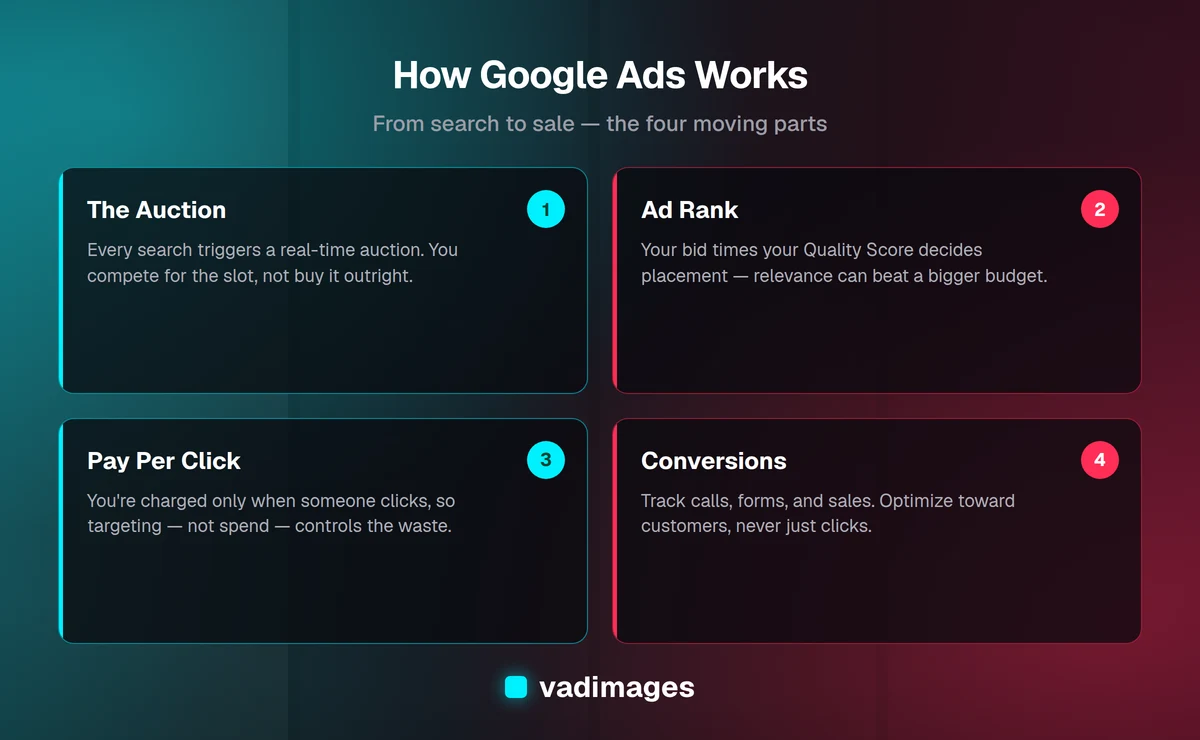
At its simplest, Google Ads is an auction for attention. When someone types a query into Google — say "emergency plumber near me" or "custom inventory software" — Google runs a lightning-fast auction to decide which ads appear above and below the regular search results. Advertisers who have told Google they want to show up for that kind of search compete for those slots. The whole thing happens in a fraction of a second, every single time anyone searches, millions of times a day.
The important part for a beginner is this: you are not buying a fixed spot on the page, and you are not paying to simply be seen. In the most common setup, you pay only when someone actually clicks your ad — this is called pay-per-click, or PPC. That means a poorly targeted campaign can rack up clicks from people who were never going to buy, while a well-built one sends you qualified visitors at a price that still leaves room for profit. The difference between those two outcomes is almost entirely in how the account is structured, not in how much you spend.
How the auction decides who wins
It's tempting to assume the advertiser with the biggest budget always wins the top spot. That's not how it works, and understanding why is the single most useful thing a beginner can learn. Google ranks ads using something called Ad Rank, which combines two main ingredients: how much you're willing to pay (your bid) and how relevant and useful Google thinks your ad is (your Quality Score). A small business with a tightly focused, genuinely helpful ad can outrank a national brand that's bidding more but showing a generic, mismatched message.
Quality Score is Google's estimate of how good your ad experience is, scored roughly from 1 to 10. It's built from three things: how likely people are to click your ad (expected click-through rate), how closely your ad matches what they searched for (ad relevance), and how well your landing page delivers on the promise of the ad (landing page experience). This is why the page you send people to matters as much as the ad itself. If your ad says "same-day appointments" and the landing page buries that fact three scrolls down, Google notices, your Quality Score drops, and you end up paying more for a worse position. Getting the landing page right is where a well-built website or landing page pays for itself.
Where your money actually goes
You control spending with two levers: a daily budget and a bid. The daily budget is the average you're willing to spend per day on a campaign — set it at $30 and Google aims to spend about $900 across a month, though it may go over on busy days and under on slow ones to average out. The bid is the maximum you'll pay for a single click. You rarely pay your full bid, because Google generally only charges you what's needed to beat the advertiser just below you.
The number beginners obsess over is cost-per-click, or CPC. It varies wildly by industry: a click for a local service might cost a dollar or two, while competitive categories like legal or insurance can run $20, $50, or more per click. But CPC is the wrong number to fixate on. What actually matters is cost-per-acquisition — how much you spend to win one real customer — and the return that customer represents. Paying $4 a click sounds expensive until you realize one in ten of those visitors becomes a $3,000 client. Chasing cheap clicks that never convert is how good budgets go to waste. If you want a clear-eyed model of what leads are worth to your business before you spend, that's exactly the kind of thing we work through in how we work with clients.
Campaign types, without the alphabet soup
Google offers several campaign types, and choosing the wrong one is a common beginner trap. For most small businesses starting out, Search campaigns are the place to begin. These are the text ads that appear on the results page when someone searches, and they capture people at the exact moment they're looking for what you sell. Intent is high, and measurement is clean.
Beyond Search, you'll hear about a few others. Performance Max is Google's automated, all-channel campaign that spreads your ads across Search, Maps, YouTube, Gmail, and the Display network using machine learning — powerful, but it hands a lot of control to the algorithm, which is risky before you have solid conversion data feeding it. Display campaigns show image ads across millions of websites and are better for awareness than immediate sales. Shopping campaigns show product images with prices and are essential for e-commerce. Our advice for beginners is simple: master Search first, get your tracking clean, then expand. Trying to run everything at once usually means running nothing well.
Keywords and match types
Keywords are the searches you want to show up for, and how you specify them dramatically changes who sees your ads. Google uses "match types" to control how loosely it interprets your keywords. Broad match casts the widest net — bid on "running shoes" and Google may show your ad for "athletic footwear," "marathon gear," or things you'd never have guessed. It reaches the most people but wastes the most money without careful oversight. Phrase match (written in quotes) is tighter, showing your ad for searches that include your phrase in roughly that order. Exact match (written in brackets) is tightest, matching only very close variations of your specific term.
Just as important is the negative keyword list — terms you explicitly do not want to trigger your ads. If you sell premium custom software, you probably don't want clicks from people searching for "free" or "cheap" or "template." Adding negatives like those saves real money by filtering out searches that will never convert. New advertisers who skip negatives are usually the ones wondering, a month in, why their budget evaporated on irrelevant clicks. Building and pruning that list every week is unglamorous work, and it's where a lot of the actual savings live.
Setting up your first campaign the right way
A sound first campaign is small, focused, and measurable. Start with a single Search campaign built around one clear offer. Group a handful of closely related keywords together, write two or three ads that speak directly to that search intent, and point them at a landing page that matches the promise word-for-word. Set a modest daily budget you're comfortable losing while you learn — this is tuition, not waste, as long as you're reading the data.
Before you flip anything on, install conversion tracking. This is the piece beginners most often skip, and it's the piece that makes everything else meaningful. Conversion tracking tells Google — and you — when a click turned into a phone call, a form submission, a booking, or a sale. Without it, you're flying blind, optimizing toward clicks that may be leading nowhere. With it, Google's automation gets the signal it needs to find more of the people who actually buy, and you get the numbers to decide what's working. Wiring tracking correctly across a site, a CRM, and a call system is genuinely fiddly, and it's a common reason businesses ask us to build the plumbing as part of their digital solutions rather than guess at it.
Measuring what matters
Once ads are running, the dashboard will show you dozens of metrics, and it's easy to celebrate the wrong ones. A high click-through rate feels good, but clicks aren't customers. Focus on the numbers tied to money: how many conversions you're getting, what each one costs, and the total return on ad spend. If a campaign spends $500 and produces two clients worth $4,000 each, it doesn't matter that the click-through rate was average — that campaign is a winner and deserves more budget.
Give changes time to breathe. Google's automated bidding needs a stretch of data before it stabilizes, and reacting to every daily wobble usually makes things worse. Check in weekly rather than hourly. Look for patterns: which keywords convert, which ad copy pulls ahead, which times of day pay off. Then shift budget toward what works and cut what doesn't. This steady, evidence-based tuning is the real job — the setup is just the beginning. It's the same discipline we bring to measurable projects across different industries, where the goal is always leads and revenue, not vanity metrics.
Common beginner mistakes that quietly drain budgets
A few errors show up again and again. Sending every ad to your homepage instead of a focused landing page dilutes intent and tanks your Quality Score. Ignoring negative keywords lets irrelevant searches eat your budget. Bidding on broad, generic terms with huge search volume — like "software" or "marketing" — burns cash on people who aren't close to buying. Leaving campaigns on autopilot for weeks means small problems compound into big bills. And turning off a campaign after three days because it "didn't work" throws away money before the data could ever tell you anything.
The through-line is that Google Ads rewards attention and punishes neglect. It is not a set-it-and-forget-it machine; it's a system that gets better the more deliberately you feed it good targeting, good pages, and clean conversion data. Handled that way, even a modest budget can produce a reliable stream of qualified leads. Handled carelessly, the same budget produces a monthly invoice and not much else. If you'd like to see how disciplined campaigns translate into real outcomes, our case studies show the kind of results measurable, well-instrumented marketing produces.
When to run it yourself and when to get help
Plenty of small business owners run their own Google Ads successfully, especially with a single Search campaign and a simple offer. The learning curve is real but climbable, and there's genuine value in understanding the mechanics before you delegate them. If your offer is straightforward, your margins have room, and you can spare an hour a week to tend the account, starting yourself is a perfectly reasonable way to learn what your market responds to.
The calculus changes when the stakes rise. If clicks in your category are expensive, if your sales process is complex, or if the tracking spans a website, a CRM, and a phone system that don't naturally talk to each other, the cost of getting it wrong quickly exceeds the cost of getting expert help. That's where Vadimages fits in — we build the landing pages, wire up the conversion tracking, and connect the systems so your ad spend is measured honestly and pointed at real revenue. We keep pricing transparent, with custom engagements starting from $5,000+, and we're happy to tell you plainly whether you even need us yet.
Thinking about running Google Ads? Talk to Vadimages about building the pages and tracking that make your budget work — or check our pricing to see how we scope a project. We're based in Vancouver, WA, and we help small and mid-sized businesses turn ad clicks into customers, not just costs.