
Workflow automation is the practice of using software to run a business process from start to finish with little or no manual effort, so that tasks, data, and approvals move between people and systems automatically. In plain terms, it means your tools do the repetitive handoffs your team used to do by hand.
If your business still copies data between apps, chases signatures over email, or re-keys the same invoice numbers into two systems, you already have processes worth automating. This guide explains what workflow automation actually is, how to spot the right processes to start with, what it costs and returns, and how to avoid the common traps. It is written for owners and managers who want practical footing, not buzzwords.
What is workflow automation, really?
A workflow is any repeatable sequence of steps that produces a result: a lead becomes a customer, a timesheet becomes an invoice, a signed contract becomes an onboarded employee. Automation replaces the manual glue between those steps, the copy-paste, the reminder emails, the "did you get my form?" follow-ups, with rules that run on their own.
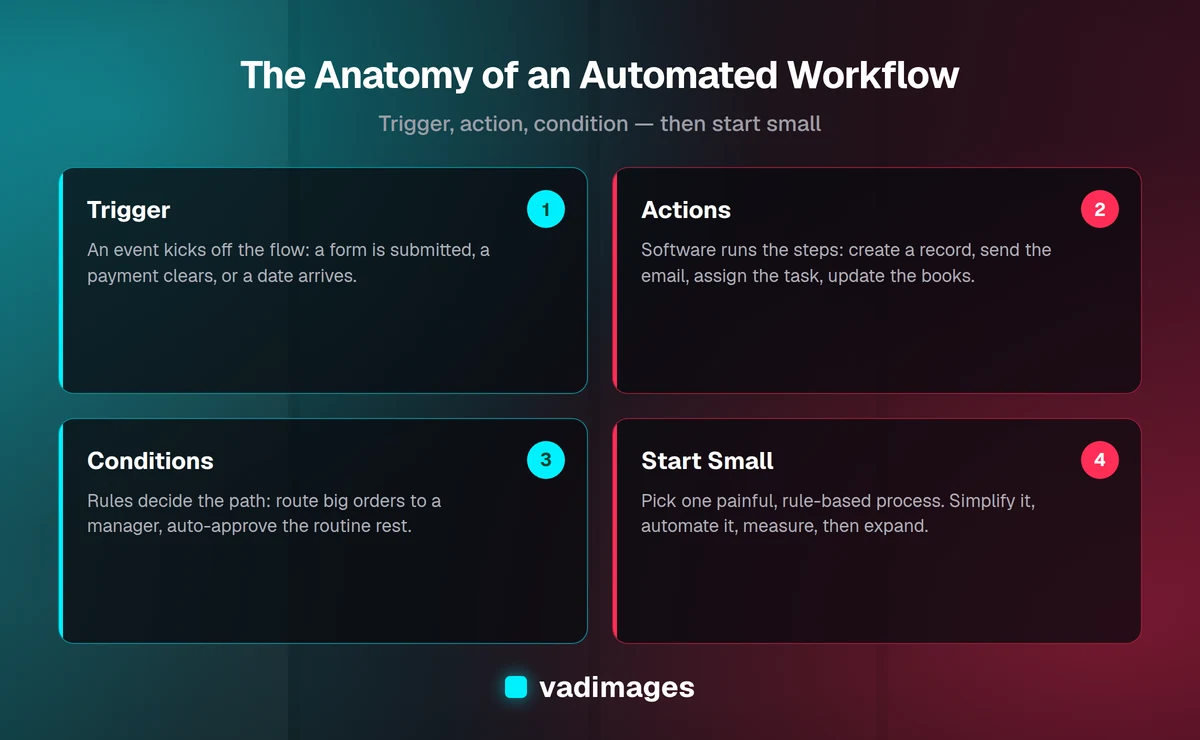
Most automated workflows share three ingredients. A trigger starts the process (a form is submitted, a payment clears, a date arrives). One or more actions then happen (a record is created, an email goes out, a task is assigned). And conditions decide the path (if the order is over $5,000, route it to a manager; otherwise approve it automatically). Once you see processes in terms of triggers, actions, and conditions, automation stops feeling mysterious and starts looking like a checklist a computer can follow.
It helps to separate workflow automation from two neighbors. Task automation handles a single repetitive action, like auto-tagging an email. Workflow automation connects several tasks and systems into one end-to-end flow. And business process automation is the broader discipline of designing, automating, and improving those flows across a company. You do not need to master all three at once. You need to automate one painful process well.
Why do small and mid-market businesses need it?
Large companies automate to manage scale. Smaller businesses automate to survive it. When you have a lean team, every hour spent re-keying data or reconciling spreadsheets is an hour not spent on customers or growth. Manual handoffs are also where errors and delays hide: a missed email, a typo in an invoice, an onboarding step that slipped through the cracks.
Here is what workflow automation typically delivers for a small or mid-market operation:
- Reclaimed hours. Repetitive administrative work often eats a surprising share of each week. Automating it gives that time back to billable or revenue-generating work.
- Fewer errors. Software does not fat-finger a number or forget step four. Consistency is a feature, not a nice-to-have, especially for invoicing and compliance.
- Faster cycle times. Approvals that used to take days happen in minutes because the request routes itself to the right person with the right context.
- Better visibility. When a process runs through software, you can see where things stand, what is stuck, and how long each step takes.
- A better experience. Customers and new hires notice when things are prompt, accurate, and never fall through the cracks.
Automation does not replace your team. It removes the low-value drudgery so your people can do the work that actually needs a human.
How do you spot a process worth automating?
Not every process deserves automation, and trying to automate everything at once is the fastest way to fail. The best first candidates share a few traits. Look for work that is repetitive (it happens often), rule-based (the decisions follow clear logic), time-consuming (it eats real hours), and error-prone (mistakes are costly or embarrassing). A process that checks three or four of those boxes is a strong candidate.
A quick way to find these is to ask your team one question: "What do you do every week that feels like a robot could do it?" The answers usually point straight at the right processes. Then sanity-check each candidate against a few questions:
- How many times does this happen per week or month?
- How long does one run take, and how many people touch it?
- What does a mistake here cost us in money, time, or trust?
- Are the rules stable, or do they change constantly? (Stable rules automate more cleanly.)
- How many systems are involved, and do they already talk to each other?
Start with a process that is painful enough to matter but contained enough to finish. A tightly scoped early win builds momentum and trust far better than an ambitious project that drags on for months.
What does workflow automation look like in practice?
Abstract definitions only go so far, so here are four everyday processes where automation pays off quickly.
Invoicing and billing. Instead of manually creating invoices, emailing them, and chasing late payments, an automated flow generates the invoice when a project is marked complete or a milestone is hit, sends it to the client, records it, and fires polite reminders on a schedule until it is paid. Fewer late payments, less awkward follow-up, cleaner books.
Client and employee onboarding. A new client or hire kicks off a predictable checklist: collect information, send agreements, create accounts, assign a welcome sequence, and notify the right people. Automation runs that checklist every time, in the same order, without anyone remembering to. Nothing gets skipped, and everyone knows their next step.
Data entry and syncing. When the same information lives in a form, a spreadsheet, a CRM, and an accounting tool, someone usually keeps them in sync by hand. An integration does it automatically: submit once, and the data flows to every system that needs it. This alone often eliminates hours of tedious, error-prone re-keying each week.
Approvals and routing. Purchase requests, discounts, time off, content sign-off, these all involve getting the right yes from the right person. An approval workflow routes each request based on its details (amount, department, urgency), collects the decision, logs it, and moves the process forward, so nothing sits in an inbox for a week.
These examples share a pattern: a clear trigger, a defined sequence, and rules that decide the path. That is exactly the shape of a good automation candidate.
Where should you actually start? A simple roadmap
You do not need a grand digital transformation plan. You need a repeatable, low-risk way to automate one process and learn from it. Here is a five-step roadmap that works for most small and mid-market teams.
- Map the process as it really is. Write down every step of one process exactly as it happens today, including the messy parts and the exceptions. You cannot automate what you cannot see, and mapping alone often reveals steps you can simply delete.
- Simplify before you automate. Remove redundant steps, unnecessary approvals, and duplicate data entry first. Automating a bloated process just makes the bloat run faster. Clean it up, then automate the clean version.
- Pick one high-value, contained process. Choose a candidate that is painful but bounded. Aim for a first win you can ship in weeks, not quarters.
- Build, test, and roll out with a human in the loop. Start with the automation supervised: let it do the work while a person reviews the output for a short while. Fix the edge cases you find, then let it run on its own.
- Measure, then expand. Track the hours saved, errors avoided, and time-to-completion. Use that proof to fund the next process. Automation compounds; each win makes the next one easier to justify.
Treat your first project as a pilot, not a permanent monument. The goal is to learn how your team and your systems behave, then apply that knowledge to bigger flows.
What is the ROI, and how do you measure it?
The return on workflow automation is usually easy to estimate because the inputs are concrete. Take one process and calculate its current cost: runs per month × hours per run × loaded hourly cost. Add the cost of errors, such as rework, refunds, or lost customers, and any revenue lost to slow turnaround. That number is what the manual process costs you every month.
Then compare it to the cost of automating: the build (tools or a custom solution), plus ongoing subscription or maintenance. Divide the setup cost by the monthly savings and you get your payback period. Many focused automations pay for themselves within a few months, and everything after that is margin.
Do not measure only hard dollars. Track the softer wins too, faster response times, fewer mistakes, happier staff who stopped doing mind-numbing work, and better data you can actually trust for decisions. Those compound over time even when they are harder to put on a spreadsheet. If you want help quantifying this for your own processes, our team is happy to run the numbers with you.
Off-the-shelf tools or a custom solution?
This is the question most owners get stuck on, and the honest answer is: it depends on the process. Both paths are legitimate, and many businesses use a mix.
Off-the-shelf tools (no-code and low-code platforms that connect popular apps) are the right choice when your process is standard, the apps you use are already supported, and your volume is moderate. They are fast to set up, inexpensive to start, and great for straightforward flows. The trade-offs show up at scale: per-task pricing can climb, you are limited to what the platform supports, and complex logic gets awkward to maintain.
Custom solutions make sense when the process is core to how you make money, when it spans systems that do not integrate cleanly, when your logic is genuinely specific to your business, or when per-task pricing on an off-the-shelf tool would eventually cost more than owning the software. A custom build costs more up front but gives you exactly the workflow you need, no per-run fees, and an asset you control. At Vadimages, we often start clients on off-the-shelf tools to prove the value, then build custom where the volume, complexity, or strategic importance justifies it. You can read more about how we approach custom software and the full range of services we offer.
A useful rule of thumb: rent when the process is common and low-volume, build when it is core, complex, or high-volume. And you do not have to decide forever on day one, plenty of workflows graduate from rented to owned as they prove their worth.
What are the common pitfalls to avoid?
Automation projects fail for predictable reasons. Knowing them in advance is half the battle.
- Automating a broken process. If a workflow is messy by hand, automation just makes the mess faster and harder to see. Fix and simplify first.
- Boiling the ocean. Trying to automate everything at once overwhelms teams and stalls. Start with one process, finish it, and build from there.
- Ignoring the exceptions. Real processes have edge cases. Plan for what happens when data is missing, an approval is denied, or something fails, and make sure a human gets notified.
- No human in the loop at first. Launching a fully automated process with zero supervision invites silent errors. Watch it closely early, then loosen the reins.
- Forgetting to measure. If you never track the before-and-after, you cannot prove value or justify the next project. Baseline first.
- Set it and forget it. Apps change, rules change, your business changes. Automations need occasional maintenance, so assign an owner.
- Over-automating human moments. Some interactions should stay personal. Automate the drudgery, not the relationship.
None of these are reasons to avoid automation. They are reasons to do it deliberately, starting small and expanding on the strength of real results.
Frequently asked questions
Is workflow automation only for big companies? No. Small and mid-market businesses often see the biggest relative gains because a few automated processes can free up a meaningful share of a lean team's week.
Do I need to know how to code? Not to start. Many workflows can be built on no-code and low-code tools. Coding, or a partner who codes, becomes valuable when your logic is complex, your volume is high, or you need a custom system you fully control.
Will automation replace my employees? In practice it removes repetitive, low-value tasks so your team can focus on work that needs judgment and a human touch. The goal is to make your people more effective, not fewer.
How long does it take to automate a process? A focused, well-scoped workflow can often be live in a few weeks. Larger or custom projects take longer, which is exactly why we recommend starting with one contained process.
What does it cost to get started? Simple off-the-shelf automations can start very small. Custom software engagements at Vadimages start from $5,000+, and we are transparent about pricing so you know what you are getting before you commit.
The bottom line
Workflow automation is not a futuristic luxury, it is a practical way for small and mid-market businesses to reclaim hours, cut errors, and grow without adding headcount. The secret is not to automate everything, but to pick one repetitive, rule-based, painful process, simplify it, automate it with a human watching, measure the result, and repeat. Start small, prove the value, and let each win fund the next.
If you would like help spotting your best first process, weighing off-the-shelf against custom, or building a workflow that fits your business, get in touch with Vadimages. We build for humans and optimize for growth, and we are happy to start with an honest conversation about what is worth automating for you.