
You can add AI features to software you already own without a rebuild. In most cases it means calling a hosted model through an API, feeding it your own data through a retrieval layer, and wrapping the whole thing in guardrails and monitoring. The hard part is not the model; it is choosing a use case that pays for itself and shipping it safely.
What does it actually mean to add AI to software?
When people say they want to add AI to software, they usually picture a rebuild. In practice, most AI features are additions to an application you already run. You keep your database, your users, and your business logic, and you bolt on a new capability that reads or writes data through the systems you already have.
There are three common shapes this takes. The first is a call to a hosted large language model (LLM) through an API, where you send text and get text back. The second is retrieval-augmented generation (RAG), where you look up relevant information from your own content first and hand it to the model so its answers are grounded in your data. The third is a narrow, purpose-built model for a specific job like classification, extraction, or forecasting. Many real features combine these, but you rarely need to train a model from scratch to get value.
The mental model that helps most: AI is a new kind of function you can call. It is probabilistic rather than deterministic, it can be expensive per call, and it can be wrong in ways traditional code is not. Everything that follows is about getting the upside of that function while containing the downside.
Which AI features are actually worth adding?
The best first features share a pattern. They handle unstructured text or images, they happen often enough to matter, and a good-enough answer is genuinely useful even if it is not perfect. Here are the use cases we see deliver the most value for small and midsize businesses.
- Search that understands intent. Semantic or natural-language search lets people find records, documents, or products by describing what they want instead of guessing keywords. This is often the highest-return first project because your users already search and already get frustrated.
- Summarization. Long threads, call transcripts, contracts, and reports get condensed into a few lines. Sales teams summarize account histories; support teams summarize ticket threads; managers summarize weekly activity.
- Customer support assist. Draft replies, suggested knowledge-base articles, and ticket categorization. Keeping a human in the loop to approve drafts captures most of the time savings while avoiding the reputational risk of a fully automated bot.
- Document processing. Pulling structured fields out of invoices, forms, resumes, or PDFs. This replaces slow manual data entry and is easy to measure because you can check extracted fields against the source.
- Recommendations. "Customers who bought this," "next best action," or content suggestions based on behavior. These lift revenue when you have enough data and clear conversion events to learn from.
Notice what is missing: anything where a wrong answer is dangerous or expensive and cannot be caught, and anything you do rarely. Those are poor first candidates, and we will come back to them.
How is AI actually added to an existing application?
The engineering path is more ordinary than the hype suggests. Here is the typical sequence.
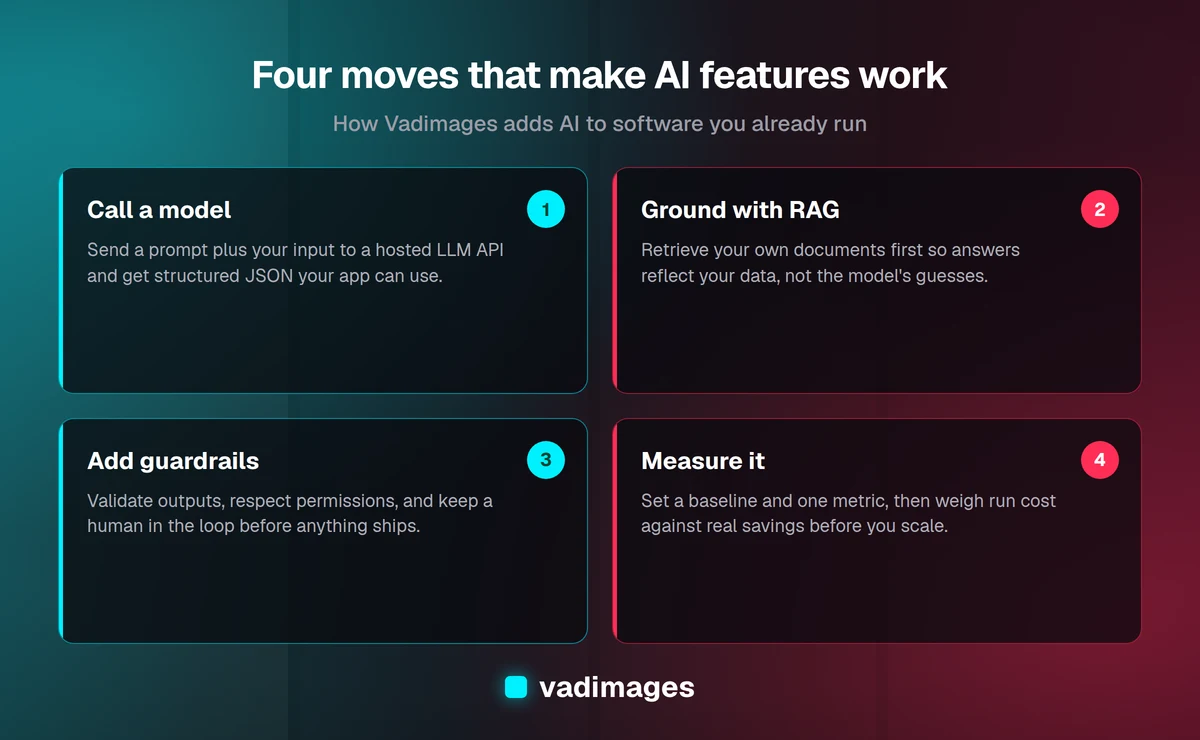
Start with an API call. You send a request to a hosted model provider, pass a carefully written prompt plus the relevant input, and receive a response. The prompt is where a lot of the quality lives: it sets the model's role, the format you want back, and the rules it must follow. For structured outputs, you ask the model to return JSON your application can parse, so the AI feature plugs into your existing code cleanly.
Ground it with RAG when answers must reflect your data. A general model does not know your customers, your pricing, or your internal policies. RAG fixes this. You break your documents into chunks, convert them into numeric representations called embeddings, and store them in a vector index. At query time, you retrieve the chunks most relevant to the user's question and include them in the prompt. The model then answers from your material rather than its training data, which cuts down on made-up answers and keeps responses current as your content changes.
Add guardrails. Guardrails are the checks that keep a probabilistic system inside safe bounds. In practice that means validating the model's output against a schema before you trust it, filtering inputs and outputs for sensitive or disallowed content, constraining what actions the AI can trigger, and always giving users a way to see the source behind an answer. For anything that writes data or contacts a customer, keep a human approval step until you have earned confidence in the numbers.
Instrument everything. Log prompts, responses, latency, cost per call, and user feedback from day one. You cannot improve or defend a feature you cannot see. This logging is also what lets you prove the return on investment later.
What about data privacy and security?
This is the question that should come first, not last, because it can rule options in or out before you write any code. A few principles keep you out of trouble.
Know where your data goes. When you call a hosted model, you are sending data to a third party. Read the provider's terms on data retention and whether your inputs are used to train their models. Reputable enterprise API tiers typically do not train on your data and offer clear retention controls, but you must confirm this rather than assume it. If you handle regulated data such as health or financial records, check for the relevant compliance commitments and sign the appropriate agreements before sending anything real.
Minimize what you send. Strip or mask personally identifiable information that the model does not need to do its job. If a summary does not require a Social Security number, do not include one. Less data in the request means less exposure.
Respect your existing permissions. An AI search or assistant must honor the same access controls as the rest of your app. It is surprisingly easy to build a RAG system that retrieves documents a given user should not see. Filter the retrieval step by the user's permissions, not just the final answer.
Consider where the model runs. For the most sensitive workloads, you can use models that run inside your own cloud environment or on your infrastructure, so data never leaves your boundary. This costs more and takes more effort, so reserve it for cases that genuinely need it rather than defaulting to it out of anxiety. Our custom software team can help you weigh hosted versus self-hosted based on your actual risk profile.
How much does it cost to add AI features?
Cost comes in two buckets: the one-time work to build and integrate the feature, and the ongoing cost to run it. Both are more predictable than people fear once you scope tightly.
Build cost depends on how much you are adding. A focused pilot — one well-defined feature, wired into your existing app, with guardrails and monitoring — is a matter of weeks, not months. At Vadimages our work starts at $5,000, and a first AI feature usually lands in the range of a small, contained project rather than a full platform build. Grounding with RAG, connecting multiple data sources, or supporting high volume adds scope.
Run cost is mostly the per-call fee charged by the model provider, which is priced by the amount of text processed. This is why measurement matters: a summarization feature used a thousand times a day has a real monthly bill, and you want to know it is smaller than the labor it replaces. You can control run cost by choosing a smaller, cheaper model where quality allows, caching repeated requests, keeping prompts lean, and only calling the model when a cheaper check cannot do the job. A common mistake is defaulting to the largest, most expensive model for tasks a mid-tier one handles just as well.
The honest summary: for a well-chosen use case, AI features are usually inexpensive to run relative to the time or revenue they generate. The risk is not the model bill; it is spending build money on a feature nobody needed.
How do you pilot and measure an AI feature?
Treat the first version as an experiment with a scoreboard, not a launch. A disciplined pilot looks like this.
- Pick one use case and one metric. Decide up front what success means — hours saved per week, ticket resolution time, search-to-conversion rate, data-entry accuracy. If you cannot name the number, you are not ready to build.
- Set a baseline. Measure the current process before the AI touches it. Without a before, you cannot prove an after.
- Ship to a small group. Roll the feature out to a handful of users or a slice of traffic. Keep a human in the loop and collect thumbs-up/thumbs-down feedback on every AI output.
- Evaluate quality honestly. Build a small test set of real examples with known good answers and check the model against it. This is how you catch regressions when you change a prompt or swap a model.
- Compare cost to benefit. Put the monthly run cost next to the measured savings or lift. If the ratio works, expand. If it does not, you have learned that cheaply.
The teams that succeed with AI are not the ones with the fanciest models. They are the ones who defined a number, measured it, and iterated. A pilot that proves a feature is not worth it has done its job — it saved you from scaling a mistake.
When should you NOT add AI?
Saying no to AI in the right places is part of doing it well. Here are the situations where we advise clients to hold off or choose a different tool.
- When a rule or a query already works. If the job is deterministic — a calculation, a lookup, a validation — write ordinary code. It is cheaper, faster, and correct every time. Do not use a probabilistic model for a problem with a right answer you can compute.
- When wrong answers are unacceptable and uncatchable. For legal, medical, or financial outputs that ship straight to a customer with no review, the risk of a confident wrong answer outweighs the convenience. Add a human checkpoint or do not automate it.
- When you do it rarely. A feature used twice a month rarely earns back its build and maintenance cost. Spend your effort where volume makes the savings add up.
- When your data is not ready. RAG and recommendations are only as good as the content and history behind them. If your documents are a mess or your data is thin, fix that first; AI will amplify the disorder, not hide it.
- When you cannot measure it. If there is no metric and no baseline, you are buying a story, not a result. Wait until you can define success.
None of this is anti-AI. It is how you keep AI credible inside your product — by pointing it at the problems it is genuinely good at and leaving the rest to the tools that already work.
Frequently asked questions
Do I need to train my own model? Almost never for a first feature. Hosted models plus your own data through RAG cover the large majority of business use cases. Custom training is a later, deliberate step for narrow problems where general models fall short and you have the data to support it.
Will adding AI require rebuilding my software? No. AI features are additions to your existing application. You keep your database, users, and logic and connect the new capability through APIs and your current permissions.
How long does a first AI feature take? A tightly scoped pilot is typically weeks. The timeline stretches when you ground it in multiple data sources, support high volume, or need self-hosted models for sensitive data.
Is my data safe with a hosted model? It can be, if you choose the right provider tier, confirm they do not train on your inputs, minimize what you send, and respect your existing access controls. For the most sensitive workloads, a model running inside your own environment keeps data within your boundary.
How do I keep AI costs under control? Choose the smallest model that meets the quality bar, cache repeated requests, keep prompts lean, and call the model only when cheaper logic cannot do the job. Monitor cost per call from day one.
The bottom line
Adding AI to your existing software is less about the model and more about judgment: choosing a use case with real volume and a measurable payoff, grounding it in your own data, wrapping it in guardrails and monitoring, and being honest about privacy, cost, and the places where AI simply does not belong. Start with one feature, set a baseline, pilot it with humans in the loop, and let the numbers decide whether to scale. That is how you get durable value instead of an expensive demo.
If you want a grounded assessment of where AI would actually help your product — and where it would not — talk to Vadimages. We build for humans and optimize for growth, with transparent pricing from $5,000. Start the conversation at /contact.