
A good website maintenance plan keeps your site secure, fast, backed up, up to date, and monitored around the clock, so that small problems get fixed before they cost you traffic, leads, or trust. At a minimum, it should cover security patching, off-site backups, uptime monitoring, software updates, performance tuning, and a clear support agreement with defined response times.
If you own or manage a small business website, "maintenance" can feel like a vague line item on an invoice. This guide breaks down exactly what a proper plan includes, how tiers usually work, what to ask a provider before you sign, and what you should expect to pay. The goal is simple: help you tell a real maintenance plan from a monthly charge that quietly does very little.
What is a website maintenance plan?
A website maintenance plan is an ongoing service agreement in which a provider takes responsibility for keeping your website healthy after launch. A site is not a "set it and forget it" asset. The software it runs on, whether that is WordPress, a headless CMS, or a custom application, ships security updates constantly. Browsers change, plugins break, hosting environments shift, and content goes stale. A maintenance plan is how you keep pace with all of that without hiring a full-time developer.
Think of it the way you think about servicing a vehicle. You can skip oil changes for a while and nothing dramatic happens, right up until it does and the repair costs many times what prevention would have. A good plan trades unpredictable emergencies for predictable, budgeted upkeep.
What does a good website maintenance plan cover?
The specific tasks vary by platform, but a complete plan should address every item below. If a provider's plan is missing several of these, ask why before you commit.
Security monitoring and patching. This is the single most important part of any plan. Your provider should apply security updates to your CMS core, themes, plugins, and server software promptly, monitor for malware and suspicious activity, and harden the site against common attacks. Known vulnerabilities are published publicly, which means attackers often know about a hole before you do. Timely patching is what keeps a routine disclosure from becoming a breach. Look for a plan that includes a web application firewall, file integrity monitoring, and a documented process for what happens if the site is compromised.
Backups. Regular, automated, off-site backups are non-negotiable. A backup that lives on the same server as your site is not a backup, because whatever takes down the server takes the backup with it. A good plan stores copies in a separate location, keeps multiple restore points, and, crucially, tests that those backups actually restore. Ask how often backups run (daily is a reasonable baseline for most business sites, more often for stores and busy publishers) and how long they are retained.
Uptime and performance monitoring. You should not learn your site is down from an angry customer. Uptime monitoring checks your site every few minutes from multiple locations and alerts your provider the moment it goes offline. The best plans pair this with response-time tracking so a slow slide toward failure gets caught early, not after the crash.
Software and plugin updates. Beyond security patches, plugins and themes release feature and compatibility updates that keep everything working together. The risk is that an update occasionally breaks something. A mature process applies updates on a staging copy first, checks that key pages and forms still work, and only then pushes to the live site. Updating blindly on production is how sites go white-screen on a Friday afternoon.
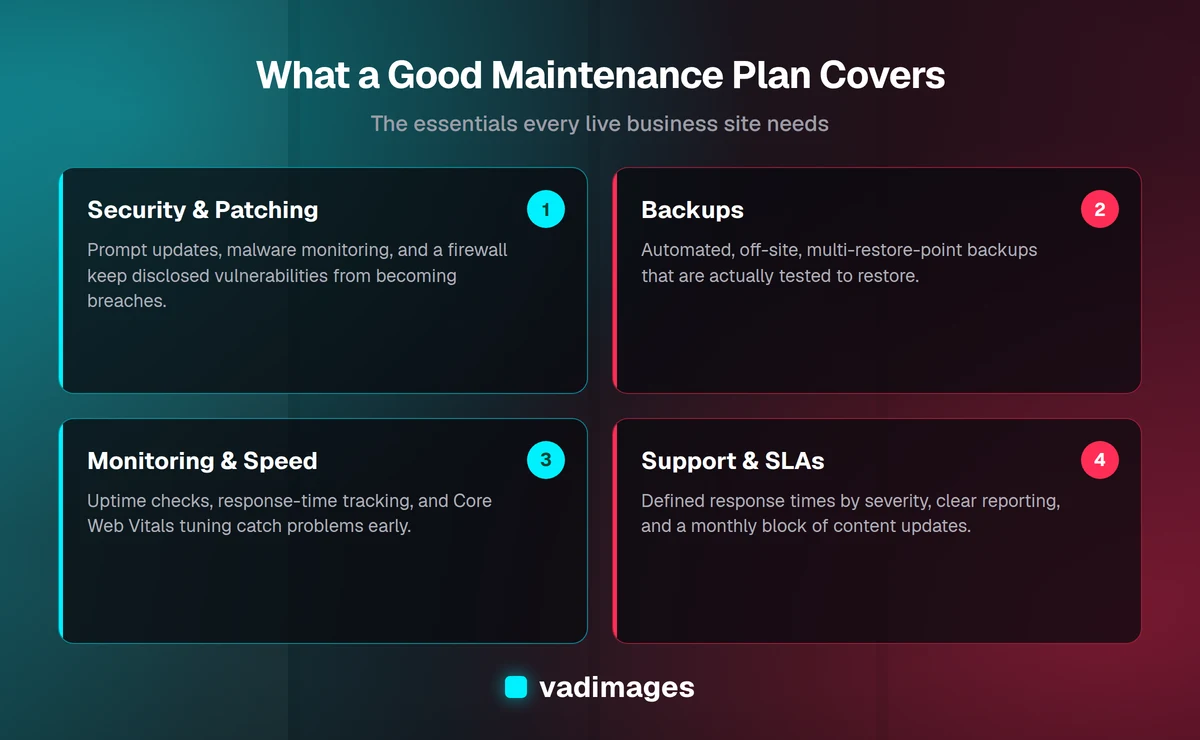
Performance and speed. Site speed affects conversions, search rankings, and how visitors judge your business. A maintenance plan should keep an eye on Core Web Vitals, optimize images, manage caching, clean up the database, and flag when something, a bloated plugin, an oversized hero image, an unminified script, has slowed things down. Speed is not a one-time launch task; it degrades over time as content and functionality accumulate.
Accessibility. Accessibility is easy to break and easy to overlook. New content, new plugins, and design tweaks can quietly introduce problems, missing image alt text, poor color contrast, forms that keyboard users cannot complete. A thoughtful plan includes periodic accessibility checks so your site stays usable for everyone and you reduce legal exposure. This matters more every year, and it is far cheaper to maintain accessibility than to remediate a site all at once.
Content updates. Many plans include a monthly allotment of small content changes, swapping out a phone number, updating hours, publishing a blog post, adding a team member, refreshing a promotion. This is one of the most practical benefits for a busy owner. Check how the allotment works: how many hours or how many changes are included, how you request them, and how quickly they are turned around.
Reporting. You are paying for work you often cannot see, so transparency matters. A good provider sends a regular report, monthly is standard, showing what was updated, what was backed up, any issues resolved, uptime figures, and performance trends. Reporting is how you know the plan is doing something. If a provider cannot show you what they did last month, that is a red flag.
Support and SLAs. A service level agreement, or SLA, defines how quickly your provider responds and how issues are prioritized. A minor content tweak and a site-is-down emergency should not carry the same response time. Look for clearly stated response windows by severity, the hours support is available, and how you reach them. An SLA turns "we'll get to it" into a commitment you can hold them to.
What are the typical maintenance plan tiers?
Most agencies package maintenance into tiers so you can match the plan to the stakes of your site. The names differ, but the structure is usually similar.
- Basic / Essentials. Core protection for a simple brochure or marketing site: security patching, automated backups, uptime monitoring, and routine updates, typically with limited or no included content changes. This is the floor, not a luxury; every live site needs at least this.
- Standard / Growth. Everything in Basic plus a monthly block of content and development time, performance monitoring, faster response times, and regular reporting. This is the right fit for most small businesses that update their site occasionally and want a partner on call.
- Premium / Priority. Built for stores, lead-generation sites, and anything where downtime directly costs money. Expect more frequent backups, priority or emergency response, deeper performance and accessibility work, staging environments, and a larger allotment of development hours. If your website is a core part of how you get customers, this tier usually pays for itself.
The right tier is a function of how much your site matters to revenue and how often it changes. A five-page site that rarely changes has very different needs from an e-commerce store processing orders every hour.
What should you ask a provider before signing?
Maintenance plans are easy to sell and hard to compare because the work is mostly invisible. These questions cut through the marketing:
- What exactly is included, and what counts as out of scope? Get the boundary in writing. Know when a request becomes billable extra work.
- How often do you back up, where are backups stored, and have you tested a restore? The restore test is the question most providers hope you skip.
- How quickly do you apply security patches after a vulnerability is disclosed? Hours-to-days is good; "in our monthly cycle" may be too slow for a serious flaw.
- Do you test updates on staging before pushing to my live site? This separates careful shops from ones that update on production and hope.
- What are your response times, and how are emergencies handled? Ask for the SLA in specifics, not adjectives.
- What do your reports look like? Ask to see a sample. It tells you how transparent they will be.
- Who owns the site, the code, the hosting, and the accounts? You should own your site and your data. Confirm you can leave and take everything with you.
- Is hosting included or separate? Some plans bundle it, some do not. Know what you are paying for.
A provider who answers these plainly and puts the answers in a contract is one you can trust. Vagueness here tends to become vagueness later, usually at the worst possible moment.
How much does a website maintenance plan cost?
Pricing varies with your platform, traffic, complexity, and how much hands-on time is included. As a rough guide for US small businesses, basic plans for a simple site often run in the low-to-mid hundreds of dollars per month, standard plans with included development time typically land in the mid-hundreds, and premium plans for stores or business-critical sites commonly run higher, sometimes into four figures monthly depending on scope.
Be cautious of plans priced far below the market. Real maintenance takes skilled time every month, so a rock-bottom price usually means the "plan" is an automated updater with no human checking the results, and no one accountable when an update breaks your checkout. On the other end, more expensive is not automatically better. What you want is a plan whose included work clearly maps to your site's risk and how often it changes. At Vadimages, we keep pricing transparent, our engagements start at $5,000 and up, so you know what you are getting and why. If you want to see how maintenance fits alongside design and development, our services overview lays out how the pieces connect.
Do I really need a maintenance plan if my site "just works"?
A site that "just works" today is working because someone, or something, is keeping it that way, or because it has not yet hit the problem that will take it down. The costs of skipping maintenance are rarely visible until they arrive all at once: a hacked site serving spam to your customers, a plugin conflict that breaks your contact form for weeks before anyone notices, a slow site quietly shedding search rankings, or a crash with no recent backup to restore from. Any one of these can cost more to fix than a year of preventive care, and some do lasting damage to your reputation and your search visibility. A maintenance plan is insurance you actually use every month.
Frequently asked questions
How is maintenance different from hosting? Hosting is the server your site runs on. Maintenance is the ongoing work of keeping the site itself secure, updated, fast, and backed up. Some plans bundle hosting; many keep them separate. Either way, paying for hosting alone does not mean your site is being maintained.
Can't I just maintain my own site? You can, if you have the time and the technical comfort to apply updates carefully, monitor for problems, test backups, and respond when something breaks. Many owners start there and move to a plan once they realize how much attention it takes and how costly a missed update can be.
How often should my site be backed up? Daily off-site backups are a sensible baseline for most business sites. If you run a store or publish frequently, you want more frequent backups so you never lose more than a few hours of orders or content.
What happens if my site gets hacked while on a plan? A good provider will have recent clean backups, a process to clean or restore the site, and a plan to close the hole that let the attacker in. Ask up front whether malware cleanup is included or billed separately, so there are no surprises during a crisis.
Will a maintenance plan improve my SEO? Indirectly, yes. Fast load times, strong uptime, mobile-friendliness, security, and fresh content are all factors search engines reward, and all of them are things a maintenance plan protects. It will not replace a dedicated SEO strategy, but neglecting maintenance will actively undermine one.
The bottom line
A good website maintenance plan is not a vague monthly charge, it is a defined set of work that keeps your site secure, backed up, monitored, current, fast, accessible, and supported, with reporting that proves it. Match the tier to how much your site matters to your business, ask the hard questions before you sign, and insist on transparency about what is included and what you are paying for. Done right, maintenance turns your website from a liability you worry about into an asset you can rely on.
Want a maintenance plan built around your site's real needs, with honest pricing and no jargon? Get in touch with Vadimages. We build for humans and optimize for growth, and we will tell you straight what your site actually needs.