
A software discovery workshop is a short, structured set of working sessions in which a business and its development partner map how work actually gets done today, agree on what the new software must do first, and leave with a written blueprint, risks and an estimate range before anyone writes code. At Vadimages, discovery usually takes about a week of calendar time. The result is a system blueprint and scope options with estimate ranges, which become the milestone plan for the build.
In this post, the Vadimages team walks through what happens in our software discovery workshop: who should be in the room, the agenda for each session, what we're listening for, and what you get at the end. If you're a US small or mid-sized business owner or operations lead weighing a custom build, it should help you decide whether you're ready, and what to prepare.
Why we run a discovery workshop before quoting a build
Most software budgets go wrong before the first line of code. A request like "we need a portal for our customers" can mean a two-screen status page or a full self-service platform with billing, permissions and integrations. Quoting that without discovery means either padding the number to cover the unknowns or quoting low and fixing it later through change orders. Neither is fair to you.
The workshop exists to swap guesses for decisions. By the end of it, both sides should agree in writing on:
- The problem in business terms: what costs time or money today, and for whom.
- The first release: the smallest version that removes the biggest pain.
- What's out of scope, at least for now.
- The risks: messy data, a vendor API that may not support what's needed, approvals that depend on one busy person.
- A realistic estimate range and timeline tied to milestones, not a single optimistic number.
Discovery is the first phase of the Vadimages delivery process, and everything after it, including the milestone plan, the weekly demos and the acceptance criteria, builds on what we agree here.
Who should be in the room
Discovery works best with a small group. From your side we ask for three roles, which in a small business may be one or two people:
- The decision-maker: the person who owns the budget and can make scope tradeoffs. They don't need to attend every minute, but they should be at the kickoff and the readout.
- The people who do the work: the dispatcher, the office manager, the warehouse lead. They know the workarounds, the exceptions and the spreadsheet tab nobody else opens. In our experience, leaving them out is the most common reason software misses the real workflow.
- Whoever owns your current tools: the person with admin access to your CRM, accounting system or e-commerce platform, so we can confirm what data exists and how to get to it.
From the Vadimages side, an engineer takes part in discovery on purpose: technical constraints show up in discovery, not three weeks into the build.
The workshop agenda, session by session
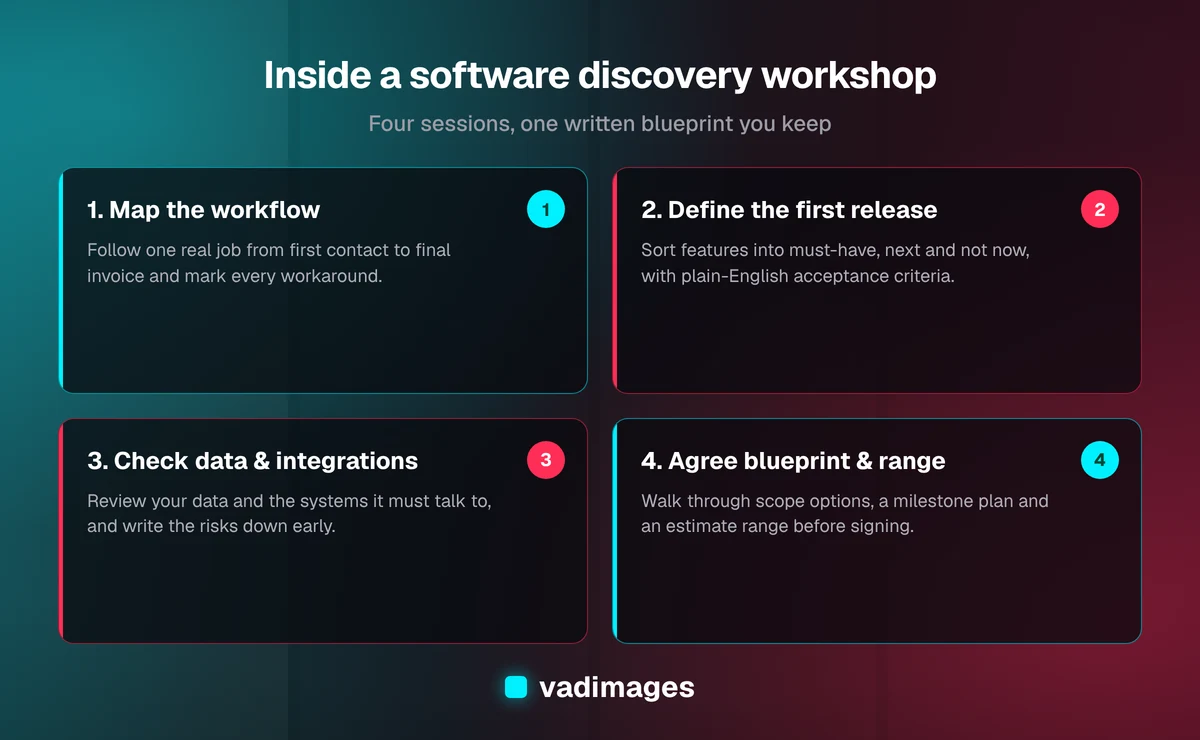
The exact agenda changes with the project, but most workshops follow the same four sessions. They can run over two or three days by video call, with time between sessions for us to document what we heard.
1. Map the current workflow
We start with how the work happens today, not with features. We pick one real job, such as an order, a service call or a new client, and follow it from the first contact to the final invoice. At every step we ask: who does this, what tool do they use, what information do they need, and what goes wrong?
Mapping one real job end to end is where the useful details come out: the order that gets re-typed into three systems, the approval that lives in someone's inbox, the "special customers" handled differently by memory alone. We capture it as a simple workflow map you can read and correct.
2. Define the first release
Next we turn the pain points into a prioritized list. Every candidate feature gets sorted into three buckets: must have for launch, next release and not now. We push hard on the first bucket. A focused first release ships sooner, costs less and teaches you more than a version that tries to do everything.
For each must-have we write a plain-English acceptance criterion: a sentence that says what "done" looks like, such as "a dispatcher can assign a job to a technician and the technician sees it on their phone within a minute." Those sentences later become the checklist for each milestone.
3. Check data, integrations and risks
This session is the most technical, and it's where our engineer earns their seat. We look at the data you have (spreadsheets, exports, an old database) and the systems the new software must talk to, such as QuickBooks Online, Shopify, HubSpot, Stripe or a shipping carrier like UPS or FedEx. For each one we confirm what the integration can actually do and how it handles authentication and rate limits, based on the vendor's current documentation and, where possible, a quick test against your account.
We also write down risks openly. Typical ones include duplicate or inconsistent customer records, a vendor API that doesn't expose a field you rely on, or a compliance requirement that changes how data must be stored. Naming a risk early doesn't make the project more expensive. It makes the estimate honest.
4. Agree the blueprint, options and estimate range
In the last session we walk you through the draft blueprint and scope options. Usually there are two or three: a lean first release, a recommended version and sometimes a fuller one. Each comes with a milestone plan, a timeline and an estimate range. You can ask questions, push back and trade features against budget before anything is signed.
What you get at the end
Discovery produces these written deliverables:
- Current workflow map: how the work flows today, with pain points marked.
- Requirements and constraints: the prioritized feature list with acceptance criteria.
- System blueprint: the main screens, user roles, data model and integrations, described in plain language.
- Risk assessment: what could go wrong and how we'd handle it.
- Recommended architecture: the technology approach and why it fits your team, budget and growth.
- Scope options with estimate ranges: what each version costs and how long it takes.
The discovery deliverables feed straight into the next phase, scope and roadmap, where the chosen option becomes a milestone plan with a delivery timeline. If you're comparing agencies, a blueprint like this also makes quotes comparable, because everyone is pricing the same thing.
A representative example
The following is a composite example drawn from the kinds of projects we see. It does not describe a specific client.
A regional home-services company with a dozen field technicians comes to us asking for "a mobile app for the techs." In the workflow session, the office manager walks us through a single service call and it turns out that the app isn't the main problem. Jobs are booked in one tool, scheduled on a whiteboard, and re-entered into QuickBooks Online by hand at the end of each week, which is where invoices get delayed and parts go unbilled.
The first release we agree on is smaller and more valuable than the original request: a shared job board for the office, a simple mobile job view for technicians, and an integration that pushes completed jobs and parts used into QuickBooks Online. Customer self-scheduling and a parts-inventory module move to the next release. The data session flags that customer records are duplicated across two systems, so a cleanup step goes into the first milestone instead of surfacing as a surprise mid-build.
You can see real, documented projects in our case studies.
How discovery fits budget and timeline
At Vadimages, discovery and system design take about one week, and scope and roadmap take roughly one more week to turn the output into a milestone plan; as described on our process page, most engagements run 6–16 weeks from discovery through launch. The bigger effect is on the build that follows, because the estimate range comes out of the blueprint rather than a guess.
As of 2026, our typical ranges for the most common build types are:
- Integrations between existing systems: $15,000–$60,000, depending on the number of systems, data volume and transformation logic.
- Workflow automation: $25,000–$100,000, depending on how many processes are automated.
- Internal tools and dashboards: $30,000–$75,000, more for multiple roles and complex workflows.
- Unified operations platforms and SaaS MVPs: $50,000–$150,000.
Smaller, focused projects start at $5,000+. You'll find the full breakdown on our pricing page and the build types on our solutions page. Discovery tells you which range your project falls into and why.
How to prepare for your discovery workshop
You don't need a requirements document. A little preparation makes the sessions faster and the blueprint more accurate:
- Write down the problem in one or two sentences, in business terms: "We lose about a day a week re-entering orders" is more useful than "we need an ERP."
- Gather real examples: a few recent orders, tickets or jobs, including one that went wrong.
- List your current tools and who has admin access to each.
- Collect the spreadsheets and forms people actually use, even the messy ones.
- Decide your budget comfort zone, even roughly, so we can shape scope options around it.
- Block time for the people who do the work, not only managers.
If your project is industry-specific, such as logistics, healthcare or construction, our industries page shows the workflows we see most often, which can help you frame what to bring.
Signs discovery is working (and signs it isn't)
A good discovery workshop should feel a little uncomfortable in a useful way. Your team should hear questions they haven't been asked before, and some assumptions should change. Good signs include:
- The first release gets smaller and clearer as the sessions go on.
- Risks are written down with a plan, not waved away.
- You can read the blueprint without a technical background.
- The estimate is a range with reasons, tied to scope options.
Warning signs, with any vendor: a fixed price before anyone has seen your workflow, a feature list that only grows, or no one from the engineering side in the room.
Frequently asked questions
How long does a software discovery workshop take?
At Vadimages, discovery and system design typically take about a week of calendar time, with the working sessions spread over two or three days. Turning the output into a milestone plan with an estimate range takes roughly another week. Larger systems with many integrations can take longer.
What does a software discovery workshop produce?
At Vadimages, discovery produces a current workflow map, prioritized requirements with acceptance criteria, a system blueprint, a risk assessment, a recommended architecture, and scope options with estimate ranges.
Can discovery be done remotely?
Yes. Most sessions work well over video with screen sharing, including walkthroughs of a shop floor, warehouse or field workflow shared from a phone.
What if discovery shows we don't need custom software?
Then we'll say so. Sometimes the right answer is configuring a tool you already pay for, or a small integration instead of a new system. Discovery is meant to find the cheapest path to fixing the problem, not to justify a build.
How is a discovery workshop different from a sales call?
A sales call checks fit at a high level. Discovery is working time: we follow real jobs through your workflow, review your data and integrations, and produce written deliverables with acceptance criteria and estimate ranges.
Start with a conversation
If you're weighing a custom software project and want a clear picture of scope, risks and cost before committing to a build, discovery is where to start. Tell us about the problem you're trying to solve and we'll suggest how to shape the workshop around it.