
MVP vs full product is the choice between launching a minimum viable product, the smallest version of your software that solves one core problem for real users, and building the complete feature set before anyone uses it. For most small and mid-sized businesses, starting with an MVP is the safer decision when the main risk is whether people will use the software and how they'll use it. A full build makes sense when requirements are already proven, when the software replaces a system people depend on every day, or when a half-finished tool would do more harm than good.
This guide from the Vadimages engineering team explains what each option really means, how to tell which one fits your situation, what each typically costs as of 2026, and how to scope a first release that doesn't become throwaway work. It's written for US business owners and operations leads planning their first custom software project or a major new one.
What an MVP is, and what it isn't
An MVP is a working product, not a prototype or a clickable mockup. Real users log in, do real work, and the data they create is kept. What makes it "minimum" is scope: it handles one workflow or one user group well and leaves everything else for later. A scheduling tool for a service company might launch with booking, technician assignment and customer reminders, and leave invoicing, reporting dashboards and a customer portal for the next phase.
An MVP is also not a cheaper, sloppier version of the real thing. The features it includes should be built to production standards: secure logins, backups, sensible data structure, and code that a team can extend. The savings come from building fewer features, not from building them badly. If a partner offers an MVP that "we'll rebuild properly later," you are paying twice.
A full build, by contrast, delivers the complete agreed feature set in one release: every user role, every integration, the reporting, the admin tools and the edge cases. Nobody uses it until it's done, which can be months after the project starts.
The core trade-off: learning speed vs completeness
The real difference between the two approaches is when you find out whether your assumptions were right. With an MVP, you learn from real use within weeks or a few months of starting, and you spend the rest of the budget on what users actually need. With a full build, you learn at the end, after most of the budget is spent.
The MVP-vs-full-build trade-off cuts both ways. An MVP puts something incomplete in front of users, so it needs people who are willing to work with a smaller tool and give feedback. A full build gives users a finished experience from day one, which matters when they have no choice but to switch, such as when an old system is being shut down.
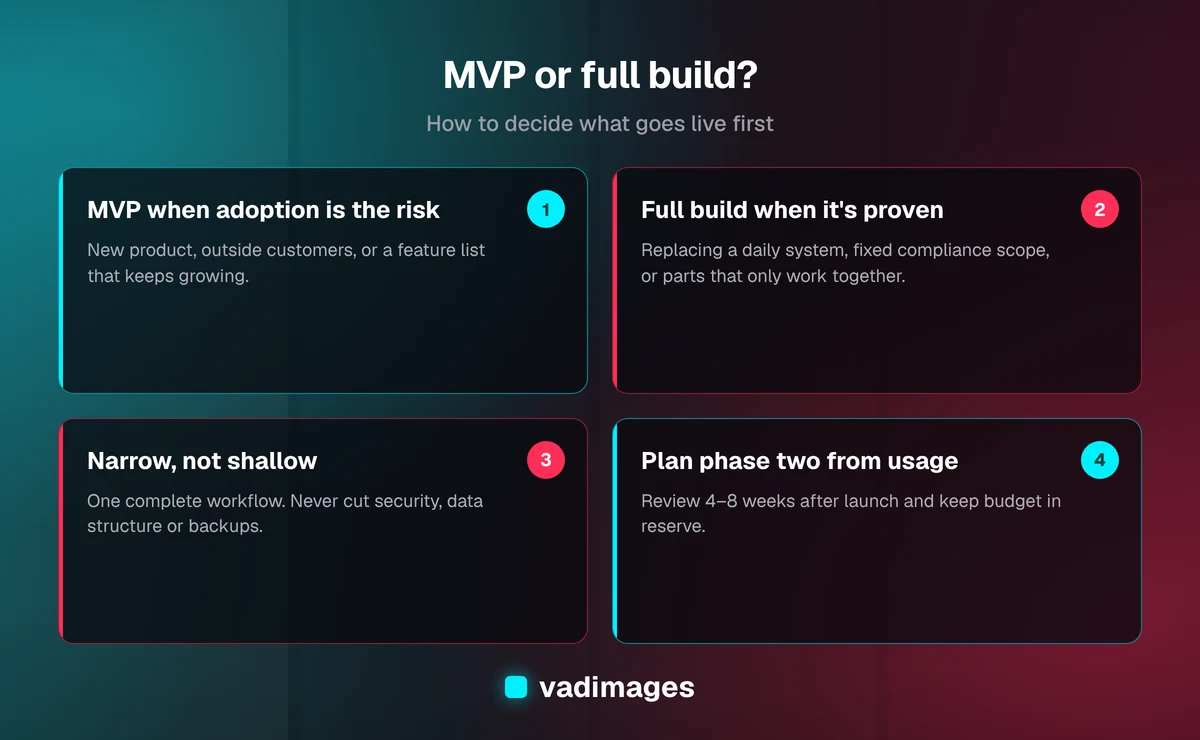
In short: build an MVP when adoption is the main risk, build in full when requirements are proven, scope the MVP around one complete workflow, and plan phase two from real usage data.
When an MVP is the right first step
Start with an MVP when most of these are true:
- The product is new. Nothing like it exists in your business today, so nobody has used it yet and requirements are mostly educated guesses.
- You're selling it to outside customers. A SaaS product or a customer portal lives or dies on whether people pay for it or use it. That's the biggest unknown, and an MVP answers it fastest.
- The feature list keeps growing. If every meeting adds new "must-haves," that's a sign the priorities aren't settled. An MVP forces a ranking.
- Budget or timing is tight. An MVP gets something useful live sooner and lets you fund later phases from what you learn, or from the revenue or time savings the first release creates.
- Users can keep their current workaround for the parts that aren't built yet. If a spreadsheet can cover reporting for three more months, reporting doesn't need to be in version one.
When a full build is the better choice
A full build, or at least a much larger first release, is the better call when:
- You're replacing a system people rely on daily. If your team has to stop using the old system on launch day, the new one has to cover everything the old one did. A partial replacement means running two systems side by side, which is often worse than either.
- Requirements are already proven. When you're rebuilding a process that has run the same way for years, you already know what's needed. There's less to learn from a small launch.
- Compliance or contracts set the scope. If a regulation, an audit or a customer contract requires specific features, those features aren't optional, whatever the release is called.
- The pieces only work together. Some products don't deliver value until several parts are connected. An order system that can take orders but can't send them to the warehouse doesn't help anyone.
Even in these cases, the build is usually delivered in stages behind the scenes, with working software reviewed every few weeks. "Full build" describes what goes live on launch day, not a project where you see nothing until the end.
A five-question test to decide
Answer these honestly, ideally with the people who will use the software in the room:
- What's the biggest risk: will people use it, or can we build it? If adoption is the bigger risk, lean MVP. If the hard part is technical or the scope is fixed by the business, lean full build.
- Is there an old system that has to be switched off? If yes, the first release has to replace it fully, so plan a larger first release.
- Can you name the one workflow that matters most? If you can, that workflow is your MVP. If everyone names a different one, run a discovery phase before building anything.
- Who will give feedback after launch, and how often? An MVP only pays off if someone is responsible for gathering feedback and deciding what comes next.
- What happens if launch slips by three months? If a delay costs you a season, a contract or a hire, a smaller release that ships on time is worth more than a complete one that's late.
Most businesses end up somewhere in between: a focused first release that handles one complete workflow end to end, followed by planned phases. That's the approach we use in our delivery process.
How to scope an MVP that isn't throwaway work
The most common MVP mistake is cutting the wrong things. A good MVP is narrow, not shallow. These rules help:
1. Build one workflow completely
Pick one job a user needs to get done and support it from start to finish. A user who can complete one task fully gives you useful feedback. A user who can do half of five tasks gives you complaints.
2. Don't cut security, data structure or backups
Logins, permissions, a sound database design and backups are the foundation everything else sits on. Changing them later means rebuilding. Cut features, not foundations.
3. Do things by hand where you can
Admin screens, automated emails and reports can often wait if someone on your team can handle those tasks manually for a few months. Automate them once you know they're worth it.
4. Pick integrations carefully
Connecting to an accounting system such as QuickBooks Online, a CRM such as HubSpot, or a payment provider such as Stripe can be a large share of the effort. Include an integration in the MVP only if the core workflow fails without it. Otherwise a simple export or import can bridge the gap. Our solutions overview covers when a dedicated integration project makes sense.
5. Write down what's out of scope
A written "not in version one" list protects the timeline. When someone asks for a new feature mid-build, it goes on the list for phase two instead of quietly expanding the project.
What each approach costs as of 2026
As of 2026, the type of software drives the price more than the MVP or full-build label: an MVP lands toward the low end of its category's range, and a full build toward the high end. Our typical ranges by type:
- SaaS platform MVP: $50,000 to $150,000, with a timeline of roughly 10 to 16 weeks. Multi-tenant platforms with billing, admin tools and integrations land at the higher end.
- Internal tool: $30,000 to $75,000, with more for multiple user roles, complex workflows and integrations; typically 6 to 12 weeks.
- Custom business system: $50,000 to $150,000, depending on the number of workflows, user roles and integrations; typically 10 to 16 weeks.
- Legacy system replacement: $75,000 to $200,000 or more, since it usually has to be a full build with data migration; typically 12 to 20 weeks.
The bigger saving is indirect: an MVP stops you from spending money on features nobody uses. See our pricing page for how we estimate and what's included.
What happens after the MVP launches
The MVP is the start of the project, not the end. Plan for it before you build:
- Set a review point. Four to eight weeks after launch, look at how the software is being used, what users ask for and where they get stuck.
- Keep budget in reserve. Don't spend the whole budget on version one. Hold back part of the budget for the changes that real use shows you need.
- Prioritize phase two from evidence. Rank the "not in version one" list against what users actually did, not what was assumed at the start.
- Keep the same team. The people who built the MVP know why decisions were made. Switching teams after launch costs time while the new team learns the code.
Some MVPs show that the idea needs to change direction. That's not a failure. It's the outcome the MVP was designed to produce, at a fraction of the cost of finding out after a full build.
How Vadimages helps you decide
Vadimages is a custom software and web development company based in Vancouver, Washington, working with US small and mid-sized businesses. Most of our custom software projects begin with a short discovery phase where we map the workflow, rank features and agree on what goes into the first release. You get a written scope, a fixed estimate for that release, and a list of what comes later. You can see how this plays out in our case studies and across the industries we serve.
Frequently asked questions
What is the difference between an MVP and a full product?
An MVP is the smallest working version of your software that solves one core problem for real users, built to production standards. A full product includes the complete feature set, every user role, integration and report, delivered in one release. The MVP lets you learn from real use before spending the full budget.
Is an MVP always cheaper than a full build?
The first release usually is, because it has fewer features. The total cost over time can be similar, since later phases add features too. The main saving is that you don't pay for features users turn out not to need.
Will we have to rebuild the MVP later?
You shouldn't. A properly built MVP has production-grade security, data structure and code that later phases extend. If a partner plans to throw the MVP away, ask why, because you'd be paying for the same work twice.
How long does an MVP take to build?
As of 2026, most SaaS MVPs we build ship in about 10 to 16 weeks. Internal tools typically take 6 to 12 weeks, and single-workflow tools land at the faster end. Timing depends on the number of integrations and how polished the first release needs to be.
Can an MVP work for internal software, not just startups?
Yes. Internal tools are often a good fit for an MVP, because your own team can give feedback quickly. The exception is when the tool replaces a system that has to be switched off on launch day; then the first release needs to cover everything the old system did.
Not sure whether to start with an MVP or a full build? Talk to the Vadimages team and we'll help you scope a first release that fits your goals and budget.