
Most small and mid-sized manufacturers do not have a software problem. They have a spreadsheet problem that has quietly turned into a business risk. Inventory counts live in one workbook, production schedules in another, and the real status of every job lives in the head of the one person who has been on the floor for fifteen years. It works until that person is out sick, a big customer asks for a rush order, or a supplier slips a delivery by two weeks.
This guide explains what manufacturing software actually needs to do for a US small or mid-sized shop, when off-the-shelf tools are enough, when custom software pays for itself, and how to scope a project so it delivers outcomes instead of a pile of features. We are a Vancouver, WA team that builds custom software for operators, so we will be plain about trade-offs.
What manufacturing software really has to do
Strip away the vendor jargon and a manufacturing and inventory system answers four questions, all day, for everyone who needs them:
- What do we have? Raw materials, work in progress, and finished goods, by location and by lot or batch where it matters.
- What are we making, and when? Open orders, the schedule, and which jobs are blocked and why.
- What do we need to buy? Shortages against upcoming demand, with enough lead time to act.
- What did it cost, and what did we ship? Job costs, yields, scrap, and the paper trail customers and auditors ask for.
If your current setup cannot answer those four questions in under a minute, without calling anyone, that gap is where money leaks: overbuying material you already own, missing ship dates, and spending Friday afternoons reconciling counts.
The warning signs your shop has outgrown spreadsheets
You do not need a crisis to justify better tooling. These are the patterns we hear most often from manufacturers who come to us:
- Two people can open the inventory file and see different numbers.
- Quotes are slow because nobody trusts the material cost or lead-time data.
- Production staff re-enter the same job information in three places.
- Stock-outs and excess stock happen in the same month, often for the same part.
- Customer service asks the floor for order status instead of looking it up.
- Lot traceability for a recall or a customer audit would take days, not minutes.
- Growth is limited by how much one person can hold in their head.
Two or three of these is normal. Five or more means the manual system is now capping your growth and you are paying for it in labor and lost orders, even if it never shows up as a line item.
The four pillars of a good system
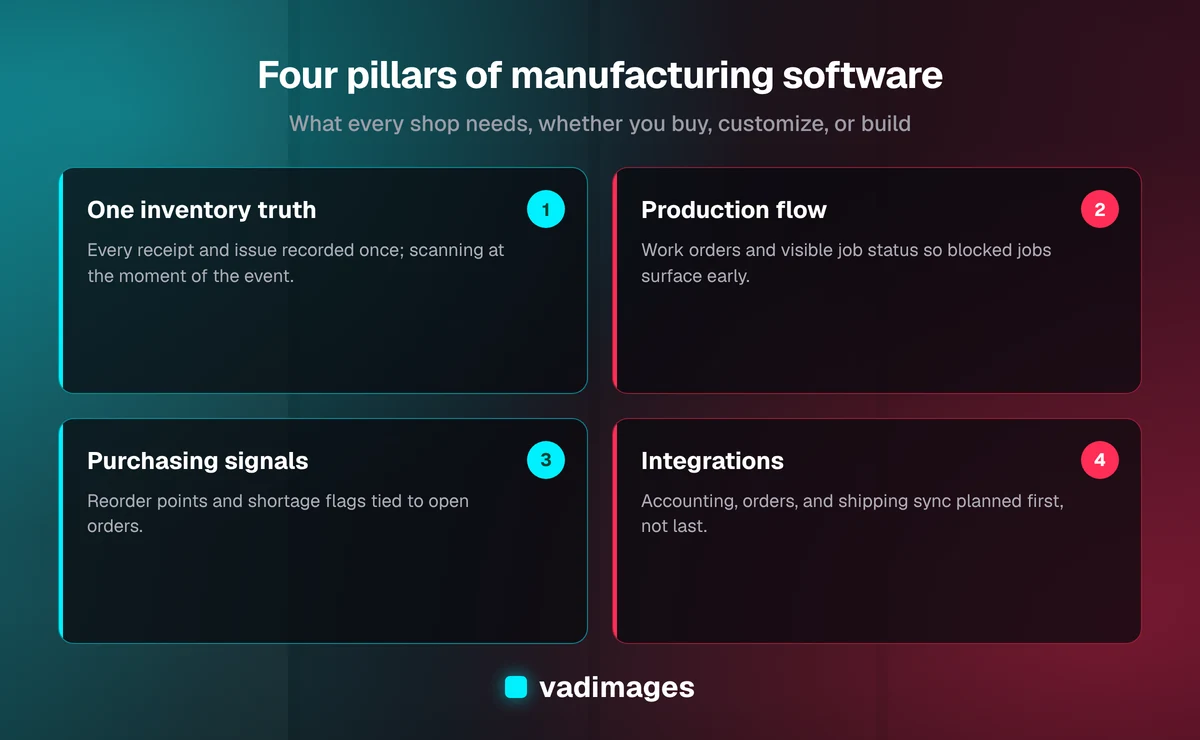
Whether you buy, customize, or build, a healthy manufacturing and inventory platform rests on four pillars. When we scope projects, we check each one before talking about screens or technology.
1. One inventory truth. Every receipt, issue, transfer, and adjustment is recorded once, as a transaction, and the on-hand number is derived from those transactions. This single design choice eliminates most spreadsheet drift. Barcode or QR scanning at receiving and at issue is usually the highest-return addition, because it moves data entry to the moment of the physical event.
2. Production flow. Work orders, routings, and a visible status for every job. The goal is not a perfect scheduling algorithm. It is that anyone can see what is running, what is waiting, and what is blocked, so problems surface in the morning meeting instead of at the shipping dock.
3. Purchasing signals. Reorder points, safety stock, and shortage reports tied to real demand. Even simple rules, such as flagging any part whose on-hand quantity will not cover the next two weeks of open orders, prevent most emergency buys.
4. Integrations. Manufacturing software rarely stands alone. It needs to exchange data with accounting (invoices, bills, cost of goods), your e-commerce or order intake, shipping carriers, and sometimes equipment or scales. Integrations are where projects quietly go over budget, so we plan them first, not last.
Buy, customize, or build?
The honest answer depends on how unusual your process is. A rough rule of thumb we use with clients:
- Buy off the shelf when your process is fairly standard, you have under about 15 users, and the vendor's workflow matches how you already work. Cloud inventory and light manufacturing tools can be live in weeks. Pay attention to per-user pricing and to what happens to your data if you leave.
- Customize or integrate when a good platform covers 80 percent of what you need but your quoting, labeling, or customer portal is unique. Often the smartest move is a mainstream system for accounting and inventory, plus a small custom layer where you differ from everyone else.
- Build custom when your process is the competitive advantage, when you are forcing a generic tool into awkward workarounds, or when licensing a tool per seat would cost more over a few years than owning the software.
There is no virtue in building what you can buy. There is also no virtue in bending a 25-person shop around software designed for a different industry. Our job in an early conversation is to tell you which of the three fits, even when the answer is that you do not need us.
Where the savings actually come from
We avoid quoting percentages we cannot support, because every shop is different. Instead, here is where the value typically shows up, so you can estimate it against your own numbers:
- Carrying cost: money tied up in stock you do not need. Better visibility lets you hold less safety stock with the same service level.
- Expedite fees and downtime: every emergency order and line stoppage has a cost you can already find in your books.
- Labor on re-entry and reconciliation: hours per week spent copying data and counting things twice.
- Lost or late orders: the quotes you were slow to send and the ship dates you missed.
- Compliance effort: time spent assembling traceability or documentation on request.
Put your own figures against each line. If the total is a few thousand dollars a month, a project in the range we describe below can pay back well within its first year or two. If it is not, the right call may be a cheaper tool or a smaller fix.
Industry-specific details that change the design
Manufacturing is not one thing. A food producer, a machine shop, and a furniture maker need different features from the same four pillars:
- Lot and batch tracking matters for food, cosmetics, supplements, and anything regulated.
- Bills of materials with substitutions matter when suppliers or inputs change often.
- Serial numbers and warranty history matter for equipment and electronics.
- Job costing by project matters for make-to-order and custom fabrication.
- Multiple locations or consignment stock matters for distributors that also assemble or kit.
Because of these differences, we start every engagement by walking the floor and the paperwork, not by showing a demo. You can see the sectors we work with on our industries page, and examples of finished work on case studies.
How a sensible project is structured
The biggest risk in manufacturing software is trying to replace everything at once. Operations cannot pause for a big-bang cutover, and staff will reject a system they did not help shape. The approach we recommend, and the one described on our how we work page, looks like this:
- Discovery (1 to 2 weeks). Map how material and information actually move today, find the top three pain points, and agree on measurable goals.
- Phase one: inventory truth. Receiving, locations, adjustments, and scanning. Run it in parallel with the old process briefly, then retire the spreadsheet.
- Phase two: production visibility. Work orders and job status, plus a screen for the floor that people will really look at.
- Phase three: purchasing and integrations. Shortage reporting, accounting sync, and customer-facing order status.
- Ongoing improvement. Once data is clean, reporting and forecasting become cheap and trustworthy.
Each phase ships something usable, so the shop gets value early and you can stop, adjust, or accelerate based on results. Training is built into every phase, because the best software fails if the night shift does not trust it.
What it costs
We publish our pricing approach because surprises are bad for everybody. Custom software projects at Vadimages start at $5,000+, and a focused first phase, such as inventory tracking with scanning and basic reporting, sits toward the lower end of what we build. Multi-phase platforms with production scheduling and several integrations cost more, and we give a fixed scope and price range after discovery rather than an open-ended hourly estimate. Details are on our pricing page.
Beyond the build, plan for hosting, support, and the time your team spends on testing and training. Ask any vendor, including us, to itemize these up front.
Questions to ask any software partner
- Who owns the code and the data, and can I export everything in a standard format?
- How will you handle the transition from our current spreadsheets without stopping production?
- Which integrations are included in the quote and which are assumed?
- How do we measure success at 30, 90, and 180 days?
- Who answers the phone when the scanner stops syncing at 6 a.m.?
Straight answers to these tell you more about a partner than a feature list. Vague answers are a sign to keep looking.
Common mistakes to avoid
- Digitizing a broken process. If receiving is chaotic on paper, it will be chaotic on a screen. Fix the process while you design the tool.
- Skipping the floor. Software designed only from the office tends to add steps for the people doing the real work.
- Over-building the first release. Start with the smallest slice that retires a spreadsheet.
- Ignoring data cleanup. Duplicate part numbers and unclear units will follow you into any new system. Budget time to clean them.
- No owner on your side. Assign one person with authority to make decisions quickly.
A simple self-check before you talk to anyone
Spend thirty minutes this week writing down the answers to three things. First, how many hours per week does your team spend counting, reconciling, or re-entering data? Second, how many times in the last quarter did a missing part or a late order cost you money or goodwill? Third, which single report would you want on your phone every morning? Those three answers form the core of a project brief, and they make any conversation with a vendor, ours or someone else's, far more productive.
Next steps
If your shop runs on spreadsheets and heroics, you are in good company, and the fix is usually smaller and cheaper than owners fear. Explore our solutions to see how we approach operations software, or contact us for a free, no-pressure conversation about your floor, your inventory, and whether custom software, an off-the-shelf tool, or a smaller fix is the right move.