
AI changing software development is the shift in how custom software gets built now that AI coding assistants can draft code, tests and documentation from plain-language instructions. For a small or mid-sized business, the practical effect is that routine build work goes faster, while the parts that decide whether a project succeeds — understanding your workflow, designing the system, reviewing every change and owning the result in production — still need experienced people. AI makes good teams faster. It does not turn a vague idea into working software on its own.
This guide from the Vadimages team covers what AI has changed in custom software development, what it hasn't, how it affects cost and timelines as of 2026, and what to ask a development partner about their use of AI. It's written for US business owners and operations leads who are weighing a custom build and keep hearing that "AI can do it now."
What AI actually does in a software project today
As of 2026, AI coding assistants such as GitHub Copilot, Cursor and Claude Code are a normal part of engineering work at many professional development teams, including ours. These tools sit inside the code editor or the terminal, read the project's existing code, and propose changes when a developer asks. In a typical custom software project, that help shows up in a few specific places:
- Boilerplate and repetitive code. Forms, data tables, API endpoints, database migrations and admin screens follow familiar patterns. An assistant can draft them in minutes instead of hours.
- Tests. Writing automated tests used to be the step teams skipped under deadline pressure. AI makes it cheap to draft test cases, so more of the code gets covered.
- Reading unfamiliar code. When we take over a legacy system, an assistant can summarize what a module does and trace how data moves through it, which shortens the time it takes to understand old software.
- Documentation. Setup guides, API references and change notes can be drafted from the code itself and then corrected by a person.
- Prototypes. A clickable first version of a screen or workflow can be put in front of your team much earlier, so feedback arrives before the expensive decisions are made.
AI coding assistants are reliable today on well-defined tasks (boilerplate code, tests, documentation, code summaries and prototypes) where a developer already knows what "right" looks like and can check the output.
What AI does not do
The harder parts of a custom software project were never typing speed. They are deciding what to build, how the pieces fit together, and what happens when real data and real users hit the system. AI assistants don't take responsibility for any of these:
- Understanding your business. An assistant doesn't know that your dispatcher overrides the schedule every Monday, or that two customers share one billing account. Someone has to find that out by talking to your team and following real jobs through your workflow.
- System design. Choosing how data is structured, which systems are the source of truth, and how integrations fail safely are decisions that shape the next five years of the software. AI can suggest options; a person has to choose and defend them.
- Accountability. AI-generated code can look correct and still contain a security hole, a subtle data bug or a dependency that shouldn't be there. Every change still needs review by an engineer who understands the whole system.
- Running it in production. Deployments, backups, monitoring, access control and fixing the issue that appears at 7 a.m. on a Monday are operational work. Someone has to own them.
How AI changes cost and timelines
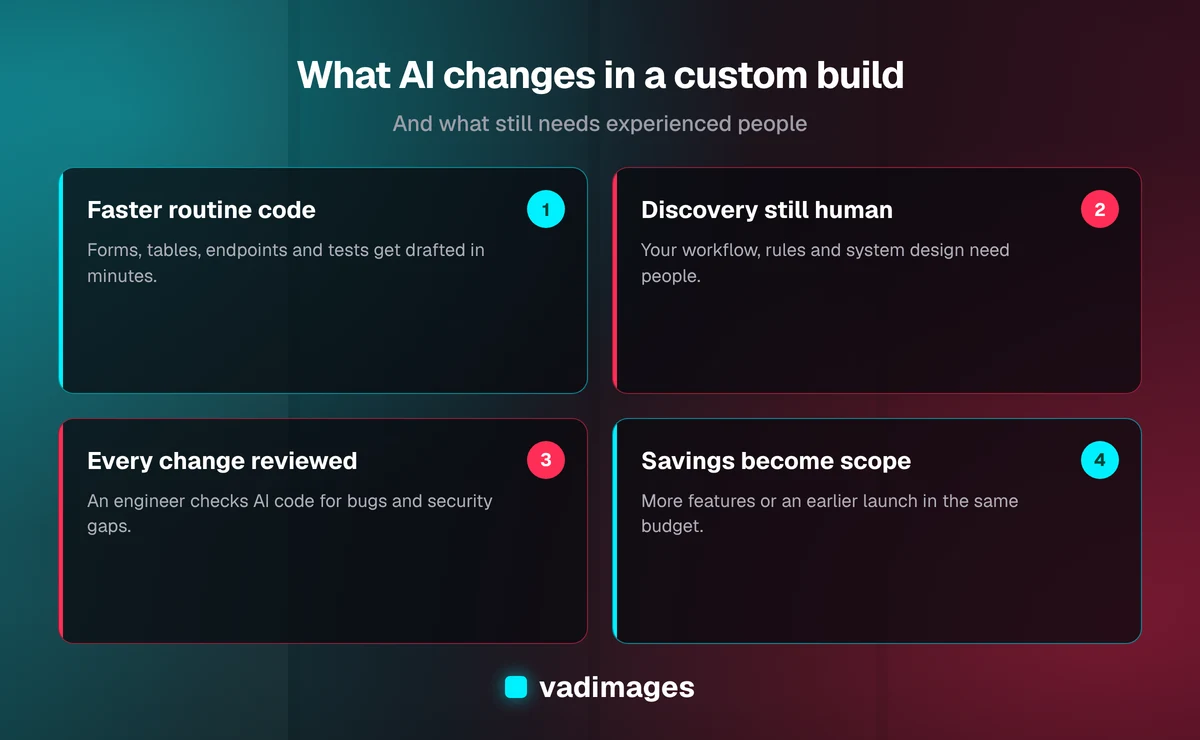
AI lowers the cost of routine build work, such as standard screens, tests and documentation, but leaves discovery, system design, integrations and data migration about the same. As of 2026, Vadimages' typical timelines are 6–12 weeks for an internal tool and 2–6 weeks for a single system integration, with AI tools already part of how we build.
1. Discovery and design: about the same
Interviews, workflow mapping, requirements and system design depend on your people's time and on judgment. AI can help summarize notes or draft a first version of a requirements document, but the sessions themselves and the decisions that come out of them don't get much shorter.
2. Building features: faster for routine work
Standard screens, CRUD operations, reports and well-documented integrations are where AI saves the most time. Unusual business rules, complex permissions and messy data still take careful work, because that is where an assistant's first draft is most often wrong.
3. Testing and review: more thorough, not shorter
Because tests are cheaper to write, a well-run project ends up with more of them. Review time doesn't disappear — it becomes more important, because more code is being produced per day and every line still has to be checked.
4. Integrations and data migration: mostly unchanged
Connecting to QuickBooks Online, a CRM such as HubSpot or Salesforce, or an old SQL Server or Access database is limited by how those systems behave, how clean the data is, and how long vendors take to grant access. AI helps write the mapping code, but most of the effort is investigation and testing against real records.
In practice, AI doesn't cut a custom software project's price in half. What it usually changes is what fits inside a budget: more of the nice-to-have features, better test coverage, or an earlier first release. As of 2026, Vadimages projects start at $5,000, and typical ranges by project type are published on our custom software pricing page — for example, internal tools typically run $30,000 to $75,000 and system integrations $15,000 to $60,000, depending on scope. Those ranges already reflect how we build today, AI tools included.
The new risks AI introduces
Faster code generation comes with its own failure modes. If you're hiring a development partner — or thinking about building something yourself with AI tools — these are the ones to watch:
- Code nobody understands. It's now possible to produce a working-looking app without anyone on the team understanding how it works. That's fine for a throwaway demo and a serious problem for software your business depends on.
- Security gaps. Generated code can skip input validation, expose data through an API, or use outdated libraries. Security review has to be a deliberate step, not an assumption.
- Your data in third-party tools. Some AI tools send code or data to outside services. You should know which tools touch your source code and whether any customer data is ever included.
- Unclear ownership. Your contract should still say plainly that you own the code and have full access to the repository, however it was written.
- Prototype mistaken for product. A prototype built in a weekend can impress in a meeting. Turning it into something with user roles, audit history, backups and integrations is still a real project.
How Vadimages uses AI in client projects
Vadimages' engineering team uses AI coding assistants as part of its normal workflow, with five rules that don't bend:
- Discovery comes first. We map your workflow and agree on requirements before code is written, as described in how we work. AI doesn't replace that step.
- An engineer owns every change. AI drafts; a developer reviews, tests and is accountable for what ships.
- Your data stays out of it. We keep client customer data out of AI tools and build against test or anonymized data.
- You own the result. The code lives in a repository you control, with documentation a future developer can follow.
- Time saved goes back to you. When AI speeds up routine work, we aim for that to show up as more scope delivered or an earlier launch.
AI inside the software, not just in how it's built
There's a second way AI is changing custom software: more of the systems small businesses ask for now include AI features themselves. Common examples are summarizing long customer emails into a ticket, extracting fields from invoices or forms, drafting replies for staff to approve, and searching internal documents in plain language.
AI features inside business software, such as email summaries, invoice field extraction and drafted replies, work best when they're narrow and checked by a person. A model that drafts a quote for a coordinator to approve is useful. A model that sends quotes to customers unreviewed is a risk. When we add AI features to a custom business system, we design the human review step, the fallback when the model is unsure, and the logging that lets you see what it did. Ongoing model usage fees are a running cost, so we estimate them alongside hosting.
Should you build it yourself with AI tools?
For some jobs, yes. A spreadsheet formula, a small internal script or a one-off data cleanup are reasonable things for a capable staff member to tackle with an AI assistant. The line is roughly this: if the software will hold customer data, handle money, connect to other business systems, or be used by more than a few people every day, it needs someone who can design, secure and maintain it.
A useful middle path is to prototype the idea yourself, use it to clarify what you actually need, and then bring that prototype to a development partner as input for discovery. It often makes requirements sharper and conversations shorter. You can see the kinds of systems we build for growing companies on our solutions and industries pages, and representative project write-ups in our case studies.
Questions to ask a development partner about AI
- Which AI tools does your team use, and what code or data do they see?
- Who reviews AI-generated code before it ships, and how?
- How do you check generated code for security issues and outdated dependencies?
- Does the contract give us full ownership of the code and repository?
- How has AI changed your estimates — and where did the savings go?
A good partner will answer these plainly. Vague answers, or a promise that AI makes the project nearly free, are reasons to keep looking.
Frequently asked questions
Is AI replacing software developers?
Not for custom business software. AI assistants speed up routine coding, but someone still has to understand the business problem, design the system, review every change and keep it running in production. What's changing is how developers spend their time: less typing, more design, review and testing.
Does AI make custom software cheaper?
It lowers the cost of routine build work, but discovery, design, integrations, data migration and review take about as long as before. For most small business projects, the benefit shows up as more scope or an earlier launch within the same budget rather than a dramatically lower price.
Is AI-generated code safe to use in production?
It can be, if an experienced engineer reviews it, it's covered by tests, and dependencies are checked. Unreviewed AI-generated code can contain security gaps and subtle bugs, so the review process matters more than the tool.
Can I build my own business app with AI tools?
For small scripts and prototypes, often yes. For software that stores customer data, handles payments, integrates with other systems or is used daily by your team, you'll want a developer who can design, secure and maintain it. A self-built prototype is a great starting point for that conversation.
Who owns code written with AI assistance?
Your contract should state that you own all code delivered for your project and have full access to the repository, regardless of the tools used to write it. Ask for that in writing before the project starts.
Talk it through with us
If you're planning a custom system and want a straight answer on what AI will and won't change about your project's scope, cost and timeline, get in touch with the Vadimages team. We're based in Vancouver, WA, work with businesses across the US, and we'll tell you plainly what it takes to build it well.