

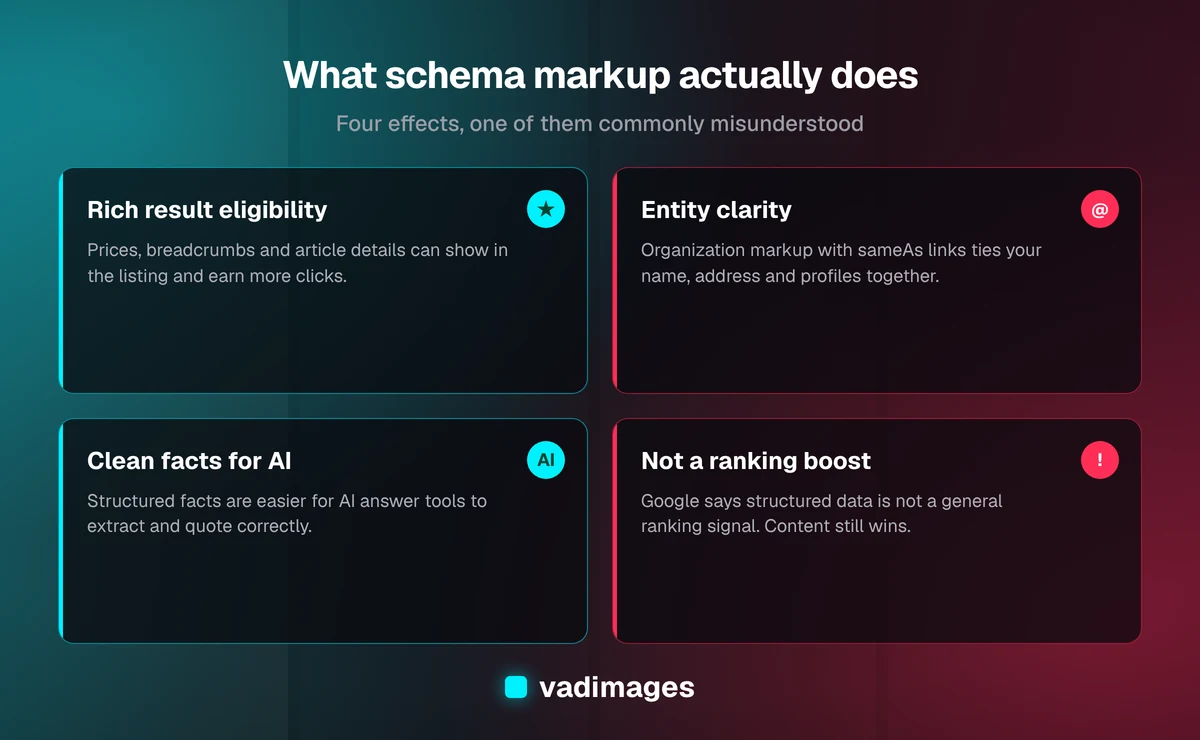
Schema markup SEO is the practice of adding structured data, usually a block of JSON-LD code using the Schema.org vocabulary, to your web pages so search engines and AI answer tools can tell exactly what each page is about: a business, a service, a product, an article, a person, an event. Schema markup does not directly push a page up the rankings. Google has said for years that structured data is not a general ranking signal. What it does is make a page eligible for rich results, remove ambiguity about your business, and give machines clean facts to quote. Those effects can lift clicks and visibility, which is why "structured data boosts rankings" is half true and worth understanding properly.
This guide from the Vadimages engineering team explains what schema markup actually changes, which types matter for a small or mid-sized US business, how to implement it without breaking anything, and how to check that it works. It's written for business owners and marketing or operations leads who want a straight answer before paying anyone to "add schema."
What schema markup is, in plain English
Your web page is written for people. A human reading your contact page knows that "1200 Main St, Suite 4" is your address and "Mon–Fri 8–5" is your opening hours. A crawler sees a string of text and has to guess. Schema markup removes the guessing by stating the facts in a fixed format: this is an Organization, its name is X, its address is Y, its phone number is Z, and these are its official social profiles.
There are three formats for writing it: JSON-LD, Microdata and RDFa. Google recommends JSON-LD, and it's the format the Vadimages engineering team uses. JSON-LD sits in a single <script type="application/ld+json"> tag, separate from the visible HTML, so a designer can change the layout without accidentally deleting the structured data woven through it.
The vocabulary comes from Schema.org, a shared standard launched in 2011 by Google, Microsoft and Yahoo, with Yandex joining later that year. It defines hundreds of types, but a typical small business site needs fewer than ten of them.
Does schema markup improve rankings?
Not directly. Adding a valid LocalBusiness block to a thin page won't move it from page three to page one. Google Search Central's “Introduction to structured data markup” describes structured data as a way to help it understand page content and to enable special search result features, not as a ranking boost.
The indirect effects are real, though, and they're why the topic keeps coming up:
- Rich results can earn more clicks at the same position. A listing with a product price, availability or breadcrumb trail takes up more space and answers a question before the click. More clicks for the same ranking is a better outcome than a ranking you can't convert.
- Entity clarity reduces mix-ups. If your business shares a name with another company in another state, consistent Organization markup with your address, logo and
sameAsprofile links helps search engines connect the right reviews, maps listing and knowledge panel to you. - AI answer tools get clean facts. As of 2026, ChatGPT search, Perplexity, Google AI Overviews and Copilot summarize pages and cite sources. Clear structure, including structured data, makes your prices, services and location easier to extract correctly. No vendor publishes a formula for this, so treat it as good hygiene rather than a guaranteed lever.
- It forces you to state your facts. Writing schema exposes gaps: no clear service list, inconsistent phone numbers, a missing logo. Fixing those helps every channel, not just search.
The schema types that matter for a small business
Most small business websites get nearly all the benefit from six Schema.org types: Organization or LocalBusiness, WebSite and WebPage, BreadcrumbList, Service or Product, Article, and, with caveats, FAQPage. Add more only when you have content that genuinely matches a type.
1. Organization or LocalBusiness
Organization markup (or its LocalBusiness subtype) states the identity of your company: legal name, logo, URL, address, phone, opening hours, and sameAs links to your LinkedIn, Google Business Profile, Facebook or industry directory listings. If customers visit a physical location, use the most specific LocalBusiness subtype that fits, such as Dentist, HVACBusiness or LegalService. Put it on the home page or a site-wide layout, and give it a stable @id so other pages can reference it.
2. WebSite and WebPage
WebSite and WebPage markup describe the site and each page and tie them back to your Organization as publisher. They rarely produce a visible feature on their own, but they're the glue of a connected graph: every page says "I belong to this site, which belongs to this company."
3. BreadcrumbList
Breadcrumb markup tells search engines where a page sits in your site structure, such as Home › Services › Kitchen Remodeling. It's cheap to add, especially if your pages already show visible breadcrumbs, and it helps search engines understand your hierarchy.
4. Service or Product
Use Service for what you do (with provider pointing at your Organization and areaServed for your market) and Product with an Offer for things you sell with a price. Product markup with a valid price and availability is one of the most consistently useful rich result types for ecommerce.
5. Article or BlogPosting
For blog posts and news, Article markup states the headline, author, publish and modified dates, and image. Accurate dates matter: they help search engines and AI tools judge freshness, and a stale "modified" date on a page you updated last week undersells it.
6. FAQPage and Review, with caveats
In August 2023 Google limited FAQ rich results to well-known, authoritative government and health websites, and stopped showing How-to rich results, and that is still the policy as of 2026. FAQPage markup is still valid Schema.org and still describes your Q&A content to machines, but most businesses shouldn't expect the expandable FAQ snippet anymore. Review stars have their own rules: Google doesn't show self-serving review stars for a business's reviews of itself, so marking up testimonials on your own site as AggregateRating for your Organization won't earn stars and can count as misleading markup.
How to implement schema markup without breaking it
The most common problem we find in schema audits isn't missing markup. It's markup that's wrong: fields that contradict the page, duplicate Organization blocks from three different plugins, or a node pointing at an @id that doesn't exist. Here's the process we follow.
- Write down your facts first. One canonical name, address, phone number, logo URL, founding year and list of official profiles. Every page and every external profile should match it.
- Generate markup from your data, not by hand. On a custom site, structured data should be built from the same source that renders the page, so a price change on the page changes the markup too. Hand-pasted JSON drifts out of date.
- Connect the graph with
@id. Give the Organization, WebSite and each WebPage a stable identifier, and reference them instead of repeating the company details on every page. - Only mark up what's visible. Google's guidelines require structured data to reflect content users can see on the page. Don't add a price, rating or FAQ to markup that isn't on the page.
- Remove duplicates. If your theme, an SEO plugin and a reviews widget each output their own Organization block, pick one source and switch the others off.
- Validate, then check it on every deploy. Run pages through Google's Rich Results Test and the Schema.org Markup Validator. On vadimages.com, an automated check runs before each release and blocks it if JSON-LD is invalid or an
@idreference is dangling, because layout changes routinely break structured data with no visible symptom.
How to tell whether it's working
Measure schema like any other change: by what happens in search, not by whether a validator shows green.
- Google Search Console enhancement reports list the structured data Google found (breadcrumbs, products, articles and others), with errors and warnings per page.
- The Performance report filtered by search appearance shows clicks and impressions for rich result types, so you can compare click-through rate before and after.
- Manual spot checks in AI tools. Ask ChatGPT, Perplexity or Google's AI Mode a question your page answers, such as your service area or starting price, and see whether the answer matches your facts and cites your page.
Give it a few weeks. Google has to recrawl the pages, and eligibility for a rich result never guarantees Google will show one.
Schema markup on WordPress versus a custom site
On WordPress, SEO plugins generate a reasonable baseline of Organization, WebSite, WebPage, Article and breadcrumb markup. The trouble starts when several plugins each add their own and nobody owns the result. Audit what's actually in the page source, not what the plugin settings screen says.
On a custom-built site, structured data is part of the code. That takes more upfront thought but gives you control: the JSON-LD graph is generated from the same data as the page, every node is connected, and automated checks catch regressions before they go live. That's how we build sites through our website design and development service, and it's one reason we treat SEO as engineering rather than an add-on.
What schema markup costs
On a new website, structured data should be part of the build, not a line item. Our website design and development projects typically run $8,000 to $35,000 as of 2026, depending on page count, design depth and integrations, and that includes the JSON-LD graph, metadata and validation. You can see how scope drives price on our pricing page.
For an existing site, a schema audit and fix is usually a small, contained piece of work, because it touches page templates rather than content. The cost depends on how many templates you have and whether the site's data is in a shape markup can be generated from. As of 2026, projects with Vadimages start at $5,000, and we'll tell you upfront if your fix is small enough that you're better off doing it with your current plugin.
Common schema markup mistakes
- Marking up content that isn't on the page, such as hidden FAQs or invented ratings. This can lead to a manual action that removes rich results.
- Conflicting facts, such as a different phone number in the schema, the footer and your Google Business Profile.
- The wrong type, such as every page marked as Article, including service pages and the contact page.
- Set and forget. Prices, hours and services change. Markup generated from your data stays current; pasted markup goes stale.
- Expecting rankings from markup alone. Schema helps good pages get understood and presented well. It doesn't replace useful content, a fast site and links from relevant sources.
Where to start this week
If you do one thing, view the source of your home page, search for application/ld+json, and paste the URL into Google's Rich Results Test. You'll see in five minutes whether you have no markup, conflicting markup or a clean graph. If it's messy, fix your Organization block first, then breadcrumbs, then your service or product pages.
If your site is built on an older platform where every fix is a fight, it may be time to look at a rebuild where SEO is part of the structure. You can see the kind of work we do in our case studies, how we run projects on how we work, and the sectors we serve on our industries page. If your structured data needs to pull from business systems such as inventory or booking, our custom software team builds that integration.
Frequently asked questions
Is schema markup a Google ranking factor?
No. Google Search Central states that structured data helps it understand pages and enables rich results, but it isn't a general ranking boost. The benefits come indirectly, through rich results that can earn more clicks and clearer understanding of your business.
Which schema format should I use?
JSON-LD. Google recommends it, and because it sits in its own script tag instead of being woven through your HTML, redesigns are much less likely to break it.
Will FAQ schema still get me FAQ snippets in Google?
For most businesses, no. As of 2026, Google shows FAQ rich results only for well-known government and health sites. FAQPage markup is still valid and still describes your Q&A content to machines, but don't add it expecting the expandable snippet.
Does schema markup help with ChatGPT and AI Overviews?
It can help AI tools extract accurate facts, such as your name, location, services and prices, but no AI vendor publishes how much weight structured data gets. Treat it as one part of being easy to quote, alongside clear, answer-first page copy and consistent business details across the web.
How long does it take to see results?
Usually a few weeks, because search engines need to recrawl the updated pages. Check Search Console's enhancement reports for detection and errors, and compare click-through rates in the Performance report once rich results start appearing.
Want a clear answer on whether your site's structured data is helping or hurting? Contact Vadimages for a straightforward review from our team in Vancouver, WA, Projects start at $5,000 as of 2026.