

A quick note before we start
This is a representative, composite case study. It is not a single named client, and the figures in it are not measured results. We built it from patterns we see repeatedly when small and mid-sized companies take an app from a handful of early users to a real audience. We use a round-number journey (100, 1,000, 10,000, 100,000 users) because it is easy to follow, not because every product hits those marks in that order. Treat it as a map, not a promise.
The product in our composite is a scheduling-and-payments app for a service business. It starts life as a quick build by a small team, gets traction through word of mouth, and then has to survive its own success. If you are planning something similar, the lessons below apply whether you are building on custom software or extending something you already have.
Stage one: 100 users and the "it just works" phase
At 100 users, almost anything works. A single server, a single database, and a deploy process that consists of someone copying files is enough. Pages load fast because nobody is competing for resources. Bugs get reported by email, and the founder fixes them the same afternoon.
That is exactly the right way to start. The mistake at this stage is not simplicity. The mistake is forgetting that simplicity is a choice you will need to revisit. The teams that scale well make a few cheap decisions early that keep their options open:
- Keep business logic out of the user interface so it can be reused later.
- Use a standard, boring database and write the schema down, rather than letting it grow by accident.
- Put configuration (keys, URLs, feature flags) in one place instead of scattering it through the code.
- Track errors from day one, even if it is only a simple alert to an inbox.
None of those cost much. All of them make the next three stages cheaper. If you want help deciding what is worth building now and what can wait, our how we work page explains how we scope early versions.
Stage two: 1,000 users and the first real pain
Somewhere around the first thousand users, the app stops being a side project and starts being a business dependency. Customers expect it to be up. Support requests arrive on weekends. The first slow pages show up, usually on screens that list data, such as a dashboard or a booking history.
The causes at this stage are almost always mundane:
- A database query that was fine with 200 rows now scans tens of thousands.
- Images and files are served from the same machine that runs the application.
- One long-running task, such as sending a batch of emails, blocks everything else.
- Deploys happen during business hours and occasionally take the app down for a minute.
The fixes are equally mundane, and that is good news. Adding the right database indexes, moving uploads to object storage with a content delivery network in front, and pushing slow work into a background queue will carry an app a surprisingly long way. We usually recommend measuring first: find the three slowest pages and the three most common errors, and fix those before touching the architecture.
This is also the stage to introduce a staging environment and a repeatable deploy. A deploy that can be run by anyone, at any time, with a quick rollback, is one of the highest-value investments a growing product can make.
What the architecture looks like at this point
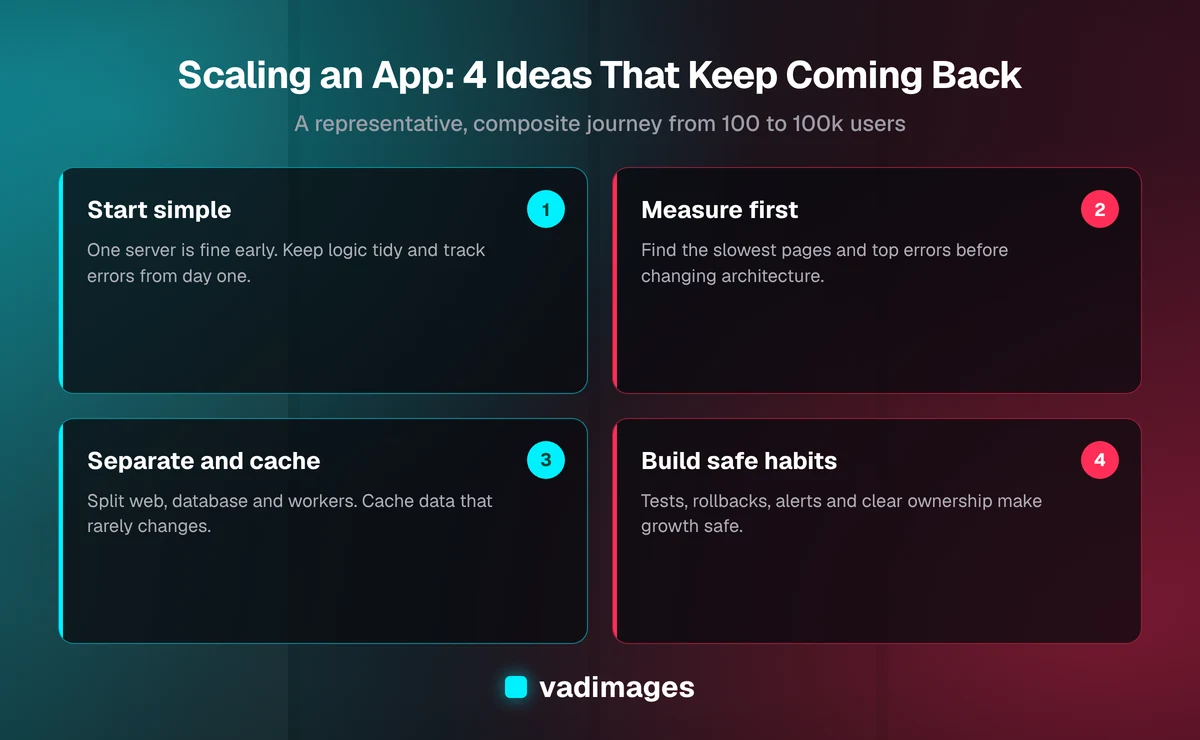
The diagram below summarizes the four ideas that matter most as an app grows. They are not a checklist to complete in one sprint. They are the themes that keep coming back at each stage.
Stage three: 10,000 users and the limits of one server
Ten thousand users changes the nature of the problem. Traffic is no longer smooth. It comes in waves: Monday mornings, the end of the month, the hour after a marketing email goes out. A single server sized for the average day struggles on the peak day.
In our composite, the team makes four moves at this stage.
First, they separate the pieces. The web application, the database, and the background workers stop sharing one machine. Each can be sized and restarted on its own. A spike in report generation no longer slows down the booking screen.
Second, they add caching where it is safe. Data that changes rarely, such as service lists, pricing tables, and public pages, is cached so it does not hit the database on every request. Data that changes constantly, such as a user's current balance, is not cached carelessly. Knowing the difference is most of the skill.
Third, they run more than one copy of the application. Putting a load balancer in front of two or more identical application servers means a single failure no longer takes the product down, and routine deploys can roll out one server at a time.
Fourth, they invest in visibility. Dashboards for response time, error rate, and database load turn guesses into evidence. Alerts are tuned so the team is woken up for real problems and not for noise.
This is also the stage where costs start to matter. Cloud bills grow quietly. A good habit is to review the biggest line items every month and ask whether each one is buying something customers can feel.
Stage four: 100,000 users and the people problem
By the time an app is serving a hundred thousand users, the hardest problems are often not technical. They are about how the team works.
- Ownership. When something breaks at 2 a.m., who is responsible, and do they have the access and the documentation to fix it?
- Change safety. Automated tests, feature flags, and gradual rollouts let the team ship often without betting the company on every release.
- Data growth. Tables with hundreds of millions of rows need archiving rules, careful migrations, and sometimes a different storage approach for analytics than for day-to-day transactions.
- Third-party dependencies. Payment providers, email services, and maps all have rate limits and outages. The app needs sensible retries and graceful fallbacks.
- Security and compliance. More users means a bigger target, and often more obligations, depending on your industry.
Notice what is missing from that list: a dramatic rewrite. In most composite journeys like this one, the product that reaches 100,000 users is an evolved version of the one that started with 100. Teams that scrap everything and start over usually lose a year and rediscover the same problems.
The mistakes we see most often
Across projects like this, the same missteps come up again and again.
Scaling too early. Building for a million users when you have a hundred burns budget and slows learning. Build for roughly ten times your current load, then revisit.
Scaling too late. The opposite error is ignoring warning signs until customers complain publicly. Slow pages, growing support queues, and nervous deploys are all early signals.
Optimizing without measuring. Teams love to rewrite the part of the system that feels slow. The part that is actually slow is often somewhere else. Measure, then change one thing at a time.
Neglecting the database. Most scaling stories are really database stories. Indexes, query shape, connection limits, and backups deserve regular attention.
Treating performance as a one-time project. Scaling is a habit. A short monthly review of response times, errors, and costs prevents the emergency projects.
What it costs, honestly
We believe in transparent pricing, so here is the honest framing. There is no single price for "scaling an app," because the work depends on where the product is today and what is holding it back. Our projects start at $5,000+, and a focused performance and reliability review of an existing app can often be scoped well inside a project of that size. Larger re-architecture work is scoped after we look at your actual data and traffic. You can see how we price in general on our pricing page.
What we will not do is quote a number before we understand the problem, or promise a specific speedup before we have measured anything.
How to apply this to your own product
If you are somewhere on this journey, here is a practical sequence to follow:
- Write down your current user count and what you expect in the next twelve months.
- List your three slowest screens and three most frequent errors, using real data from your logs.
- Check that you can deploy safely and roll back quickly.
- Confirm you have tested backups and know how long a restore would take.
- Decide what the next 10x looks like, and fix only what would break before then.
If your app serves a particular sector, the constraints differ. A healthcare product has different data-handling rules than a retail one, and our industries pages describe how we think about each. You can also browse real examples of our work under case studies and the kinds of systems we build under solutions.
The takeaway
Getting from 100 to 100,000 users is rarely about one clever trick. It is a series of small, well-timed decisions: keep things simple early, measure when pain appears, separate and cache as load grows, and build the team habits that keep a bigger system safe to change. The apps that make the journey are usually the ones whose owners stayed curious about what the data was telling them.
If you are planning an app, or you already have one that is starting to creak, we would be glad to take a look. Contact us for a no-pressure conversation about where you are and what the next stage should be.