
Why a general AI model doesn't know your business
Large language models like the ones behind popular chatbots are trained on huge amounts of public text. They are good at language, summarizing, and reasoning in general terms. What they do not have is your information: your price list, your return policy, your onboarding documents, your support history, your internal procedures. Ask a general model a question about your own company and one of two things happens. It admits it doesn't know, or, more dangerously, it produces a confident answer that sounds right and isn't.
For a small or mid-sized business, that second outcome is the real risk. An assistant that quotes a warranty term you never offered, or a policy you changed last year, creates customer confusion and internal rework. The question most owners ask us is simple: how do we get AI to answer from our actual knowledge, and nothing else?
The most common answer is a technique called retrieval-augmented generation, usually shortened to RAG. This article explains what it is in plain English, how it works, where it fits, where it doesn't, and what it takes to build one properly.
What RAG actually is
RAG is a two-step pattern. Instead of asking the AI to answer from memory, the system first looks up the relevant pieces of your documents, then hands those pieces to the AI along with the question and asks it to answer using them.
Think of an open-book exam versus a closed-book exam. A plain language model takes the test from memory. A RAG system gets to open your company binder to the right page before answering. The model's language skill is the same; what changes is that it now has the facts in front of it.
The name breaks down neatly:
- Retrieval: find the passages in your content that are most relevant to the question.
- Augmented: add those passages to the prompt the AI sees.
- Generation: the AI writes a natural-language answer grounded in those passages.
How a RAG system works, step by step
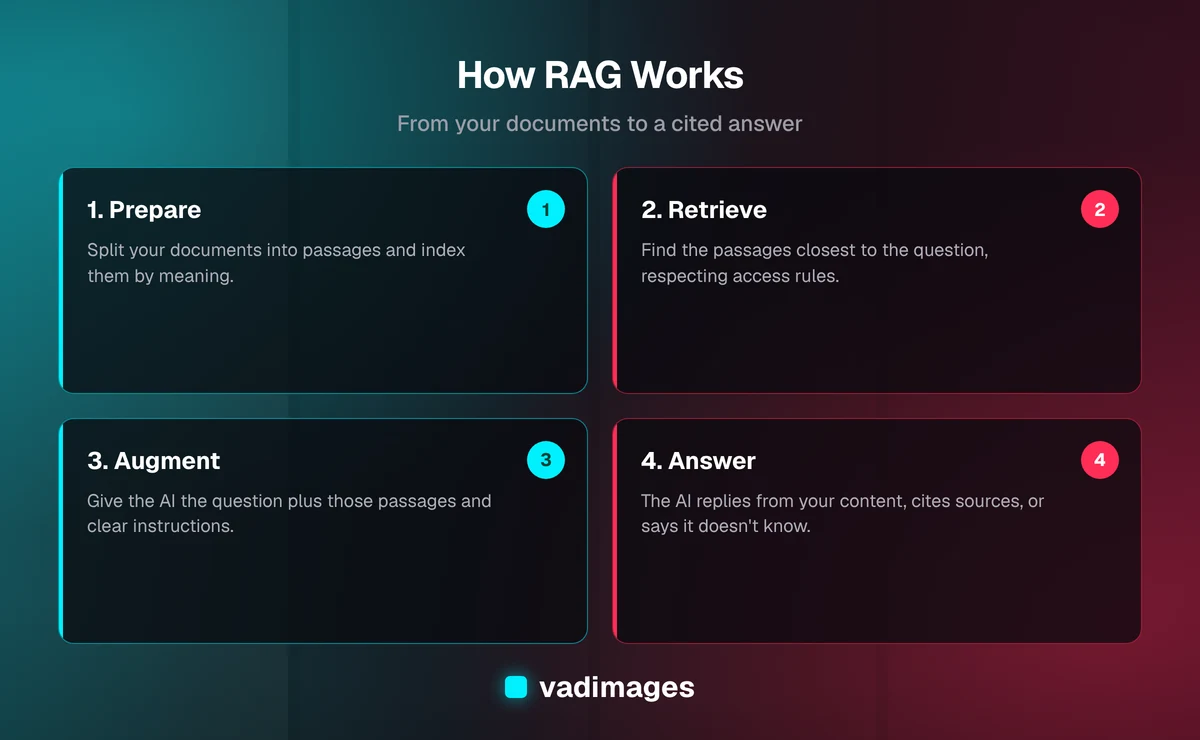
Under the hood, a well-built RAG system has two phases: preparing your knowledge ahead of time, and answering questions when someone asks.
Phase one: preparing your knowledge
- Collect the sources. Policy documents, help articles, product manuals, contracts, spreadsheets, wiki pages, past support tickets, whatever should inform answers.
- Clean and split. Documents are broken into smaller passages, often a few paragraphs each, so the system can retrieve just the part that matters rather than a 60-page PDF.
- Index for meaning. Each passage is converted into a numerical representation of its meaning (an embedding) and stored in a searchable index, commonly called a vector database. This lets the system find passages by meaning, not just matching keywords. A question about 'canceling my plan' can surface a passage titled 'Ending your subscription'.
Phase two: answering a question
- Understand the question. The user's question is converted into the same kind of meaning-based representation.
- Retrieve. The system pulls the handful of passages closest in meaning, and filters them by what that particular user is allowed to see.
- Compose the prompt. The question and the retrieved passages are bundled together with instructions such as 'answer only from the material below; if it isn't there, say so'.
- Generate and cite. The model writes the answer and, ideally, points to the source passages so a person can verify it.
That last point, citations, matters more than most people expect. An answer with a link back to the source document is something an employee or customer can check in seconds. An answer without one asks them to simply trust the machine.
RAG vs. fine-tuning vs. just pasting documents into a chat
RAG is not the only way to put company knowledge in front of a model, and it helps to know the alternatives.
- Pasting documents into a chat window. Fine for a one-off question. It doesn't scale, it depends on a person remembering to do it, and it raises data-handling questions about where your files end up.
- Fine-tuning. Further training a model on your data. It is good for teaching a style, format, or specialized task behavior. It is a poor way to teach changing facts: updating a price means retraining, and you can't easily see which document produced an answer.
- RAG. Knowledge stays in your own documents and index. When a policy changes, you update the document and the system reflects it. Answers can point to sources, and access rules can be enforced at retrieval time.
For most business question-answering needs, where facts change and traceability matters, RAG is the practical starting point. Fine-tuning can sit alongside it later if you need a very specific tone or output format.
Where RAG pays off for a small or mid-sized business
RAG is a means, not a goal. The useful way to evaluate it is to look for places where people currently spend time hunting for information or answering the same questions repeatedly.
- Customer support. A support assistant that answers from your actual help center and policies, and hands off to a human when the answer isn't there.
- Internal knowledge search. New hires and busy staff asking 'how do we handle a rush order?' and getting the current procedure instead of pinging a senior colleague.
- Sales enablement. Quickly pulling accurate specs, past proposal language, or compliance statements when preparing a quote.
- Operations and field teams. Technicians or coordinators searching manuals and service histories from a phone.
- Document-heavy back offices. Contracts, policies, and reports that people need to question, not just read.
If your industry carries specific compliance or privacy duties, such as healthcare, finance, or legal work, those shape the design from day one. See how we approach this across the industries we serve.
What can go wrong (and how good builds prevent it)
RAG reduces made-up answers; it does not eliminate every problem. Knowing the failure modes is how you avoid them.
- Bad source material. If your documents are outdated, contradictory, or scattered across five tools, the AI will faithfully repeat the mess. Content cleanup is often the biggest part of the project and the part with the best return, because humans benefit from it too.
- Poor retrieval. If the system fetches the wrong passages, the answer will be wrong even though the model behaved. Chunking choices, hybrid search (meaning plus keywords), and re-ranking all affect quality.
- Access control gaps. A search across everything must still respect who is allowed to see what. Permissions need to be enforced at retrieval, not bolted on afterward.
- No 'I don't know' behavior. A system must be instructed and tested to say it can't find an answer rather than guess.
- No evaluation. Without a set of real test questions with known good answers, you can't tell whether a change made things better or worse.
What a sensible RAG project looks like
The projects that go well tend to be narrow first and broad later. Here is the shape we recommend to teams considering this.
- Pick one use case with a clear owner. For example, 'answer the 50 most common support questions' or 'let the sales team search our product documentation'.
- Audit the sources. Decide which documents are authoritative, who maintains them, and what should be excluded.
- Build a test set. Collect real questions people ask along with the correct answers, so quality can be measured instead of guessed at.
- Build the pipeline. Ingestion, indexing, retrieval, the answering step, source citations, and permission checks.
- Pilot with a small group. Watch the questions that fail; they tell you whether the fix is content, retrieval, or instructions.
- Add monitoring and a refresh routine. Documents change. The system needs a reliable way to pick up updates and a way for users to flag bad answers.
This is ordinary custom software work with an AI component, and it should be run like any other project: a defined scope, milestones, and a way to measure whether it is working. Our approach is laid out on the how we work page.
Build, buy, or both?
There are off-the-shelf tools that bolt a chat box onto your documents, and for simple cases they can be enough. A custom approach starts to make sense when one or more of these is true:
- Your knowledge lives in several systems and formats that need to be combined.
- You need fine-grained permissions, such as different answers for staff, partners, and customers.
- The assistant needs to take actions, not just answer, like creating a ticket or looking up an order in your own system.
- You have regulatory or contractual limits on where data can be processed and stored.
- You want the experience embedded in your own product or website rather than a separate tool.
Often the right answer is a mix: use proven components for the commodity parts and build the integration, permissions, and workflow around them to fit how your business operates. Explore the kinds of systems we build under custom software and solutions.
What it costs
We believe in stating this plainly. Vadimages custom software projects start at $5,000+, and the final figure depends on how many sources you need to connect, how strict the permission rules are, whether the assistant also takes actions, and how much content cleanup is required. A focused pilot on a single, well-defined use case sits at the lower end of that range. Multi-system builds with role-based access and integrations cost more. You can see how we think about budgets on the pricing page, and ongoing costs such as model usage and hosting are something we estimate with you up front rather than leave as a surprise.
We won't promise specific percentage gains in support time or response speed, because they depend entirely on your starting point. What we can promise is a way to measure it: the test set built at the start becomes the yardstick you use to judge the finished system.
Questions to ask any vendor proposing a RAG system
- Which of our documents will it read, and who decides what is included?
- Does every answer show its sources?
- What does it do when the answer isn't in our content?
- How are permissions enforced, and where is our data stored and processed?
- How will we measure quality before and after launch?
- How does the system pick up changes when our documents are updated?
- Who owns the code, the index, and the content when the project ends?
A vendor who answers these concretely has probably built one before. Vague answers about 'proprietary AI' are a signal to keep asking.
The bottom line
RAG is a practical way to make AI useful for your specific business: keep your knowledge in your own documents, retrieve the right pieces at question time, and have the model answer from them with sources you can check. It works best when the use case is narrow, the content is in decent shape, and quality is measured against real questions.
If you are wondering whether your documents and workflows are a good fit, the best first step is a conversation. Contact Vadimages and tell us what your team keeps searching for or answering by hand. We'll tell you honestly whether RAG is the right tool, what a first version would look like, and what it would cost. You can also browse our case studies to see how we approach custom builds.