
Most software decisions get made on one number: the quote. It is easy to compare, easy to put in a spreadsheet, and easy to defend in a meeting. It is also the least complete number you will ever look at. The price you pay to build or buy software is the opening bid. What the software costs you over the next three to five years is a different, and usually larger, figure. That figure has a name: total cost of ownership, or TCO.
This guide explains software total cost of ownership in plain English, shows where the hidden costs live, and gives you a simple way to compare a cheap build against a well-built one before you sign anything. No invented benchmarks here, just a framework you can run with your own numbers.
What total cost of ownership actually means
Total cost of ownership is everything you spend to acquire, run, change, and eventually replace a piece of software, added up over the time you expect to use it. The upfront cost is one line inside that total. For many small and mid-sized businesses it is not even the biggest line.
A useful way to think about it: you are not buying software, you are buying an outcome for a period of time. If the outcome is "orders flow into accounting without anyone retyping them for the next five years," then the right question is what it costs to keep that outcome true for five years, not what it costs to switch it on.
The upfront cost usually covers:
- Discovery, planning, and design
- Development and testing
- Data migration from your old system
- Launch and initial training
Everything after launch belongs to the rest of the TCO.
The costs that never show up on the quote
Here are the categories we see teams forget, whether they are buying off-the-shelf subscriptions, commissioning custom software, or inheriting something a previous vendor built.
1. Hosting and infrastructure. Servers, databases, storage, backups, monitoring, and domain and certificate management all recur monthly or yearly. Some are tiny. Some grow with your usage.
2. Maintenance and security updates. Frameworks, libraries, and operating systems get patched. Skip the patches and you accumulate risk. Do the patches and someone has to be paid to do them and test that nothing broke.
3. Licenses and per-seat fees. Subscription software looks inexpensive at five users and looks very different at fifty. Add-ons, API call limits, and premium tiers that unlock a feature you assumed was included all move the number.
4. Integration upkeep. Every connection to your accounting tool, payment processor, CRM, or shipping carrier is a dependency. When one of them changes its API, your connection needs attention.
5. Workarounds and manual labor. This is the quiet one. When software does 80% of the job, a person does the other 20% by hand, every day, indefinitely. Salary time spent on copy-and-paste is a real cost even though it never appears on an invoice.
6. Training and turnover. New hires need to learn the tool. Awkward tools take longer to learn and produce more mistakes.
7. Change requests. Your business will change. Adding a product line, a pricing rule, or a new approval step is much cheaper in software designed to change than in software that was rushed.
8. Downtime and errors. A system that goes down during your busiest week, or quietly produces wrong totals, has a cost that can dwarf the build price. We will not put a number on it for you, because it depends entirely on your business, but you should be able to estimate it for yours.
9. Exit and replacement. Eventually you migrate off. If your data is locked in a proprietary format or your code is not documented, leaving is expensive.
Why the cheapest quote is often the most expensive purchase
Low upfront prices have to come from somewhere. In software, the usual sources are skipped discovery, thin testing, no documentation, and copy-pasted code that nobody on the team fully understands. None of these hurt on launch day. All of them hurt later.
Consider two hypothetical versions of the same project, described here as an illustration and not as measured results.
- Version A is built fast against a loose spec. It launches quickly and costs less. Six months later every small change takes longer than it should, because nothing is documented and the logic is tangled. Bug fixes are billed hourly with no cap.
- Version B costs more up front because it includes real discovery, automated tests, clear documentation, and a data model designed around how your business works. Changes are faster and cheaper because the foundation is clean.
The gap between the two shows up gradually, in maintenance invoices, in staff frustration, and in the projects you decide not to attempt because the system makes them painful. By year three, Version A can easily have cost more than Version B, and it is still the worse system. That is the pattern TCO thinking is designed to expose.
The reverse mistake exists too. Paying for a sprawling enterprise platform when you need something focused is also poor TCO. The goal is not the most expensive option; it is the option whose total cost matches the outcome you need.
A simple TCO model you can run in an afternoon
You do not need a finance team for this. Open a spreadsheet and build one column per option, then one row per cost category over a fixed horizon. We recommend five years for core business systems and three years for lighter tools.
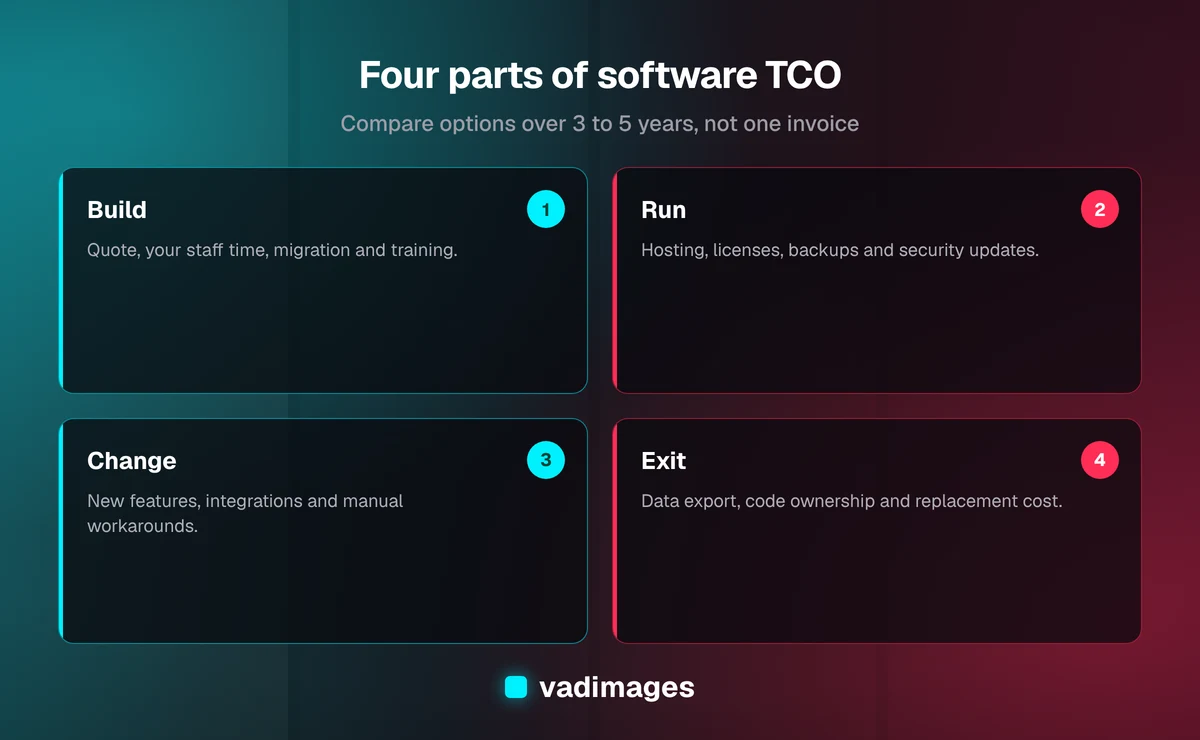
Use these four buckets:
- Build: the quoted price, plus your own staff time to participate, plus data migration and training.
- Run: hosting, licenses, monitoring, backups, and routine security updates, per year.
- Change: a realistic allowance each year for new features and adjustments. A common planning approach is to reserve a portion of the original build budget annually; ask your vendor what they recommend and why.
- Exit: what it would take to export your data and move on, including any contract notice periods.
Then add a fifth line that most spreadsheets leave out: the cost of the manual work the software does not eliminate. Estimate hours per week, multiply by a loaded hourly cost, and carry it across the full horizon.
Finally, add the cost of risk in plain terms. Ask what happens if the system is unavailable for a day, and what a data breach would cost you in notification, cleanup, and trust. You do not need precision. You need to see whether the option that looks cheap is exposing you to a large downside.
Questions that reveal real TCO before you sign
Whether you are talking to us or to anyone else, these questions separate honest quotes from optimistic ones.
- What is included after launch, and what is billed separately? Is there a warranty period for defects?
- Who owns the source code, the data, and the hosting accounts? Can you take all three with you?
- What does a typical small change cost, and how is it estimated?
- How is the work tested, and is the code documented well enough that another team could pick it up?
- What recurring fees will I pay to third parties, and how do they scale as I grow?
- What happens to my price if my user count or transaction volume doubles?
Vague answers are information. A vendor who cannot explain what year two looks like has not planned for year two.
Buy, subscribe, or build: how TCO changes the answer
TCO does not automatically favor custom software, and it does not automatically favor subscriptions. It depends on how well the tool fits how you work.
Subscriptions tend to win when your needs are common and the product already does them well. Low upfront cost, predictable monthly fees, and someone else maintaining the product are real advantages. Watch for per-seat growth and the manual workarounds that pile up when the fit is imperfect.
Custom software tends to win when your process is a competitive advantage, when you are stitching together several tools with manual glue, or when per-seat pricing would scale painfully. Upfront cost is higher, but you control the roadmap and avoid paying for features you do not use. You can read more about how we approach this on our custom software page.
A hybrid is often the most sensible answer: keep the commodity tools, and build only the layer that connects them or that handles the part of your business no product handles well. Our solutions overview shows common patterns.
Whichever way you lean, run the five-year model for each option. The answer is frequently different from what the upfront price suggests.
How to keep ownership cost down on any project
Once you have chosen, a few habits reduce the long-run bill regardless of vendor.
- Invest in discovery. Misunderstood requirements are the most expensive thing in software, because they are discovered late.
- Keep the scope honest. Launch with what delivers the outcome, then add. Features nobody uses still need maintenance forever.
- Insist on documentation and tests. They are what make future changes cheap and make switching vendors possible.
- Use standard, well-supported technology. Obscure stacks are harder and costlier to staff later.
- Budget for the second year. Put a maintenance and improvement line in the plan from day one, so it is never a surprise.
- Review annually. Look at what you pay for, what is unused, and which workarounds could now be automated.
What this looks like at Vadimages
We price projects openly. Most engagements start at $5,000 and up, and we will tell you what drives the number: scope, integrations, and how much the system has to change over time. You can see how we structure that on our pricing page, and how a project runs from kickoff to launch on how we work.
We also talk about year two before you sign. That means what hosting will cost, what ongoing support looks like, who owns the code and the data, and what a typical change request costs. If a lower-priced option is the right call for your situation, we will say so. We would rather you make a well-informed decision than a surprised one. If you want to see the kinds of problems we solve, browse our case studies and the industries we work in.
The bottom line
The upfront cost is what you pay to start. Total cost of ownership is what you pay to succeed. Compare options over three to five years, include the manual work and risk that never appear on a quote, and ask every vendor what year two and year five look like. The cheapest proposal is only a bargain if it is still cheap after you have lived with it.
Not sure what your current system really costs you? Tell us about it. We will walk through the numbers with you and give you an honest view, whether or not we end up working together. Contact us to start the conversation.