
Almost every growing business hits the same wall. The accounting system says one thing, the inventory spreadsheet says another, and the sales team keeps a third version in the CRM. Someone has the job of retyping numbers between them every Friday. Sooner or later an owner says, "We need to connect everything to our ERP," and a quiet dread settles over the room. ERP integration has a reputation for blown budgets, missed dates, and systems that break the week after launch.
That reputation is earned, but it is not inevitable. Most nightmare projects fail for a handful of predictable reasons, and nearly all of them can be avoided with planning done before anyone writes code. This guide explains what ERP integration actually is, where projects go wrong, and how to approach it in small, safe steps that pay off quickly.
What ERP integration actually means
An ERP (enterprise resource planning) system is the system of record for the core of your business: orders, inventory, purchasing, invoicing, payroll, or some mix of them. Common examples include NetSuite, Microsoft Dynamics, Sage, QuickBooks Enterprise, Acumatica, and SAP Business One. ERP integration simply means making your other tools exchange data with that system automatically, so people stop copying information by hand.
Typical examples for a small or mid-sized company look like this:
- A web order is placed on your website and appears in the ERP as a sales order without anyone touching it.
- Inventory levels in the ERP are reflected on your online store, so you stop selling things you do not have.
- A signed quote in your CRM creates a customer record and a draft invoice in accounting.
- Shipping status from your carrier flows back to the order and triggers a customer email.
- Timesheets or job data from a field app land in payroll and billing.
Notice that none of these require replacing the ERP. Integration is about the connections between systems, and that distinction matters because it keeps the scope honest.
Why ERP integrations turn into nightmares
In our experience, troubled integration projects share a few root causes. None of them are exotic.
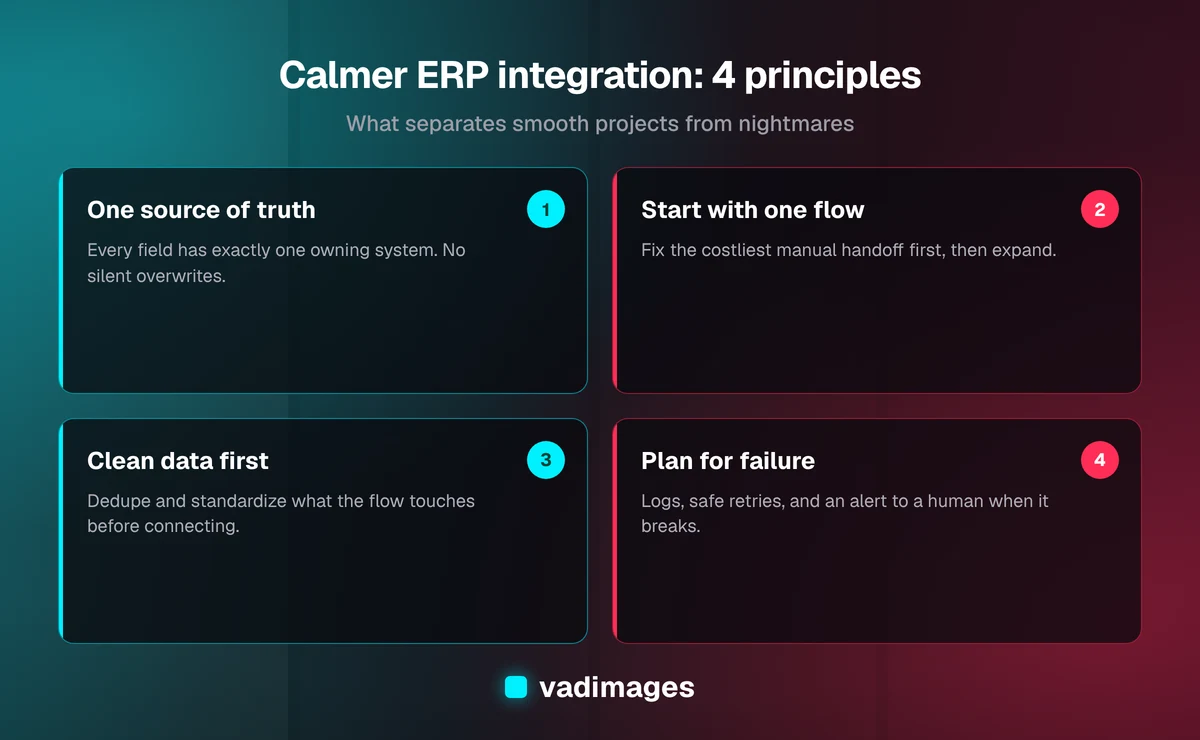
1. No one agreed on the source of truth. If both the CRM and the ERP can edit a customer's address, the two will eventually disagree, and a sync tool will cheerfully overwrite the correct one with the wrong one. Every piece of data needs exactly one home, and every other system should read from it or send changes to it through a defined path.
2. The scope was "everything." Projects that begin with a map of every possible data flow rarely finish. The business changes while the project drags on, and the first release arrives too late to matter. A better scope is the one or two flows that cost you the most time or cause the most errors today.
3. Messy data was assumed to be fine. Duplicate customers, inconsistent product codes, and free-text fields that should have been dropdowns do not become clean because a connector moved them. They become messy in two places instead of one. Data cleanup is unglamorous, but it is often the largest single risk in the plan.
4. Nobody planned for failure. APIs time out. A vendor changes a field name. A record gets rejected because a required value is blank. If an integration has no retry logic, no error log, and no way to alert a human, failures stay invisible until a customer complains or the month-end numbers do not tie out.
5. The wrong tool was chosen for the job. Some integrations are perfect for an off-the-shelf connector. Others need custom logic that a connector cannot express. Buying the wrong one leads to expensive workarounds either way.
Choose the right integration approach
There is no single best way to connect to an ERP. The right approach depends on how many systems are involved, how unusual your rules are, and how much volume you handle. Here are the main options, in plain terms.
Native connectors and marketplace apps. Many ERPs and platforms ship with ready-made connections, for example between an online store and an accounting package. These are quick and inexpensive to start with. The trade-off is flexibility: you get the fields and rules the vendor decided on, and anything unusual in your process becomes a workaround.
Integration platforms (iPaaS and no-code tools). Tools such as Zapier, Make, or Workato let you wire systems together with visual workflows. They are a strong fit for simple, low-volume flows and for proving that a connection is worth having. They can get fragile and costly when logic grows complicated or volume climbs.
Direct API integration. Most modern ERPs expose an API, a defined way for other software to read and write data. A custom integration built on the API can apply your exact business rules, handle errors the way you want, and scale with you. It costs more up front than a connector, but it avoids per-task fees and gives you full control.
File-based and legacy methods. Older systems may only offer scheduled file exports, database access, or EDI. These can work well, but they usually need extra care around timing, validation, and security.
A common and sensible pattern is to start with the cheapest approach that satisfies the requirement and move to custom work only where the cheap option actually breaks down. If you are weighing these choices, our custom software and solutions pages describe how we approach this kind of work.
A step-by-step plan that keeps risk low
Here is the approach we recommend to most small and mid-sized businesses. It is deliberately boring, which is exactly what you want from a project that touches your financial records.
Step 1: Map the manual work. Spend a week noting every time someone retypes, exports, or reconciles data between systems. Record who does it, how often, how long it takes, and what goes wrong. This list is your business case and your priority order, and it costs nothing but attention.
Step 2: Pick one flow and define "done." Choose the flow with the best combination of pain and simplicity, such as web orders into the ERP. Write down what triggers it, which fields move, which system owns each field, and what a correct result looks like. Specific acceptance rules make testing possible.
Step 3: Clean the data that flow touches. Deduplicate customers, standardize product codes, and fix the fields the integration will depend on. Limit this to the data in scope so it does not become a separate year-long project.
Step 4: Build in a sandbox. Most ERPs offer a test or sandbox environment. Build and test there with realistic sample data, including the awkward cases: a refund, a backorder, a customer with two addresses, an order with a discount code. Never test a first-time integration against live financial data.
Step 5: Design for failure from the start. Every integration should log what it did, retry safely when something temporary goes wrong, avoid creating duplicates if it runs twice, and notify a person when it cannot resolve a problem on its own. This is the difference between an integration you trust and one you babysit.
Step 6: Run in parallel, then cut over. For a short period, let the integration run while someone still checks the results against the manual process. When the two agree for a sensible stretch, retire the manual step. Then move on to the next flow.
Step 7: Document and assign an owner. Write a one-page description of what the integration does, where credentials live, and who to call when it stops. Integrations without an owner quietly rot.
What to ask any vendor or developer before you sign
Whether you hire an agency, a freelancer, or an internal developer, the following questions separate careful partners from risky ones:
- Which system is the source of truth for each field, and how will conflicts be handled?
- What happens when the integration fails at 2 a.m.? Who is alerted, and what is logged?
- How will you test, and will testing happen in a sandbox with realistic data?
- Who owns the code, the accounts, and the credentials when the project ends?
- What are the ongoing costs: platform fees, API limits, hosting, and maintenance?
- How will the integration survive an ERP upgrade or a vendor API change?
- Can the first phase be limited to one flow so we see value before committing to more?
Vague answers to these are a warning sign. Clear answers, even uncomfortable ones, usually mean the team has done this before.
Security and access: the part people skip
An ERP holds sensitive financial and customer information, so an integration deserves the same care as any other door into it. Use a dedicated service account with the minimum permissions the flow needs rather than an administrator's login. Store credentials in a proper secrets manager, not in a spreadsheet or a code file. Keep an audit trail of what the integration changed. And plan for rotating keys, because a key that never changes is a key that eventually leaks.
If your business handles payment data, health information, or other regulated records, involve whoever is responsible for compliance early. Our industries page outlines the sectors we work in and the constraints that often come with them.
Budgeting honestly
Pricing for ERP integration varies widely, and anyone quoting a precise number without understanding your systems is guessing. What we can say plainly is how to think about the cost. A simple connector or no-code flow may cost little to set up but carries monthly fees and limits. A custom integration is a real project: at Vadimages, custom software projects start at $5,000+, and the final figure depends on the number of systems, the quality of your data, and how many business rules are involved. You can see how we price work on our pricing page.
Whatever route you take, budget for three things that are easy to forget: data cleanup, testing time, and ongoing maintenance. A reasonable rule of thumb is to treat the integration as a small product that needs a little care each month, not a one-time purchase. Compare that cost to what the manual process costs today in staff hours and corrected mistakes, and the decision is usually clearer than it first appears.
A representative example
To make this concrete, consider a representative scenario. This is a composite for illustration, not a specific client. A regional distributor takes orders by email, phone, and a basic web store. Staff retype each order into the ERP, then update stock counts on the website by hand once a day. Oversells happen, invoices go out late, and one person spends several hours a week on reconciliation.
A sensible first phase would connect only the web store and the ERP: new orders create sales orders automatically, and stock levels flow back to the store on a schedule. Customer and product data used by that flow get cleaned first. The integration is built and tested in a sandbox, runs alongside the manual process for a couple of weeks, and sends an alert when any order fails to post. Only after that works does the team consider phase two, such as shipping updates or CRM sync. The result is a small, low-risk win that builds confidence, rather than a sprawling project that tries to fix everything at once.
You can read more about how we describe our own engagements on our case studies page, and about our process on how we work.
Signs you are ready to start
You do not need a perfect plan to begin, but a few things should be true before you commit budget:
- You can name the one or two flows that cost you the most time or cause the most errors.
- You know which system should own each piece of data in those flows.
- Your ERP has an API, a supported connector, or a documented export route.
- Someone inside the business is willing to own the result and answer questions.
- You are willing to start small and expand after the first flow proves itself.
If most of those are true, you are in a better position than many companies that have already spent heavily on integration. If several are not, a short planning engagement is usually cheaper than discovering the gaps mid-build.
The bottom line
ERP integration becomes a nightmare when it is treated as a giant, all-at-once technical event. It becomes manageable when it is treated as a series of small, well-defined improvements: one clear source of truth per field, clean data, a sandbox for testing, error handling that tells a human when something is wrong, and a named owner. Start with the manual work that hurts most, connect that first, and let the results guide what comes next.
If you are staring at a pile of disconnected systems and are not sure where to begin, we are happy to talk it through. Contact us for a no-pressure conversation about your systems, and we will tell you honestly whether you need a connector, a custom build, or just a better plan.