
Update, October 21, 2026: This is a developing story. We are publishing it fast because the practical advice does not change: find out which PHP version you run, and get it patched. We could not reach php.net from our environment while writing, so the technical details below come from several security vendors and hosting providers reporting the same facts. Always confirm exact version numbers on the official PHP release page before you act.
Two critical remote code execution flaws in PHP itself, tracked as CVE-2026-109618 and CVE-2026-109619 (nicknamed "PHP2Shell" in security coverage), were patched on October 21. Both are reported at CVSS 9.2. A proof-of-concept has reportedly leaked, although we have not seen confirmed in-the-wild exploitation at the time of writing. If you run WordPress, Laravel, or custom PHP, this is a patch-today item.
What happened, in plain English
PHP is the language that runs a very large share of the web, including WordPress and Laravel. These two bugs are in PHP core, which means the problem is not in a plugin, a theme, or a package you installed. It is in the engine underneath your site.
"Remote code execution" is the worst category a bug can be in. It means that, under the right conditions, an attacker on the internet could make your server run commands the attacker chose. In practice that can mean a web shell, stolen customer data, a defaced site, spam or malware hosted from your domain, or a foothold for deeper attacks.
Here is what we can say with reasonable confidence from the reporting we reviewed:
- Fixed releases are reported as PHP 8.5.12, 8.4.27, 8.3.36 and 8.2.35. Verify these on php.net.
- Official fixes are expected for supported PHP branches only. Branches that have reached end of life are not expected to receive official patches.
- Some hosting vendors are shipping their own rebuilt packages. Plesk, for example, said it would rebuild its bundled PHP and deliver it to Plesk servers.
- Some Linux package repositories lag behind the official release. One report noted that a popular third-party PHP repository for RHEL-based servers did not yet have the fix on the day of release.
- A leaked proof-of-concept means the window between "patch exists" and "attackers use it" can be short.
What we do not know, and will not guess at, are the exact exploit conditions, which PHP configurations are reachable, and how widespread attacks will be. Treat any source that claims precise numbers of affected servers with caution.
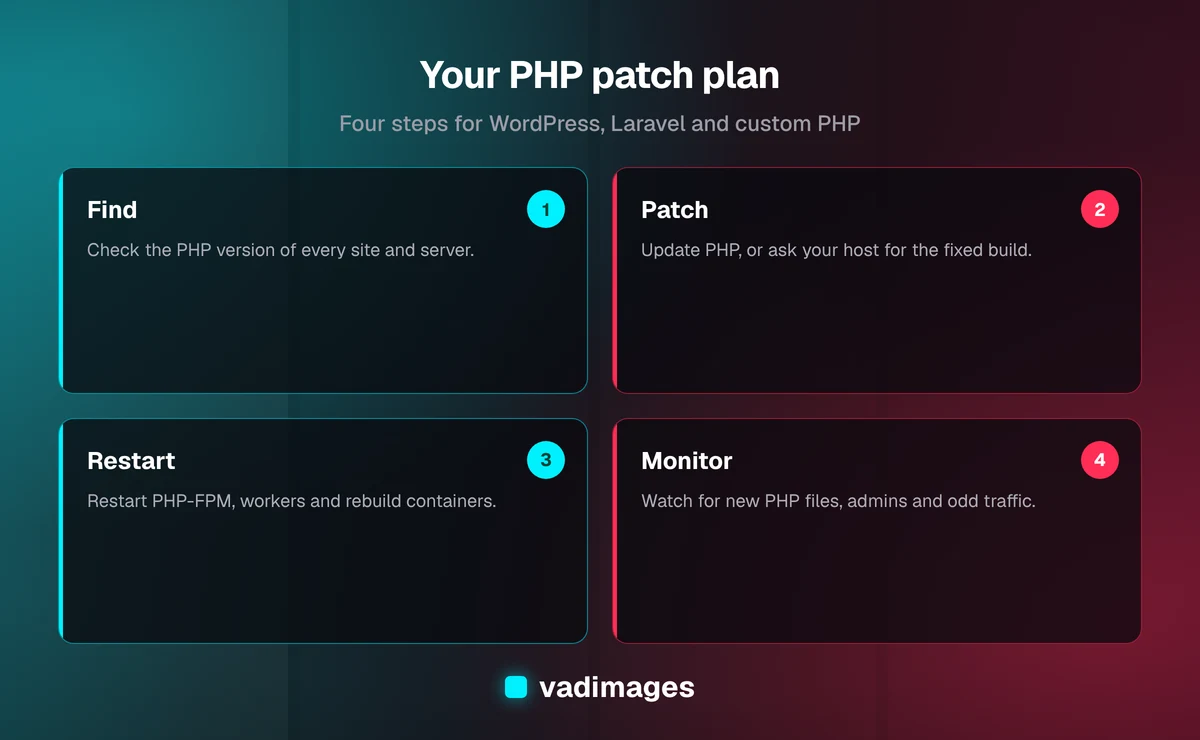
Step one: find out which PHP version you are running
You cannot fix what you cannot see. Do this first.
- Hosting control panel (cPanel, Plesk, and similar): look for a "PHP version" or "MultiPHP" setting. It shows the version for each site.
- WordPress: in the dashboard, open Tools, then Site Health, then Info, then Server. The PHP version is listed there.
- Command line on a server you manage: run
php -v. Remember that the command line version and the version your website uses (PHP-FPM or Apache) can differ, so check both. - Docker or containers: check the base image tag in your Dockerfile, such as
php:8.3-fpm, and when it was last rebuilt. - Laravel: run
php artisan --versionfor the framework, andphp -vin the same environment your app runs in. The framework version and the PHP runtime version are different things.
Write down every site and server, including the forgotten ones: staging sites, old microsites, an abandoned landing page, a client's side project on your hosting account. Attackers scan for exactly those.
If you run WordPress
Most WordPress sites do not control PHP directly. Your host does. That makes this a short conversation, not a big project.
- Managed or shared hosting: look for a PHP version switcher in your hosting dashboard and move to the latest patched release of a supported branch. If the fixed release is not available there yet, contact support and ask directly when it will be. Ask for a date, not a reassurance.
- Before you switch versions: take a backup, and test on staging if you have one. Moving between minor versions is usually smooth, but an old plugin or theme can break. A broken site is better than a hacked one, but a tested change is better than both.
- Update everything else while you are there. WordPress core, plugins and themes. This bug is in PHP, but attackers who get in through any door will use it. We covered a recent plugin supply chain incident separately, and the lesson is the same: remove plugins you do not use.
- Turn on automatic updates for core security releases and for plugins you trust.
- Put a firewall in front of the site. A web application firewall from your host or a CDN is not a fix, but it can buy time and block known exploit patterns while you patch.
If you run Laravel
Composer manages your packages, but it does not manage PHP itself. Updating packages will not fix this.
- Servers you manage (VPS or dedicated): update the PHP packages with your operating system's package manager, then restart PHP-FPM and your web server. If you use a third-party package repository, check whether it has published the fixed build yet. If it has not, ask whether you can use an alternative source or a container image in the meantime.
- Docker or Kubernetes: pull the newest patched base image, rebuild, and redeploy. A running container does not update itself. This is the most common way teams believe they are patched and are not.
- Managed platforms (Forge-style tooling, platform-as-a-service): check the provider's status or security page and apply their PHP update. Confirm with
php -vfrom inside the running environment once it is done. - Queue workers and scheduled jobs: restart them. Long-running PHP processes keep running the old code until they are restarted.
- Keep
APP_DEBUGoff in production and make sure your.envfile is not reachable from the web.
If you run custom PHP
Custom PHP applications are often the least visible, because nobody put them on an inventory. A few specific actions:
- Identify every PHP runtime your application touches: web, CLI scripts, cron jobs, workers.
- Patch the runtime, then restart services.
- Review any code path that accepts input from the outside and passes it to unusual functions, file handling, or deserialization. This is good hygiene any day, and it reduces how much an engine-level bug can do to you.
- If your app runs on a PHP branch that no longer receives official fixes, treat this as the trigger to plan an upgrade. Running unsupported PHP on the public internet is an accepted risk only until a bug like this one arrives.
What to do if you cannot patch today
Sometimes the fixed package is not available for your system yet, or a legacy app breaks on the new version. That is real, and it deserves a plan, not panic.
- Reduce exposure. Restrict admin areas by IP address, put the site behind a CDN or firewall, and disable any PHP endpoints you do not need.
- Block code execution where it should never happen. Upload folders should not be able to run PHP. This is a standard WordPress and Laravel hardening step and it limits what a successful attacker can do.
- Turn off unused PHP extensions. Less loaded code means less attack surface.
- Move the workload. If a patched container image exists, running the app in a container may be faster than waiting for your server's package repository.
- Set a deadline. Write down who owns the patch and by when. Temporary mitigations tend to become permanent.
Do not run leaked exploit code
When a proof-of-concept leaks, many people want to test their own site with it. Please do not run exploit code from random repositories or forums on your production server. Leaked tools are a known way to distribute malware, and some "checkers" do more than they claim. If you want verification, use a trusted scanner from a reputable vendor, or ask a security professional.
Signs your site may already have been touched
No confirmed mass exploitation had been reported when we wrote this. But because a proof-of-concept is public, it is worth a quick look, especially on sites that stayed unpatched for several days.
- Unfamiliar PHP files in upload, cache, or temporary directories
- Recently modified core files you did not change
- New administrator accounts, unexpected scheduled tasks, or unfamiliar cron entries
- Unusual outbound connections, a sudden spike in server load, or a hosting provider warning
- Search results for your domain showing spam pages or strange redirects
If you find anything, do not just delete the file and move on. Take a backup for evidence, patch PHP, change the passwords and keys that the server could read (database credentials, API keys, WordPress salts, the Laravel APP_KEY where appropriate), and get help with a proper cleanup. A web shell you missed is an open door.
A simple 24-hour plan
- Hour 0 to 2: list every site and server, and record the PHP version of each.
- Hour 2 to 6: ask your hosts and vendors for their patch status in writing. Back up anything you plan to change.
- Hour 6 to 12: patch the highest-risk systems first, which means public sites that handle customer data, payments, or logins.
- Hour 12 to 24: restart services, confirm the live PHP version, and review logs and file changes for anything suspicious.
- This week: retire what you do not use, switch on automatic updates, and write a one-page patching routine so the next announcement is a ten-minute job.
Why this keeps happening, and how to be less exposed next time
Engine-level bugs are rare, but they are a reminder that every site sits on a stack someone has to maintain: the PHP runtime, the framework, the plugins, the server, and the host. Businesses get into trouble when nobody owns that stack. Our article on total cost of ownership makes the same point from the budget side: ongoing maintenance is part of the price of software, not an optional extra.
A few habits make emergencies like this one much cheaper:
- Keep an inventory of what you run and where.
- Use supported software versions only.
- Automate updates where it is safe, and rehearse the rest.
- Keep tested backups that live outside the server they protect.
- Have one named person responsible for patching, and one backup person.
How Vadimages can help
If you would rather hand this off, we can help. We review PHP, WordPress, and Laravel environments, identify which systems are exposed, apply and verify the update, and set up a maintenance routine so it is not a scramble next time. For more context on how we work, see how we work, our custom software services, and our solutions. If you operate in a regulated or high-risk field, the industries we serve are listed too, and our case studies show the kind of systems we build and maintain. For larger rebuilds, projects start at $5,000+, and our pricing page explains what drives the number.
Not sure whether your site is exposed? Send us the URL and your hosting provider, and we will tell you plainly what we see and what to do next. Contact us and we will respond as quickly as we can.