
Every founder who asks us to build a SaaS product eventually asks the same question: "What should we build it on?" The honest answer is that the best stack is the one that gets a paying customer onto a working product quickly, stays affordable to run, and can be maintained by whoever you hire next. This is the stack we recommend to most US small and mid-sized businesses starting a SaaS product in 2026, and, just as important, the reasons behind each choice so you can judge whether it fits you.
How we choose a stack
We do not pick tools because they are fashionable. Every recommendation below is measured against five plain questions:
- Can we ship the first version fast? A product that is live in weeks teaches you more than a perfect architecture that is live in a year.
- Can you hire for it? If only a handful of people on earth can maintain your code, you have a business risk, not an asset.
- What does it cost to run at ten customers and at a thousand? Costs should grow roughly in line with revenue, not ahead of it.
- Does it lock you in? You should be able to move hosts or swap a vendor without rewriting the product.
- Is it boring where it counts? Billing, authentication and data storage should use proven, widely deployed technology.
If a tool fails two or more of those questions for your situation, we leave it out, no matter how good the demo looks.
The front end: React with Next.js and TypeScript
For the part of the product your customers actually see, we default to React with Next.js, written in TypeScript. React has the largest hiring pool of any front-end technology, and Next.js gives you routing, server rendering, and a sensible project structure out of the box. It also lets your marketing pages and your logged-in application live in one codebase, which keeps your public site fast and search-friendly while the app behind the login stays interactive.
TypeScript is non-negotiable for us. It catches a whole category of mistakes before a customer ever sees them, and it makes the code far easier for a new developer to read months later. The small amount of extra typing up front pays for itself the first time someone changes a data field and the compiler points out every place that breaks.
For styling and components we use a utility-first approach with a small, consistent component library. The goal is a product that looks professional and feels consistent, not a bespoke design system you will have to maintain forever.
The back end: TypeScript on Node, with a plain API
On the server we prefer to keep the language the same as the front end. A Node.js back end written in TypeScript means one team can work across the whole product, share types between client and server, and move faster with fewer handoffs. For the vast majority of SaaS products, a straightforward API with clear routes, validation on every input, and a job queue for background work is all you need.
We deliberately avoid splitting a new product into many small services. Microservices solve problems that companies with dozens of engineers have. A new SaaS with two or three developers gets slower, more expensive and harder to debug when it is cut into pieces too early. Start with one well-organized application, keep the boundaries clean inside it, and split a part out later only when a real bottleneck proves it is necessary.
The database: PostgreSQL
If we could give only one piece of advice, it would be this: use PostgreSQL. It is mature, well understood, available from every major cloud provider, and flexible enough to handle structured business data, JSON documents, full-text search and even basic vector search for AI features. Almost every question a growing SaaS faces, such as reporting, audit history and per-customer data separation, has a well-known answer in Postgres.
- Relational by default. Customers, subscriptions, invoices and permissions are naturally related, and a relational database enforces those relationships for you.
- Multi-tenancy that fits. Most SaaS products can keep all customers in one database with a tenant identifier on every row and database-level rules that stop one customer from seeing another's data. Very large or regulated customers can later be moved to their own database.
- Managed hosting. Pay a managed provider to handle backups, patching and failover. Running your own database server is rarely a good use of a small team's time.
Add a cache such as Redis only when you can point to a specific slow query or a rate-limiting need. It is a useful tool, but it is not part of the day-one minimum.
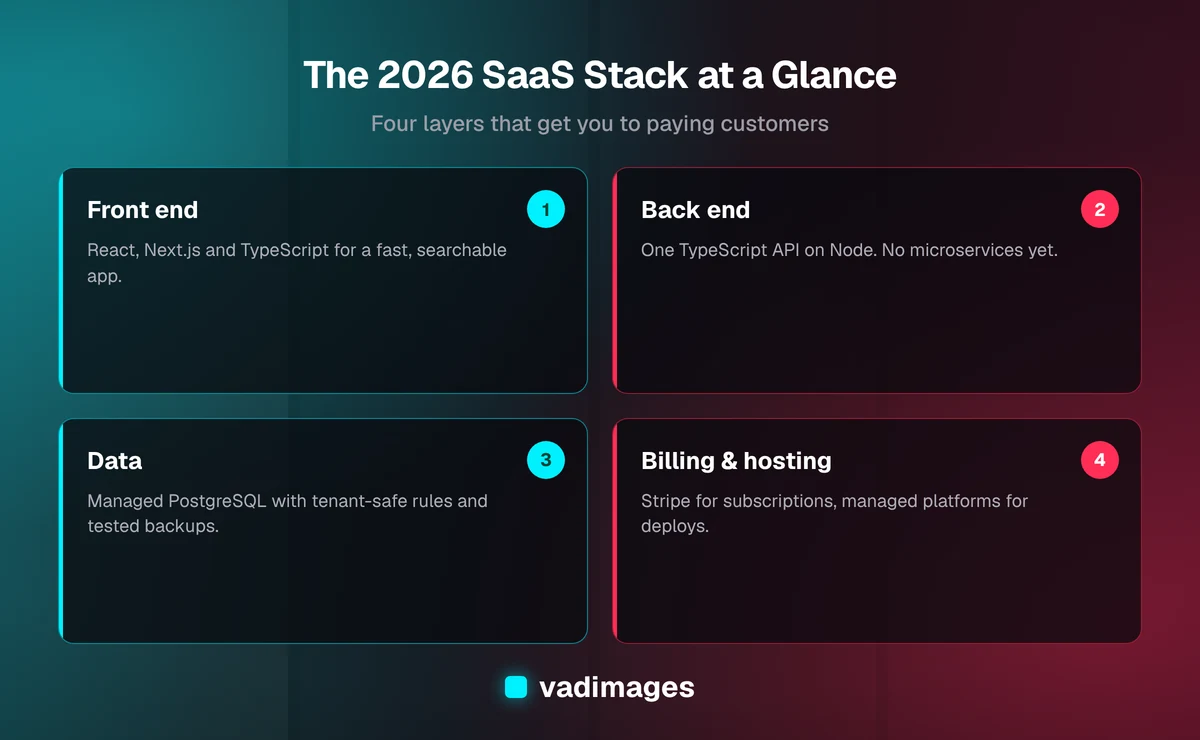
Diagram: the four layers at a glance
Here is how the pieces fit together, and what each layer is responsible for.
Authentication: buy it, do not build it
Login screens look simple and are surprisingly dangerous to build yourself. Password storage, session handling, multi-factor authentication, password resets and single sign-on for business customers are all places where small mistakes become security incidents. We recommend a dedicated authentication provider or a well-maintained open-source auth library, configured carefully, rather than hand-rolled code.
Two features matter early for business software: role-based permissions (who in a customer's team can see or change what) and single sign-on for larger accounts. Choose an approach that can grow into both, even if you launch with email and password only. Retrofitting permissions into a product that never planned for them is one of the most expensive rewrites we see.
Billing: Stripe, wired in properly
For taking money, we recommend Stripe Billing. It handles subscriptions, free trials, plan upgrades and downgrades, invoices, tax collection tools and failed-payment retries, all things that sound easy and are not. The key is how you connect it. Treat Stripe as the source of truth for payment status, listen for its webhooks, and make your handling of those events safe to repeat, so a duplicate message never double-charges or double-upgrades a customer.
Design your pricing model so it is easy to change. Plans, limits and prices will almost certainly change in your first year, and they should live in configuration, not scattered through the code.
Hosting and infrastructure: start simple
Most new SaaS products do not need a complicated cloud setup. We typically recommend a managed platform for the front end and a managed container or application host for the API, paired with managed Postgres. This gives you automatic deployments, preview environments for every change, TLS certificates, and easy rollbacks, without hiring someone to run servers.
- Environments: keep at least a staging copy that mirrors production, so you can test a change before customers see it.
- Infrastructure as code: even a small amount of scripted setup means you can rebuild your environment if something goes wrong.
- Backups you have actually restored: a backup you have never tested is a hope, not a plan. Practice a restore before you need one.
When your traffic, compliance needs or cost profile outgrow the managed platforms, you can move to larger cloud services. Because the application is a normal, portable codebase, that move is a project, not a rescue mission.
Email, files and background work
Three supporting pieces show up in almost every SaaS product. For transactional email such as receipts, invitations and password resets, use a dedicated email delivery service and set up proper sender authentication so your messages reach the inbox. For file uploads, store files in object storage and keep only references in your database. For background jobs like report generation, imports and scheduled reminders, use a job queue so slow work never makes a customer wait on a loading screen.
Observability: know before your customers tell you
You cannot fix what you cannot see. From the first release, include error tracking, structured logs, and a few uptime checks on your most important pages and API routes. Add basic product analytics so you can see which features people actually use. These tools are inexpensive, and they turn a vague "the app feels slow" email into a specific, fixable problem.
Alerts should be few and meaningful. A channel that fires all day trains everyone to ignore it, and then the one real alert gets missed.
Where AI fits in 2026
Many founders now ask whether their product needs AI features. Sometimes it does, but add it where it removes real work for your users: drafting, summarizing, classifying, searching your customers' own data. Keep the AI layer behind your own interface so you can switch model providers as prices and quality change. Be careful about what customer data you send to outside services, state it clearly in your privacy terms, and always give users a way to review and correct what the model produces. An AI feature that is occasionally wrong and unreviewable damages trust faster than having no feature at all.
What we leave out on purpose
Part of a good recommendation is what is missing. For a first release we usually skip a separate mobile app (a responsive web app covers most needs), Kubernetes, a microservice architecture, a custom-built admin framework, and exotic databases. Each of these can be the right answer later. None of them is the right answer before you have customers.
When to choose something different
This stack is a starting point, not a rule. If your team already knows Python or .NET deeply, building in what they know will beat adopting something new. If your product is heavy on real-time collaboration, data pipelines or hardware integration, some of these choices change. If you serve healthcare, finance or government customers, compliance requirements will shape hosting and data handling from day one. The right move is to make these decisions deliberately, with someone who has seen the trade-offs before.
What it costs to build
We believe in transparent pricing. A focused first version of a SaaS product, with accounts, billing, a core workflow and a clean admin area, is typically a project that starts at $5,000+, with the final figure depending on scope, integrations and compliance needs. Hosting and third-party services for an early-stage product are generally modest monthly costs that grow as you gain customers. You can see how we price and plan work on our pricing page and how an engagement runs on how we work.
Next steps
If you are weighing a SaaS idea, the most useful thing to do is to write down your first customer, the one job your product does for them, and the one way you will charge for it. Everything in the stack above exists to serve that sentence. Explore our custom software services, browse the solutions we build, look at the industries we work in, or read through our case studies to see how projects like this come together.
Want a second opinion on your stack before you commit budget? Contact us for a straightforward conversation about what to build first, what to leave for later, and what it will realistically cost.