
Most growing sales teams do not have a CRM problem. They have a conversation problem between their tools. Leads land in a web form, get copied into the CRM by hand, get re-typed into a quoting tool, and then show up again in accounting with a slightly different company name. Every handoff is a chance for a deal to stall, a follow-up to slip, or a number in the weekly report to be quietly wrong. CRM integration services exist to fix exactly that: to connect the systems your sales team already uses so that information moves on its own, lands in the right place once, and stays consistent everywhere it appears.
This is a practical guide for owners and operations leaders who suspect their sales stack is costing them more than it should. We will cover what a good integration actually does, how to tell whether you need one, the main ways to build it, the decisions that make or break the project, and what a realistic scope and budget look like. No vendor pitch for a particular CRM — the principles hold whether you run HubSpot, Salesforce, Pipedrive, Zoho, or something your team has customized for a decade.
What CRM integration services actually do
At its simplest, CRM integration means your customer relationship management system exchanges data automatically with the other tools that touch a customer: your website forms, email and calendar, phone system, quoting or proposal software, e-signature, invoicing and accounting, support desk, marketing platform, and often an operations or job-management system after the sale closes.
"Automatically" is the important word, but it is not the whole story. A useful integration does three things well:
- It moves the right data at the right moment. A new lead becomes a CRM contact within seconds, not at the end of the day when someone gets around to it. A deal marked "won" creates the customer record in accounting without a second round of typing.
- It keeps one version of the truth. When a phone number changes in one place, it does not silently diverge from the other four places that store it.
- It fails loudly, not quietly. When a sync breaks — and every sync eventually hits an edge case — someone finds out the same day instead of discovering three weeks later that forty leads went nowhere.
Tools that "talk" are tools that do all three. Plenty of businesses have connections that technically exist but fail the second and third tests, which is why the integration feels like it works until a customer calls to ask why nobody followed up.
Signs your sales tools are not talking
You rarely need an audit to know something is off. The symptoms show up in everyday work. If several of these sound familiar, an integration project is probably worth scoping:
- Sales reps keep their own spreadsheets because they do not trust what is in the CRM.
- Someone spends part of every week copying data between systems — form submissions into the CRM, closed deals into invoicing, contact updates into the email platform.
- The same customer exists three or four times with slightly different spellings, and nobody knows which record is current.
- Pipeline reports and revenue reports disagree, and the monthly meeting starts with an argument about whose numbers are right.
- Leads from certain channels — a partner referral form, a chat widget, a trade-show list — routinely fall through the cracks because they arrive somewhere the CRM does not look.
- Handing a won deal to the delivery or operations team involves an email, a phone call, and a re-keyed order.
Each of these has a cost that rarely shows up on a budget line: slower response to new leads, mistakes on quotes and invoices, and senior people spending hours reconciling data instead of selling or managing. The goal of integration is not technology for its own sake; it is getting those hours and those lost deals back.
Map the flow before you connect anything
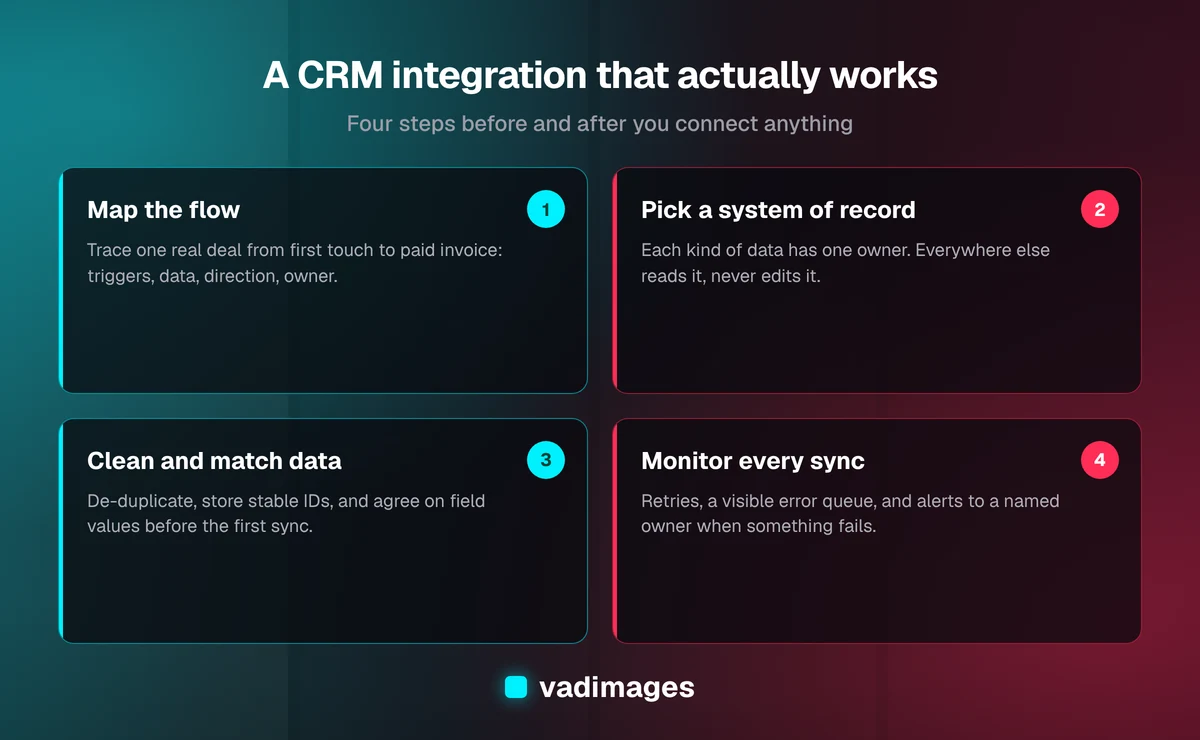
The single most common mistake we see is starting with the tools instead of the process. Someone installs a connector between the CRM and accounting, turns it on, and discovers that it creates duplicate customers, overwrites fields the finance team relies on, or syncs in a direction nobody expected. The fix is unglamorous: draw the flow first.
Take one real deal and trace it from first touch to paid invoice. Write down every system it passes through, every time a person enters or changes data, and every place the information is read later. Then answer four questions for each step:
- What triggers it? A form submission, a stage change, a signed contract, a payment.
- What data moves? Be specific — contact name and email, company, deal value, line items, owner, source.
- Which direction? One-way, or does a change downstream need to flow back?
- Who needs to know if it fails? A named person or role, not "the system."
This map usually fits on one page, and it becomes the specification for everything that follows. It also tends to reveal that two or three handoffs cause most of the pain, which keeps the first phase of work small and focused.
Choose a system of record for every kind of data
Once you know what moves where, decide which system owns each kind of information. This is the decision that separates integrations that stay clean from ones that slowly turn into a tangle of conflicting edits.
A typical split for a small or mid-sized business looks something like this:
- Contacts, companies, and deals are owned by the CRM. Other systems read from it.
- Products, prices, and line items are owned by the quoting tool or the accounting system, depending on who maintains the price list.
- Invoices, payments, and balances are owned by accounting. The CRM may display them, but it never edits them.
- Email consent and subscription status are owned by the marketing platform, because that is where unsubscribe requests land.
The rule that follows is simple: data flows out of its owner and is treated as read-only elsewhere. Two-way sync is sometimes genuinely needed, but it should be a deliberate exception with clear conflict rules — "most recent edit wins" or "the CRM always wins for these fields" — rather than the default. Most of the integration horror stories we are asked to untangle come from two systems both believing they own the same field.
Three ways to connect your tools
There is no single right way to build a CRM integration. The right choice depends on how many systems are involved, how unusual your process is, and how much it hurts when something goes wrong. Broadly, you have three options, and many businesses end up using more than one.
1. Native connectors. Most modern CRMs ship with built-in integrations for popular email, calendar, accounting, and marketing tools. They are quick to switch on and usually inexpensive. Their limits show up when your process does not match the connector's assumptions: fixed field mappings, limited control over when records are created, and little visibility into failures. Start here when your workflow is standard and the stakes of an occasional miss are low.
2. No-code automation platforms. Tools like Zapier and Make let you build "when this happens, do that" workflows between hundreds of apps without writing code. They are excellent for simple, linear flows and for proving out an idea quickly. As the number of steps, branches, and edge cases grows, they can become hard to see into, costs scale with volume, and logic ends up scattered across dozens of small automations that only one person understands.
3. Custom API integration. A small, purpose-built service talks directly to each system's API, applies your business rules, handles errors and retries, and logs every sync. It costs more to build, but it fits your process exactly, handles volume and complexity gracefully, and gives you one place to look when something needs to change. This is the right call when the integration is central to how you make money, when off-the-shelf connectors cannot express your rules, or when you are already maintaining a fragile web of automations. It is the kind of work we do in our custom software projects.
A sensible pattern is to use native connectors for the commodity links, and reserve custom work for the two or three flows that carry your revenue.
Clean data is half the project
Connecting systems that are full of duplicates and inconsistent fields does not fix the duplicates; it copies them everywhere faster. Before the first sync runs, plan for a data clean-up pass, and build the integration so it keeps the data clean afterward.
The practical work usually includes:
- De-duplication. Merge duplicate contacts and companies using sensible matching rules — email address first, then company domain, then name and phone as fallbacks.
- Stable IDs. Store each system's record ID on the matching record in the other systems. Matching on names is how integrations create duplicates; matching on IDs is how they avoid them.
- Field mapping. Agree on what each field means and what values are allowed. "Lead source" with forty free-text variations cannot drive a reliable report.
- Required fields and validation. Decide what must exist before a record moves downstream — for example, no invoice customer without a billing email.
This is also the stage where you decide what not to migrate. Ten-year-old dead leads and test records rarely deserve a place in a clean system.
Build for failure, not just for the happy path
Every integration works in the demo. The real test is what happens when an API is briefly down, a required field is blank, a rep pastes an emoji into a company name, or someone deletes a record that another system still references. Reliable integrations are designed around these moments.
- Retries with limits. Temporary failures should be retried automatically; permanent ones should stop and raise a flag instead of looping forever.
- A visible error queue. Failed syncs go somewhere a person can see them, understand why they failed, fix the data, and re-run them.
- Alerts to a named owner. A short daily summary, or an immediate notice for critical flows like new inbound leads.
- Logs you can read. When a salesperson asks "why did this deal not reach accounting," the answer should take minutes, not an afternoon.
- Respect for rate limits. Every major platform limits how many API calls you can make in a period. Bulk updates need to be paced so they do not lock you out mid-sync.
Security belongs on the same list. Use dedicated integration accounts with the narrowest permissions that do the job, store API keys and tokens securely rather than in a shared document, and make sure that when an employee leaves, the integrations do not stop because they were connected under that person's login.
What CRM integration services cost
Costs depend far more on the number of flows and the messiness of the data than on which CRM you use. A useful way to think about it:
- Configuration of native connectors and a few no-code automations is often a modest, short engagement — sometimes something your team can do in-house with a clear flow map.
- A focused custom integration covering one or two high-value flows — for example, website and phone leads into the CRM, and won deals into accounting — with clean-up, error handling, and monitoring typically starts around $5,000 and goes up with complexity.
- A broader sales-stack integration that connects several systems, includes a data migration, and adds custom dashboards or a lightweight internal portal sits higher, and is usually best delivered in phases.
Third-party subscriptions — your CRM tier, any automation platform, API add-ons — are separate and vary by vendor and plan, so check current pricing directly with each provider. Ongoing costs are worth budgeting too: APIs change, business rules evolve, and a small retainer for monitoring and adjustments is usually cheaper than an emergency fix. You can see how we structure fixed-scope and retainer work on our pricing page.
How a well-run integration project unfolds
Whoever provides your CRM integration services, a solid project follows a predictable shape. Ours runs like this:
- Discovery. We walk through real deals with your team, map the current flow, and list every system, field, and handoff. We also look at the data itself, because the clean-up effort is often the biggest unknown.
- Scoping and a milestone plan. We agree on systems of record, the flows in phase one, what is explicitly out of scope, and a fixed price or retainer structure tied to milestones.
- Build with weekly demos. You see each flow working against test data, then against a copy of real data, before anything touches production. Your team catches the "that is not how we actually do it" moments early, when they are cheap to change.
- Launch and support. We cut over in a planned window, watch the error queue closely for the first weeks, and hand over documentation that explains what syncs where and how to fix common issues.
You can read more about that rhythm in how we work, and see the kinds of systems we connect across different industries and in our case studies.
Getting your sales tools to actually talk
A good CRM integration is invisible on a normal day. Leads appear where they should, deals flow into invoices without re-typing, reports agree with each other, and when something does go wrong, the right person hears about it before a customer does. Getting there is less about picking the perfect connector and more about the groundwork: mapping the real process, deciding which system owns what, cleaning the data, and building for the days when things break.
If your team is spending hours shuttling data between systems, or you no longer trust the numbers coming out of your CRM, it is worth a conversation. Vadimages is a custom software studio in Vancouver, WA, working with businesses across Portland, SW Washington, and the rest of the US. We will look at your current stack, tell you honestly which pieces can be solved with off-the-shelf connectors and which need custom work, and give you a clear scope before anything is built. Explore our solutions, or get in touch to talk through your sales stack.