

Everyone agrees a fast website is better than a slow one. Far fewer people know what actually makes a site slow, which is why so many attempts to improve website speed end with a caching plugin, a slightly better score in a testing tool, and a site that still feels sluggish to the customers using it. Speed is not one setting you switch on. It is the result of dozens of decisions about images, code, hosting, third-party tools, and how the site was built in the first place.
This guide explains, in plain English, where website speed really comes from, how to measure it in a way that reflects your actual customers, and which fixes give you the most improvement for the least effort. It also covers the uncomfortable part: when a site is slow because of how it was built, and no amount of tuning will make it genuinely fast.
Why website speed is a business problem, not a technical one
It is easy to file page speed under "things the developer worries about." But the people who feel a slow site are your customers, and they rarely complain. They simply leave. A visitor on a phone, in a parking lot, with a weak signal does not wait patiently while a hero video and six tracking scripts load. They hit the back button and call the next business in the results.
Speed also affects how you are found. Google uses page experience signals, including its Core Web Vitals, as part of how it evaluates pages, and a faster site is easier and cheaper for search engines and AI crawlers to read in full. And speed affects how your business is perceived: a site that responds instantly feels competent and trustworthy, while one that stutters and jumps around feels neglected, even if the work you do is excellent. When you think about speed as a revenue and reputation issue, it becomes much easier to justify spending real effort on it.
How to measure speed the right way
Before fixing anything, get an honest baseline. The most useful framework is Google's Core Web Vitals, three measurements that describe what a visitor actually experiences:
- Largest Contentful Paint (LCP) measures how quickly the main content of a page appears. Google considers about 2.5 seconds or less to be good.
- Interaction to Next Paint (INP) measures how quickly the page responds when someone taps or clicks. Around 200 milliseconds or less is considered good.
- Cumulative Layout Shift (CLS) measures how much the page jumps around while loading. A score of about 0.1 or less is considered good.
There are two kinds of data to look at. Lab data, from a tool like PageSpeed Insights or Lighthouse, simulates a page load under controlled conditions and is great for diagnosing specific problems. Field data, shown in Google Search Console's Core Web Vitals report and at the top of PageSpeed Insights when enough traffic exists, reflects what real visitors experienced on real devices. Field data is what matters most, because it is what your customers live with. A perfect lab score on your office computer means little if real phone users are waiting.
Test your most important pages, not just the homepage: your top service pages, your contact or booking page, and any landing pages you pay to send traffic to. And always test on mobile, because that is where slow sites hurt the most.
Images and media: the usual first culprit
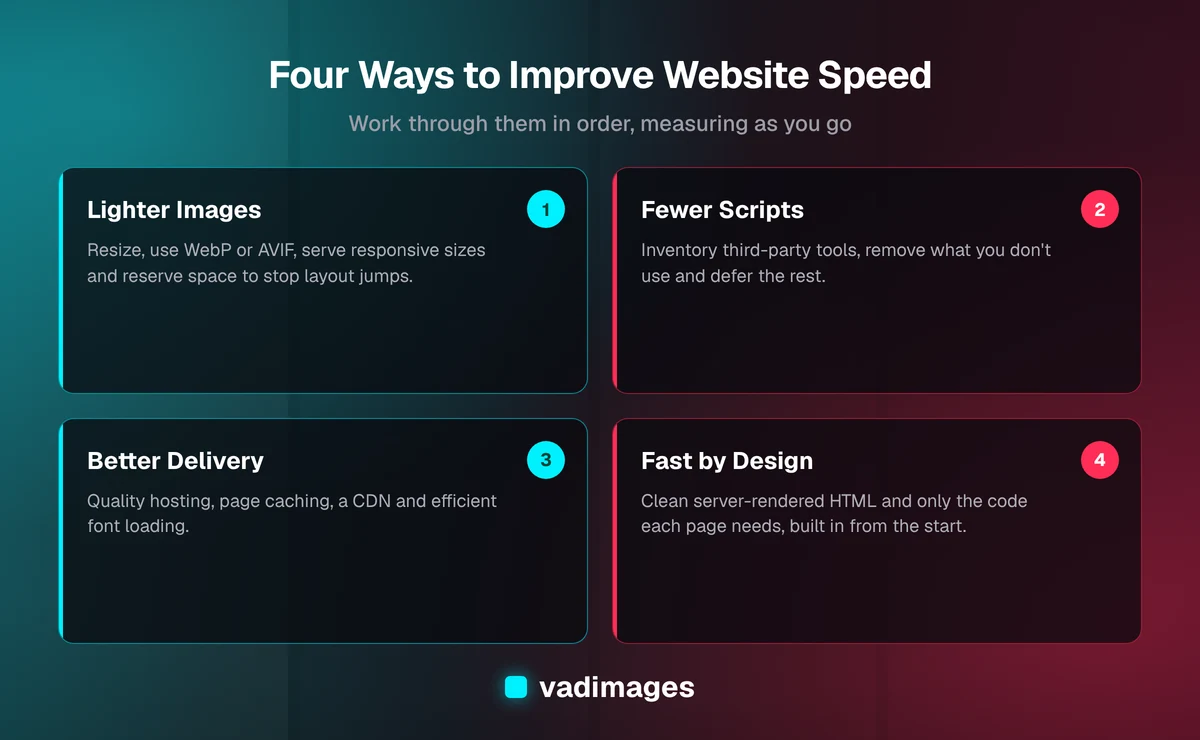
On most small-business sites, images are the single biggest source of wasted weight. A photo uploaded straight from a modern phone or camera can be many times larger than it needs to be for a web page, and it is common to find a homepage loading several of them at full size. The good news is that image problems are usually the easiest to fix.
- Resize images to the largest size they will actually display, rather than uploading originals and letting the browser shrink them.
- Use modern formats such as WebP or AVIF, which typically deliver the same visual quality at a fraction of the file size of older formats.
- Serve responsive images, so phones receive smaller versions than large desktop screens.
- Lazy-load images further down the page so they only load as the visitor scrolls, but do not lazy-load the main image at the top, since that delays your LCP.
- Set width and height on images and embeds so the browser reserves space for them, which prevents the page from jumping around.
- Think twice about autoplaying background videos and heavy sliders. They are often the slowest element on the page and rarely the reason anyone buys.
JavaScript and third-party scripts
If images are the most common cause of slow loading, JavaScript is the most common cause of a site that loads but then feels sluggish when you try to use it. Every script the browser has to download, read, and run competes for the same limited processing power, and on an average phone that power runs out quickly. This is what drags down your INP score.
Much of that JavaScript is not even yours. Chat widgets, analytics tools, ad pixels, heatmaps, review badges, social embeds, A/B testing tools, and cookie banners each add their own code, and they accumulate over the years as different people try different tools. A practical clean-up looks like this:
- Make an inventory of every third-party script on the site and who asked for it. You will often find tools nobody uses anymore.
- Remove what you do not need, and consolidate overlapping tools where possible.
- Defer or delay non-essential scripts so they load after the main content, or only when a visitor interacts, for example loading a chat widget when someone clicks the chat button.
- On builder-based sites, audit plugins and add-ons, since each one may load its own scripts and styles on every page, even where they are not used.
This step often produces the most noticeable improvement in how a site feels, and it costs nothing in new tools. It does require someone with the authority to say no to the next "just one more script" request.
Hosting, caching and delivery
Even a lean page will feel slow if the server behind it takes a long time to respond. Bargain shared hosting, an overloaded database, or a server located far from your customers can add delay before the browser receives anything at all. A few infrastructure basics make a large difference:
- Quality hosting matched to your traffic and platform. The cheapest plan is often a false economy for a site that generates revenue.
- Page caching, so the server sends a ready-made page instead of rebuilding it from the database on every visit.
- A content delivery network (CDN), which stores copies of your files on servers around the country so visitors download them from somewhere nearby.
- Compression and modern protocols, which most good hosts and CDNs handle automatically when configured properly.
- Efficient fonts: limit the number of font families and weights, and load them in a way that does not block text from appearing.
These changes are mostly configuration rather than code, which makes them a good second step after images and scripts. They do have limits: caching makes a heavy page arrive faster, but it does not make it any lighter once it arrives.
When the problem is the build itself
Sometimes a team does everything above and the site is still slow. That usually means the problem lives in how the site was built. Common patterns include page builders that wrap every element in layers of extra code, themes that load every feature on every page, sites that rely on heavy JavaScript just to display basic text, and years of stacked plugins that each solve one problem while adding weight everywhere.
In those cases, optimization tools are treating symptoms. You can squeeze out some improvement, but you are fighting the platform rather than working with it, and the gains tend to erode with the next update. A site that is fast by design takes a different approach from the start: pages are rendered as clean HTML on the server or generated ahead of time, only the code a page actually needs is sent to the browser, images are processed automatically, and performance budgets are checked before changes go live. That is how we approach the business websites and custom applications we build at Vadimages, because retrofitting speed onto a slow foundation is almost always more expensive than building it in.
A practical order of operations
If you want to improve website speed without wasting effort, work through it in this order:
- Measure your key pages on mobile using field data from Search Console and PageSpeed Insights, and note which Core Web Vital is failing.
- Fix images: resize, convert to modern formats, and stop lazy-loading the main image.
- Cut scripts: remove unused third-party tools and defer the rest.
- Tune delivery: hosting, caching, CDN, and fonts.
- Re-measure after a few weeks, since field data takes time to reflect changes.
- Decide whether the remaining gap is worth a deeper refactor or rebuild.
Then keep it fast. Speed tends to decay as new content, tools, and features pile up, so add a quick performance check to your regular maintenance routine and review any new script or plugin before it goes live.
What it costs to make a site genuinely fast
The cost depends almost entirely on where the slowness comes from. Image clean-up, script pruning, and better hosting configuration are relatively contained tasks that can often be handled as part of routine maintenance. A structural fix, such as rebuilding key templates, moving off a heavy page builder, or replatforming the site, is a defined project. At Vadimages, projects start at $5,000 and are scoped up front, either as a fixed-scope build or as part of an ongoing retainer, so you know what you are paying for before work begins. Our pricing page explains how that works, and our case studies show the kinds of builds we take on.
Whatever route you take, insist on before-and-after measurements using the same pages and the same tools. "It feels faster" is a good sign, but field data in Search Console is how you know the improvement is reaching your real customers.
Getting help with a slow website
If your site is slow and you are not sure why, the most valuable first step is a clear diagnosis: which pages, which metrics, and which causes, ranked by how much they are costing you. From there, the decision between quick fixes and a deeper rebuild becomes straightforward. Our process starts with exactly that kind of discovery, then moves to a scoped milestone plan, a build with weekly demos, and support after launch. You can read more about how we work or see the solutions we build for businesses in Portland, Southwest Washington, and across the US. If you want a straight answer about what is slowing your website down, get in touch and we will take a look.