
Almost every business owner has now tried a general-purpose AI chatbot. Most come away with the same mixed feeling: it is impressive, it writes a decent email, and it has no idea how your business actually works. It does not know your pricing rules, your service area, your return policy, or the status of the order a customer is asking about. A custom AI assistant closes that gap. It is an assistant built around your own documents, your own systems, and your own rules, so that it can answer the questions your team and your customers really ask — and, where it makes sense, take care of the routine work behind them.
This guide explains, in plain English, what a custom AI assistant is, where it pays off for a small or mid-sized business, how one is put together, what the real risks are, and how to scope a first version without overspending. The goal is not to sell you on AI. It is to help you decide whether a custom assistant would earn its keep in your business, and what a sensible first step looks like.
What a custom AI assistant actually is
A custom AI assistant is software that uses a large language model — the same kind of technology behind the well-known chat tools — but wraps it in three things a public chatbot does not have. First, your knowledge: product sheets, policies, procedures, past tickets, and anything else the assistant should be able to draw on. Second, your systems: connections to the tools where your real data lives, such as your CRM, scheduling software, inventory, or order database. Third, your rules: what it is allowed to say, what it must never do, when it should hand the conversation to a person, and who is allowed to ask it what.
The difference shows up quickly in practice. Ask a general chatbot "Can I reschedule my Thursday install?" and it can only offer generic advice. Ask a custom assistant the same question and it can look up the appointment, check your scheduling rules and open slots, offer real options, and either book the change or route it to your office with the details already filled in. One is a clever conversationalist. The other is a member of your operation that happens to be made of software.
Where a custom AI assistant earns its keep
The best candidates are jobs that are repetitive, text-heavy, and rule-bound — work where your people spend hours answering the same questions or hunting for the same information. Common examples we see in small and mid-sized businesses include:
- Customer questions after hours. Order status, appointment changes, service-area and availability questions, warranty and return policy — answered from your real data, with a clean hand-off to staff when something needs a human.
- An internal knowledge assistant. New hires and field staff ask "how do we handle X?" and get an answer drawn from your own manuals and procedures, with a link to the source document, instead of interrupting a senior colleague.
- Quote and intake preparation. The assistant gathers project details from a customer conversation or a form, checks them against your pricing rules, and drafts a quote or job ticket for a person to review and send.
- Document drafting and summarizing. Turning call notes into follow-up emails, summarizing long email threads, or drafting proposals and reports from a template and the facts in your system.
- Sales and account support. Pulling a customer's history from the CRM before a call, suggesting next steps, and logging the outcome afterwards so the record stays current.
Notice what these have in common: the assistant is not replacing judgment. It is removing the lookup, the retyping, and the first draft, so that people spend their time on decisions and relationships. That is where a custom assistant pays for itself most reliably. If you want to see how this kind of work fits alongside other automation, our solutions overview walks through the patterns we build most often.
How a custom AI assistant works under the hood
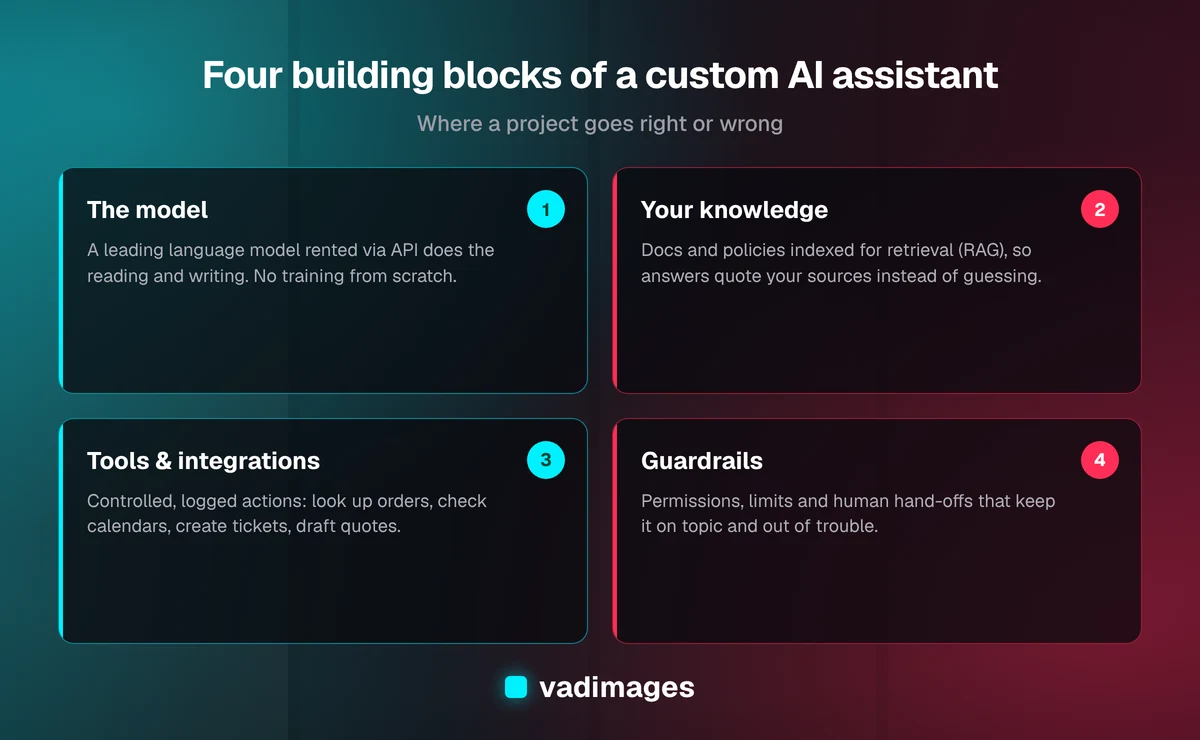
You do not need to be technical to make good decisions here, but it helps to know the four building blocks, because each one is a place where a project can go right or wrong.
- The model. The language model does the reading and writing. Businesses usually rent access to a leading commercial model through an API rather than training their own. Training a model from scratch is almost never necessary for a small business, and fine-tuning is the exception rather than the rule.
- The knowledge layer. Your documents are split into passages and indexed so the assistant can retrieve the most relevant ones for each question and answer from them. This approach is usually called retrieval-augmented generation, or RAG. It is what lets the assistant quote your actual policy instead of guessing, and it means updating the assistant is as simple as updating the document.
- Tools and integrations. These are the controlled actions the assistant can take: look up an order, check a calendar, create a ticket, draft an invoice. Each tool is a small piece of conventional software with clear inputs, permissions, and logging. This is where most of the real engineering effort goes.
- Guardrails. Instructions, permission checks, and limits that keep the assistant on topic, stop it from taking actions it should not, and route edge cases to people. Good guardrails are the difference between a helpful assistant and an embarrassing one.
Around those four blocks sit the ordinary parts of any business application: a chat window on your website or inside your internal tools, user accounts and access control, logs of every conversation, and an admin screen where your team can review answers and update content. A custom AI assistant is, in the end, custom software with a language model at its center — and it should be built with the same care.
Off-the-shelf or custom: when building makes sense
Before building anything, it is worth checking what you can buy. Many software products you may already use — help desks, CRMs, website builders, office suites — now include AI features, and several vendors sell configurable chatbots you can point at your website and FAQ. For simple needs these are often the right answer: fast to set up, low monthly cost, and good enough.
A custom AI assistant starts to make sense when one or more of these are true:
- The answers depend on live data spread across several systems that no single vendor's bot can reach.
- You need it to take actions, not just answer questions — booking, updating records, creating tickets — with your own approval rules.
- Your rules are specific: pricing logic, compliance language, service boundaries, or escalation paths that a generic tool cannot express.
- You care where the data goes and want control over storage, retention, and which model provider processes it.
- The assistant is part of your product or customer experience, so it needs to look, feel, and behave like your brand rather than someone else's widget.
A useful middle path is to start with an off-the-shelf tool to learn what people actually ask, then build custom once the questions and the value are clear. That is often cheaper overall than guessing at requirements up front.
Data, privacy, and security
An assistant is only as trustworthy as the way it handles information. Three questions deserve clear answers before anything goes live. What data can it see? The assistant should only be able to retrieve documents and records the person asking is allowed to see. A front-desk employee and an owner should get different answers to "what did we pay this supplier last year?" Where does the data go? Know which model provider processes your requests, what their business terms say about data retention and use for training, and whether that fits your obligations to customers. What can it do? Every action the assistant can take should be deliberately granted, logged, and — for anything that moves money, changes a customer record, or sends a message on your behalf — ideally reviewed by a person until you trust it.
If you work in a regulated field such as healthcare, finance, or legal services, involve whoever owns compliance early. The technology can usually be set up to respect your obligations, but only if those obligations shape the design rather than being checked at the end. Our industries page covers the sectors we work with most and the constraints that typically come with them.
Keeping the assistant accurate and honest
Language models can produce confident answers that are simply wrong. You cannot eliminate that risk entirely, but you can manage it well enough for real business use. The practical techniques are not exotic:
- Ground answers in your sources. Instruct the assistant to answer only from retrieved documents and data, and to say "I don't know — let me connect you with someone" when the answer is not there.
- Show where answers came from. Linking to the source document builds trust with users and makes mistakes easy to spot and fix.
- Test with real questions. Before launch, assemble a set of genuine questions with known correct answers and check the assistant against them. Rerun the same set whenever you change prompts, documents, or the model.
- Review conversations. Especially in the first weeks, have someone read a sample of conversations, flag poor answers, and fix the underlying document or rule.
- Keep humans on the hook for high-stakes outputs. Quotes, refunds, legal or medical language, and anything irreversible should be drafted by the assistant and approved by a person.
Treat accuracy as an ongoing operating task, not a launch checkbox. Your policies change, your products change, and the models themselves are updated. A small amount of regular review keeps the assistant aligned with how your business actually works.
What a custom AI assistant costs
Cost has two parts: building it and running it. The build cost depends mostly on how many systems the assistant connects to and how many actions it can take, not on the AI itself. A focused first version — one audience, one well-organized knowledge base, a small number of read-only lookups — sits at the lower end of a custom project. An assistant that writes to several systems, enforces role-based permissions, and handles approvals is a larger piece of software and is priced accordingly. At Vadimages, projects start at $5,000 and are scoped either as a fixed-scope build or an ongoing retainer; our pricing page explains how we arrive at a number.
Running costs include usage fees from the model provider, which scale with how much the assistant is used and how long the conversations and documents are, plus ordinary hosting and a modest amount of maintenance time for content updates and review. For most small-business use cases these are manageable, but they are real, so model them before launch with your expected volume. The comparison that matters is not "AI versus free" but the assistant's total cost against the staff hours it frees up and the customers it serves faster.
How we build a custom AI assistant
We follow the same process for an AI assistant as for any custom software, because the risks are the same: building the wrong thing, or building the right thing badly.
- Discovery. We look at the questions and tasks the assistant would handle, who would use it, where the data lives, and what "good" looks like. Often this reveals that the knowledge base needs tidying before any AI is involved.
- Scoping and a milestone plan. We agree on a deliberately narrow first version, the systems it connects to, the guardrails, and how we will measure success — for example, the share of questions answered without hand-off, or time saved per week on a specific task.
- Build with weekly demos. You see the assistant answering your real questions from the first weeks, so you can correct tone, rules, and gaps early rather than at the end.
- Launch and support. We launch to a limited group first, review conversations, tune, and then widen access. After launch we keep monitoring quality and updating content as your business changes.
You can read more about how this works week to week on our how we work page, and see examples of the kinds of systems we build in our case studies.
A sensible first step
The businesses that get the most from a custom AI assistant start small and specific. Pick one audience — customers or staff, not both. Pick one job — answering policy questions, preparing quotes, or checking order status. Gather the documents and data that job depends on, and write down the ten or twenty questions people ask most. That short list is the best possible starting brief, and it will tell you quickly whether an off-the-shelf tool is enough or whether a custom build is worth it.
If you would like a second opinion on where an assistant could save your team time — and an honest answer if the simpler option is the better one — contact Vadimages. We are based in Vancouver, WA, work with businesses across Portland, Southwest Washington, and the rest of the US, and we will help you scope a first version that proves its value before you invest further.