
Every business that has run on the same software for a few years eventually hits the same wall. The system that once fit perfectly now fights you: changes take weeks, the person who understood it has moved on, it does not talk to your newer tools, and everyone has a spreadsheet on the side to work around it. At that point the conversation turns to three options — fix it, rebuild it, or swap it out — and the debate over refactor vs rebuild vs replace begins. It is one of the most expensive decisions an operations leader makes, and it is usually made on gut feel.
This guide gives you a better way to decide. We will define each path in plain English, walk through the signals that point toward one or another, cover the costs and risks people tend to underestimate, and finish with a simple decision framework you can use in a leadership meeting. There is no universally right answer to refactor vs rebuild vs replace — but there is almost always a right answer for your system, and it can be found with a few honest questions.
Refactor, rebuild, replace: what each option really means
The three words get used loosely, so it is worth pinning them down before comparing them.
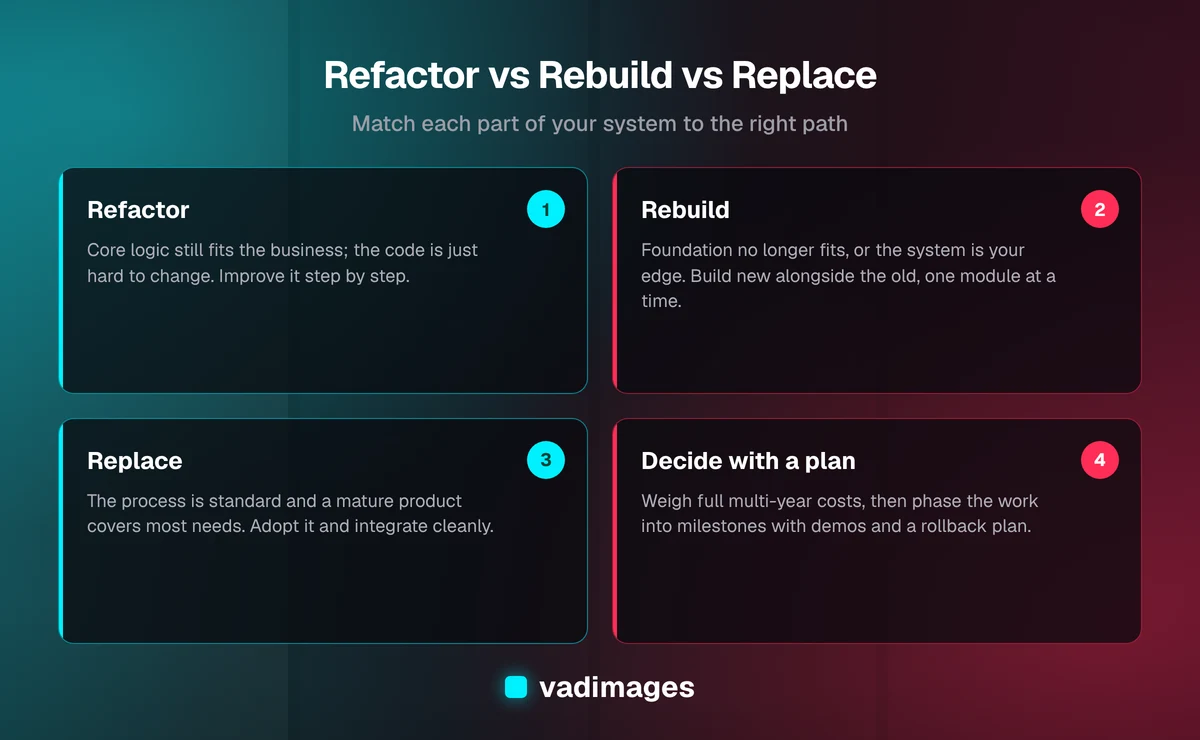
- Refactor means improving the existing system's internal structure without changing what it does for users. You clean up tangled code, upgrade outdated frameworks and dependencies, add tests, improve performance, and make the system safer to change. The software your team uses stays recognizably the same.
- Rebuild means writing a new version of the system — typically on a modern stack — that does the job your current one does, usually better and often with improvements you could never retrofit. It stays custom and fits your processes, but the codebase is new.
- Replace means retiring the custom system and adopting an off-the-shelf product, usually a SaaS platform, then configuring it and integrating it with the rest of your tools. You trade ownership and fit for speed and a vendor's ongoing development.
In practice these blur together. A good modernization plan often mixes them: replace the commodity parts, rebuild the part that differentiates you, and refactor what is still sound. Keeping the definitions sharp is what lets you mix them deliberately rather than by accident.
When refactoring is the right call
Refactoring is the least disruptive option and, when the conditions are right, the best value. It makes sense when the system's core logic is still correct and still matches how your business works — the problem is the condition of the code, not its purpose. Signals that point toward refactoring include:
- Users are broadly happy with what the system does; the complaints are about speed, bugs, or how long changes take.
- The technology is dated but still supported, or can be upgraded in steps rather than all at once.
- The data model — how your customers, orders, jobs, or records are structured — still reflects reality.
- The pain is concentrated in specific modules rather than spread evenly across the whole system.
The great strength of refactoring is that it can happen incrementally while the business keeps running. You can prioritize the parts that hurt most, deliver improvements every few weeks, and stop at any point with a better system than you started with. The risk is the opposite of a big-bang project: refactoring can drift on for years without anyone deciding whether it is still worth it. Give it clear goals and checkpoints.
When a rebuild makes more sense
A rebuild becomes the better option when the system's foundations — not just its surface — no longer fit. Patching a building with a cracked foundation only delays the inevitable. Common signals include:
- The platform or language is end-of-life, unsupported, or a growing security concern, and upgrading in place is effectively a rewrite anyway.
- The way your business works has changed so much that the system's data model and workflows are fundamentally wrong for you now.
- Every change breaks something else, there are no tests, and the team is afraid to touch it.
- You need capabilities the architecture simply cannot support, such as a customer portal, mobile access, real-time integrations, or multi-location operations.
- The system is genuinely a competitive advantage — the way you quote, schedule, price, or serve customers is part of why you win — so an off-the-shelf tool would flatten what makes you different.
Rebuilds have a reputation for running long and over budget, and the reputation is earned when they are done as one giant leap. The safer approach is incremental: build the new system alongside the old one, move one workflow or module at a time, and retire the old pieces as the new ones prove themselves. That pattern — sometimes called the "strangler" approach — keeps the business running and keeps the risk in small, visible slices.
When replacing with off-the-shelf software wins
Sometimes the honest answer is that you should not own this software at all. If the job the system does is common to most businesses — general accounting, payroll, standard CRM, basic e-commerce, email marketing — a mature SaaS product has years of development and thousands of customers behind it. Replacing makes sense when:
- Your process is standard, or you are willing to adopt the industry-standard way of doing it.
- A well-established product already covers most of what you need without heavy customization.
- The custom system does not differentiate you; it just keeps the lights on.
- You would rather pay a subscription than maintain software and the people who understand it.
Replacement has its own hidden costs. You inherit the vendor's roadmap, pricing changes, and limits. You still need data migration, integrations, and training, and your team will need to adapt to the product's workflows rather than the other way around. And if you end up bending a SaaS tool with heavy customizations and workarounds, you can recreate the legacy problem you were trying to escape. We cover that trade-off in more depth in our guidance on custom software versus off-the-shelf tools.
The costs people underestimate in refactor vs rebuild vs replace
Most bad modernization decisions come from comparing only the obvious cost — the project price or the subscription fee — and missing the rest. Whichever path you are leaning toward, put these on the table:
- Data migration. Years of records, often messy and inconsistent, must be cleaned, mapped, and moved. This is frequently the hardest part of a rebuild or replacement.
- Integrations. The old system likely feeds or is fed by other tools — accounting, inventory, shipping, reporting. Each connection needs to be rebuilt or rewired.
- Hidden business rules. Legacy systems encode years of decisions nobody wrote down: special pricing for one customer type, a quirk in how jobs are numbered. A new system must capture these or someone will notice, painfully, after launch.
- Change management. Training, adjusted procedures, and a period of reduced productivity while people adapt.
- Running two systems. During any transition you will pay to operate the old and the new in parallel for a while.
- The cost of doing nothing. Staff time lost to workarounds, missed opportunities, security exposure, and the risk that one key person leaving makes the system unmaintainable. This cost is real even though it never shows up on an invoice.
Comparing options honestly means comparing the full cost of each path over several years, not just the up-front number.
A practical decision framework
When we help a business work through refactor vs rebuild vs replace, we use a handful of questions. Answer them as a team, honestly, and the right path usually becomes obvious.
- Does this system make us different? If it embodies how you win customers, lean toward keeping it custom — refactor or rebuild. If it is commodity, lean toward replace.
- Is the core logic still right? If yes, refactoring is likely enough. If the data model and workflows no longer match the business, you are looking at a rebuild or replacement.
- Is the platform still viable? Supported, secure, and hireable-for technology favors refactoring. End-of-life technology pushes toward rebuild or replace.
- Does a mature product already do 80% or more of what we need, without heavy customization? If so, replacement deserves serious consideration.
- How much disruption can the business absorb right now? Low tolerance favors incremental refactoring or a phased rebuild over a single cutover.
- What does the full multi-year cost look like for each option, including migration, integrations, parallel running, and the cost of the status quo?
Many businesses end up with a hybrid: replace the commodity functions with proven SaaS tools, rebuild the differentiating core as custom software, and integrate everything cleanly. That combination often delivers the best of both — and it is far easier to plan when each part of the system is assessed on its own merits.
How to de-risk whichever path you choose
The failure stories in modernization almost always share a pattern: a large scope, a long silence, and a big-bang launch. You can avoid most of that with a few habits.
- Start with discovery, not code. Map the workflows, data, integrations, and unwritten rules before choosing a path. A short, focused discovery phase is cheap insurance against an expensive wrong turn.
- Break the work into milestones. Each milestone should deliver something usable and testable, with a clear budget, so you can adjust course between them.
- Insist on regular demos. Seeing working software every week surfaces misunderstandings while they are still cheap to fix.
- Migrate data early and rehearse it. Do trial migrations long before launch so surprises appear in testing, not on cutover day.
- Plan the cutover and the rollback. Know exactly how you will switch, how you will verify success, and how you would back out if something goes wrong.
This is the same shape as our own process: Discovery, then a scoped milestone plan, then a build with weekly demos, then launch and ongoing support.
What a typical engagement looks like
To make this concrete, here is an illustrative, composite example of the kind of situation we see often — not a specific client. A service business runs its quoting, scheduling, and invoicing on an internal tool built years ago by a contractor who is no longer around. It works, mostly, but every change is slow, it does not connect to the accounting system, and the office team re-keys data daily.
Discovery shows that invoicing is entirely standard, so it moves to an established accounting product. Quoting and scheduling, however, encode the way this business prices and dispatches work — the part customers value — so they are rebuilt as modern custom software, one workflow at a time, with the old tool retiring piece by piece. A couple of reports that still work fine are simply refactored and kept. Nobody had to choose one option for the whole system; each part got the treatment it deserved. You can see examples of how we approach work like this in our case studies.
Making the call — and getting a second opinion
The refactor vs rebuild vs replace decision deserves more than a hunch, but it does not need a months-long study either. Most businesses can reach a confident answer with a focused assessment of their system, their processes, and their goals. If you are unsure, the most valuable thing you can get is an outside view from someone who has no stake in selling you one particular option.
Vadimages is a custom software studio in Vancouver, WA, helping businesses across the Portland area and the US modernize legacy systems — whether that means refactoring, rebuilding, replacing, or a mix. Our projects start at $5,000+, scoped as fixed milestones or an ongoing retainer, and you can see how that works on our pricing page and explore the kinds of solutions we build. If your current system is holding you back and you want an honest recommendation, get in touch and we will help you work out the right path.