
A note before we start: this is a representative, composite case study. It combines patterns we see again and again in sales-integration work into one illustrative engagement. The business, the people, and the details are anonymized and simplified; there are no real client names here, and we deliberately avoid quoting measured results as if they came from a single project.
When people search for a CRM integration case study, they usually want to know what the work actually looks like from the inside: where the problems were hiding, what decisions mattered, what went wrong along the way, and what changed once the dust settled. Feature lists and before-and-after screenshots do not answer those questions. A story does. So this CRM integration case study walks through a typical project, told start to finish — a growing service business whose sales tools each worked fine on their own, and together created a weekly mess.
The starting point: five tools, no single truth
Picture a regional commercial services company with a small sales team, an office manager who doubles as the operations lead, and an owner who still signs off on larger quotes. Over several years they had assembled a sensible-looking stack, one tool at a time:
- A popular CRM, adopted a few years earlier and used unevenly — some reps lived in it, others updated it on Friday afternoons.
- A website form and live chat that emailed new inquiries to a shared inbox.
- A quoting tool that held the price list and produced polished proposals.
- An e-signature service for contracts.
- A cloud accounting system for invoicing and payments, owned by an outside bookkeeper.
Every tool was reasonable. None of them talked to the others in any meaningful way. A lead arrived by email, someone typed it into the CRM (or did not), the rep re-typed the contact into the quoting tool, the signed proposal was downloaded and emailed to the office manager, and she created the customer and the first invoice in accounting by hand. Somewhere in there, the same company became three slightly different records, and the owner's question — "what did we actually close this month?" — produced a different answer depending on who he asked.
What discovery turned up
Our engagements start with discovery, and the most useful part is always the least technical: we sit with the people who do the work and follow real deals through the system. In a project like this, a few findings tend to surface quickly.
The leak was at the very top of the funnel. Inquiries that arrived after hours or while the shared inbox owner was out sometimes sat for days. Nobody was careless; there was simply no system making sure every inquiry became a tracked record with an owner.
The handoff from "won" to "invoiced" depended on one person's memory. The office manager was the integration. When she was on vacation, signed deals waited.
Nobody agreed which system was right. Reps edited prices in the quoting tool, the bookkeeper corrected customer names in accounting, and the CRM held a third version. Each team was confident its own system was accurate — and each was, for the fields it cared about.
Previous automation attempts had made things worse. A handful of no-code automations had been set up over time by different people. Some still ran, some had silently stopped, and one was creating a new CRM contact for every chat message, which explained a good share of the duplicates.
None of this is unusual. In our experience, the technical side of a CRM integration is rarely the hardest part; agreeing on how the business actually wants information to flow is.
The plan: ownership first, then connections
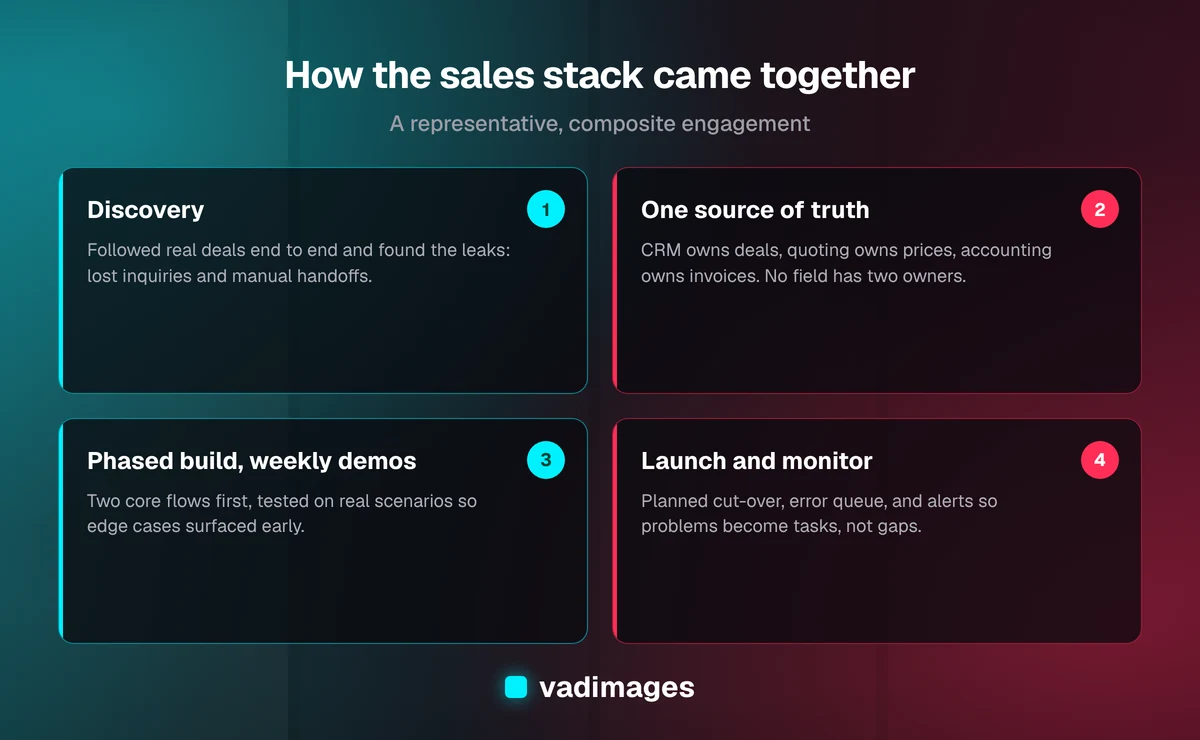
Instead of proposing "integrate everything," we scoped a first phase around the two handoffs causing the most pain, and wrote down a clear rule for which system owns which data. That rule became the backbone of the whole project.
- The CRM owns contacts, companies, deals, and deal stages. Every other tool reads from it.
- The quoting tool owns products, prices, and proposal line items.
- Accounting owns invoices, payments, and balances. The CRM can show them; it never changes them.
Phase one covered two flows. First, every inquiry from the website form and chat would create or update a CRM contact and deal automatically, assign an owner by simple rules, and alert that owner right away. Second, when a proposal was signed, the deal would move to "won" in the CRM, and a matching customer and draft invoice would be created in accounting for the bookkeeper to review and send. Reporting dashboards and a phone-system connection were explicitly parked for a later phase.
We also made a deliberate choice about how to build it. Native connectors existed for a couple of these links, but they could not express the business's rules — such as only creating the accounting customer once a contract was signed, or matching companies by their domain rather than their name. The old no-code automations were retired. In their place we built a small, custom integration service that talked to each tool's API, applied the agreed rules in one place, and logged every action. It is the kind of focused custom software that suits a flow sitting directly on the path to revenue.
Cleaning the data before connecting it
Connecting messy systems only spreads the mess faster, so the first real work was clean-up. We exported contacts and companies from all three systems, matched them — email address first, then company web domain, then name and phone as a fallback — and produced a merge list for the team to review rather than merging blindly.
Review mattered. In a project like this, the matching rules catch most duplicates, but a few judgment calls always remain: two branches of the same company that should stay separate, a contact who changed employers, a long-dormant account that should be archived instead of merged. The office manager and the most senior rep worked through those over a couple of sessions. Once the merge was done, every surviving record received the matching IDs from the other systems, so future syncs would link by ID rather than by guessing at names.
We also tightened a few fields. "Lead source" became a short pick-list instead of free text, and a deal could not be marked "won" without a billing contact email — a small rule that removes an entire category of invoicing headaches.
Building it with weekly demos
The build ran in short cycles, with a demo every week. Each demo used the team's real scenarios against test accounts: an after-hours web inquiry, a chat from an existing customer, a proposal signed with a revised price, a deal that was won and then partially cancelled.
The demos earned their keep. In one session, a rep pointed out that repeat customers often reached out by chat with a new request, and the first version was attaching those to the old, closed deal instead of opening a new one. In another, the bookkeeper explained that certain customers were billed under a parent company, which meant the "won deal creates customer" logic needed a way to point to an existing parent account. Neither detail was in anyone's head during discovery. Both were cheap to fix in week three and would have been painful to discover after launch.
Alongside the flows themselves, we built the unglamorous parts that keep an integration trustworthy:
- Automatic retries for temporary errors, with a limit, so a brief outage at one vendor would not lose data.
- A simple error queue showing any sync that could not complete, why, and a button to re-run it after the data was fixed.
- A daily summary to the office manager and an instant alert for any new inquiry that failed to reach the CRM.
- A dedicated integration user in each system, with only the permissions it needed, so the connections did not depend on any one employee's login.
Launch and the first few weeks
Cut-over happened in a planned window at the start of a week, after the final clean-up pass. For a short period the old manual steps continued in parallel, so the team could compare what the integration did against what they would have done by hand.
As with any launch, a few things surfaced that testing had not. A handful of older proposals signed just before launch needed to be pushed through manually. A rarely used product in the quoting tool had a tax setting that the accounting system rejected, which showed up in the error queue on day two and was fixed the same afternoon. That is exactly what the error queue is for: problems became visible tasks instead of invisible gaps.
We kept close watch through the first weeks, then moved to a light support arrangement for adjustments as the business changed.
What changed for the sales team
Because this is a composite, we will describe the outcomes qualitatively rather than invent precise figures. In projects shaped like this one, the changes people notice first tend to be the same:
- Every inquiry becomes a tracked deal with an owner, including the ones that arrive at night or on a weekend. Response depends on a system, not on who happens to be watching the inbox.
- The re-typing disappears. The office manager's week is no longer organized around copying signed deals into accounting; she reviews drafts and handles exceptions instead.
- The numbers agree. The owner's "what did we close?" question has one answer, because closed deals and invoices are linked rather than reconciled by hand.
- Reps start trusting the CRM. When the data is complete and current without extra effort, side spreadsheets quietly fall out of use.
- Problems are visible. When something does break, it shows up in a queue with a reason attached, rather than being discovered weeks later by an unhappy customer.
The business also came away with something less obvious but just as valuable: a written map of how information moves through sales, and a clear rule about which system owns what. That made the next phase — pipeline dashboards and a phone-system connection — straightforward to scope.
Lessons from this CRM integration case study
If you are weighing a similar project, these are the points we would underline:
- Start with the process, not the tools. Follow real deals end to end before choosing connectors.
- Decide ownership early. One system of record per kind of data prevents most conflicts before they start.
- Phase it. Fix the two handoffs that hurt most, prove them, then expand.
- Budget for clean-up. Data quality work is often the biggest unknown, and skipping it undermines everything else.
- Demo weekly with the people who do the work. They will catch the edge cases nobody thought to mention.
- Plan for failure. Retries, an error queue, and alerts are what make an integration trustworthy over time.
On cost: a focused first phase like the one described here — two core flows, a data clean-up, error handling and monitoring — is the kind of work that typically starts around $5,000 and scales with the number of systems and the state of the data. Broader projects are usually split into phases with a fixed scope for each. You can see how we structure that on our pricing page.
Does this sound like your sales stack?
If your team re-types the same customer into three systems, your reports disagree, or new leads depend on someone checking an inbox, you are likely a good candidate for the kind of project described above. Vadimages is a custom software studio in Vancouver, WA, serving Portland, SW Washington, and businesses across the US. We help teams connect the tools they already have, and we are honest about when a native connector will do and when custom work is worth it. Browse our solutions and other case studies, or get in touch to talk through how your sales tools could finally work together.