
Ask ten business owners how often to update a website and you will get ten different answers. Some rebuild every couple of years because the old site "feels dated." Others have not touched theirs since the day it launched and only remember it exists when a customer mentions that the phone number is wrong. Neither approach is really a plan. A website is not a brochure you print once, and it is not a project you can finish. It is a working piece of your business that needs a predictable rhythm of care, the same way your vehicles, your books, or your equipment do.
The honest answer is that different parts of a website age at different speeds. Software components need attention every month. Content needs attention every quarter. Design and structure need a serious look every few years. This article breaks down that rhythm in plain English, so you can decide what to handle yourself, what to hand off, and how to tell when small updates are no longer enough and a rebuild is the smarter spend.
Why "how often" is the wrong first question
Most people treat "update the website" as one job. In practice it is at least four different jobs, each with its own clock. There is the technical layer: the platform, plugins, libraries, server, and security certificates that keep the site running. There is the content layer: your services, prices, team, hours, photos, and articles. There is the performance and search layer: speed, search visibility, broken links, and how your pages show up in Google and AI assistants. And there is the design and architecture layer: how the site looks, how it is organized, and what it is built on.
When owners say their website is "out of date," they usually mean one of these layers, and they often guess the wrong one. A site that feels slow and clunky may not need a new design at all; it may need its technical layer cleaned up. A site that looks great but generates no leads may need sharper content rather than a fresh coat of paint. Asking which layer is aging, rather than how often to update the whole thing, saves a lot of money.
Monthly: security and software updates
The fastest-aging part of any website is the software underneath it. Content management systems, plugins, themes, JavaScript libraries, and server software all receive regular updates, and many of those updates close security holes that attackers already know about. The longer a site goes without them, the more of those known holes stay open. This is the one layer where "we will get to it eventually" is genuinely risky.
A sensible monthly routine looks like this:
- Apply platform and plugin updates, ideally on a staging copy first so a broken update never reaches customers.
- Confirm backups are running and, at least occasionally, that a backup can actually be restored. A backup nobody has tested is a hope, not a plan.
- Check that your SSL certificate is valid and set to renew automatically, so visitors never see a browser security warning.
- Review user accounts with admin access and remove anyone who no longer needs it, such as former employees or past contractors.
- Test your forms and checkout end to end. A contact form that silently stopped sending email can cost you weeks of leads before anyone notices.
Critical security patches are the exception to any schedule. When a platform or plugin announces a serious vulnerability, the right cadence is "this week," not "next month." If nobody on your team is watching for those announcements, that alone is a good reason to put the site on a maintenance plan.
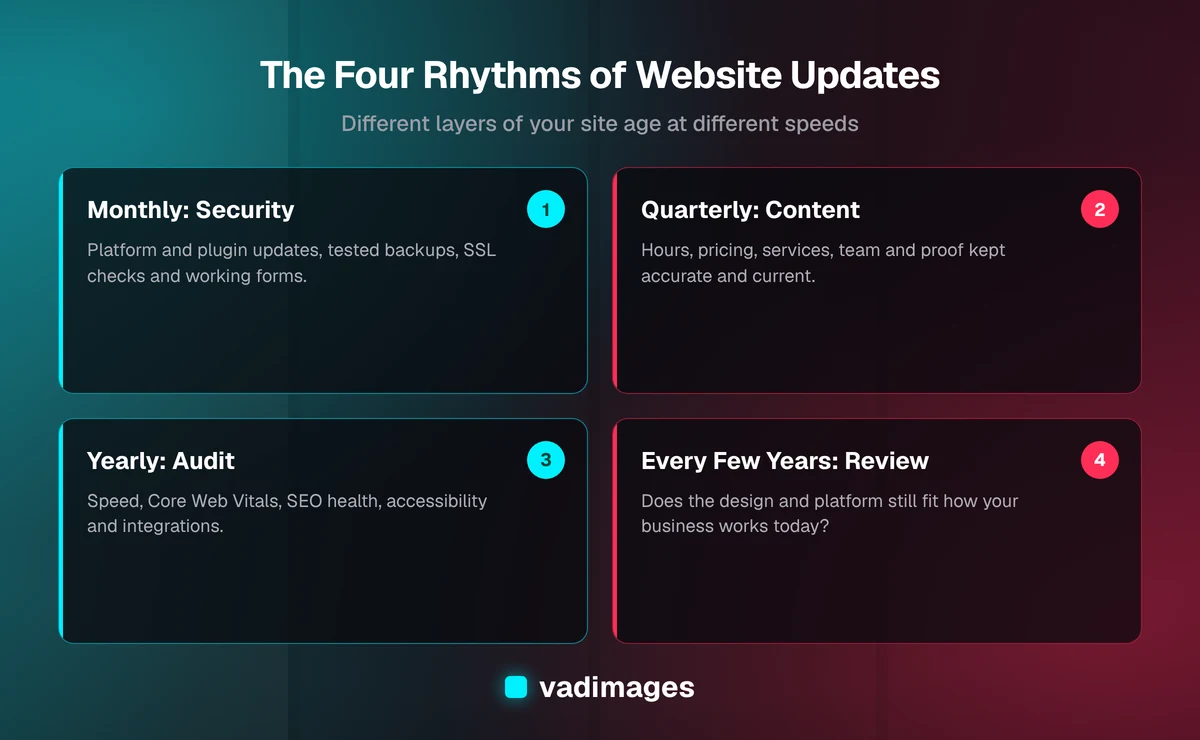
Quarterly: content and accuracy
Content goes stale more quietly than software, but it costs you in a more direct way. A prospect who sees last year's pricing, a team page full of people who have moved on, or a services list that does not mention what you actually sell today will draw conclusions about your business, and not good ones. Search engines and AI assistants draw conclusions too: pages that are clearly maintained tend to be treated as more trustworthy sources than pages that look abandoned.
Once a quarter, walk through your site the way a new customer would and check:
- Core facts: hours, address, phone, service area, and anything else a customer might act on.
- Offers and pricing: services you have added or dropped, packages that changed, and any promotions that have expired.
- Proof: new case studies, project photos, reviews, certifications, or awards you have earned since the last pass.
- Your best-performing pages: refresh the articles and service pages that already bring in traffic, rather than only publishing new ones.
How often you publish new content, such as blog posts or guides, is a separate decision that depends on your marketing goals. For many small businesses, a steady pace of genuinely useful articles beats an ambitious schedule that fizzles out in month three. Consistency matters more than volume.
Yearly: performance, SEO and accessibility audits
Once a year, step back from individual pages and look at the health of the whole site. Websites drift. Every new plugin, tracking script, oversized photo, and quick landing page adds a little weight, and a site that was fast at launch can become sluggish without any single change being to blame. An annual audit catches that drift before it shows up as lost rankings and abandoned visits.
A useful yearly review covers:
- Speed and Core Web Vitals: Google's measures of loading, responsiveness, and visual stability, available for free in Search Console and PageSpeed Insights.
- Search health: indexing problems, broken links, redirect chains, missing titles and descriptions, and whether your structured data still validates.
- Accessibility: color contrast, keyboard navigation, image alt text, and form labels. Beyond being the right thing to do, accessibility is increasingly part of legal and procurement expectations for US businesses.
- Analytics and goals: whether your tracking still works, and whether the pages that matter are actually converting visitors into calls, bookings, or sales.
- Integrations: payment processors, booking tools, CRMs, and email platforms change their APIs and requirements over time. Confirm everything still connects the way you think it does.
The output of an annual audit should be a short, prioritized list: what is broken, what is slowing you down, and what would move the needle most. If that list keeps getting longer every year, it is telling you something about the foundation.
Every few years: design and platform review
The slowest-aging layer is the design and the technology the site is built on. There is no magic number here, and you should be skeptical of anyone who tells you a website "expires" after a fixed period. Plenty of well-built sites stay effective for many years with steady maintenance. That said, somewhere in the range of every three to five years is a reasonable point to ask a harder question: does this site still fit how the business works today?
Businesses change faster than websites do. You may have added a service line, moved into new markets, started selling online, or begun relying on the website for scheduling, quoting, or customer portals. Customer expectations shift too: what felt modern a few years ago may now feel slow or awkward on a phone. A periodic review looks at whether the structure, design, and platform still support your goals, or whether you are spending more and more effort working around them.
Signs you need an update now, not on schedule
A calendar is a good default, but some signals mean you should act regardless of where you are in the cycle:
- The site is hard to use on a phone, with tiny text, buttons too close together, or layouts that break.
- Pages load noticeably slowly, especially on mobile data, or your Core Web Vitals are flagged as poor.
- Your team avoids editing the site because it is fragile, confusing, or requires a developer for every small change.
- The platform or a key plugin is no longer supported and will not receive security updates.
- Leads have dropped and you cannot explain why, or your forms and integrations keep breaking.
- The site no longer describes your business: what you sell, who you serve, or where you work has changed.
- You are relying on manual workarounds, such as retyping web form submissions into another system, that a better-built site could handle automatically.
Any one of these is worth a conversation. Several of them together usually mean the site is costing you more than it looks.
Refresh, refactor or rebuild?
When updates are overdue, there are three broad paths, and choosing the right one is where most of the savings are. A refresh keeps the existing platform and structure but updates content, imagery, and visual details. It is the right call when the foundation is sound and the problem is mostly cosmetic or informational. A refactor keeps what works but repairs what does not: cleaning up slow code, replacing abandoned plugins, fixing the mobile layout, or rebuilding a few key templates. It suits sites that are basically right but have accumulated technical debt.
A rebuild starts the structure and technology over, usually carrying over your best content and URLs so you do not lose search visibility. It makes sense when the platform is unsupported, when each fix creates two new problems, or when the website needs to do real work for the business, such as booking, quoting, client portals, or integrations with your operations, that the current setup cannot handle cleanly. That last case is where a website starts to overlap with custom software, and it is worth scoping it as such rather than stacking more plugins on a site that was never designed for the job.
A good rule of thumb: if the annual audit keeps surfacing the same structural problems, and the cost of patching them each year is creeping toward the cost of fixing them properly, the rebuild is often the cheaper option over a few years.
DIY, retainer or project: who should do the updates
Some of this work is easy to keep in-house. Updating hours, adding a blog post, swapping a photo, or refreshing a service description are tasks a reasonably organized team can own, as long as the site is built to make editing safe. Other tasks really benefit from someone technical: applying updates without breaking things, monitoring security, diagnosing performance, and handling integrations.
For many small and mid-sized businesses, the practical split is to keep content in-house and put the technical layer on a maintenance retainer, so the monthly and yearly work happens without anyone having to remember it. Larger changes, such as a refactor, a rebuild, or new functionality, are better handled as defined projects with a clear scope and milestones. At Vadimages we offer both: ongoing support for sites and applications we build or take over, and fixed-scope projects starting at $5,000 when something needs to be built or rebuilt. You can see how that is structured on our pricing page.
Putting it on the calendar
The simplest way to stop worrying about how often to update your website is to stop treating it as a once-in-a-while event. Put the four rhythms on an actual calendar: a monthly technical check, a quarterly content pass, a yearly audit, and a design and platform review every few years. Assign each one to a named person or partner. That alone puts you ahead of most of your competitors, whose websites are slowly drifting out of date while nobody is watching.
If you are not sure which layer of your site needs attention, or whether it is time for a refresh or a rebuild, that is exactly the kind of question our process is designed to answer. We start with discovery, scope the work into a clear milestone plan, build with weekly demos so there are no surprises, and support the site after launch. You can read more about how we work or browse the solutions we build for businesses across Portland, Southwest Washington, and the rest of the US. When you are ready for a straight assessment of where your website stands, get in touch and we will take a look.