
If you run trucks, vans, a warehouse, or a dispatch desk, you already know the feeling: the work is moving faster than the tools you use to track it. Drivers text photos of delivery receipts. Dispatchers juggle a whiteboard, two spreadsheets, and a phone that never stops ringing. Customers want to know where their order is, and the honest answer is "let me call the driver." That gap between how the operation actually runs and what your software can see is exactly where logistics software development earns its keep.
This article is a plain-English look at custom software for logistics and fleet operators — the small and mid-size carriers, distributors, field-service fleets, and regional delivery companies that are too specialized for generic tools and too lean to waste money on the wrong build. We will cover where off-the-shelf platforms fall short, which problems are worth solving with custom code, how to approach integrations and mobile apps for drivers, what a sensible first phase looks like, and how to think about budget before you talk to anyone.
Why logistics outgrows off-the-shelf software
There is no shortage of logistics products on the market: transportation management systems, fleet telematics, route optimizers, warehouse management tools, proof-of-delivery apps. Many of them are good, and for plenty of companies a well-chosen subscription is the right answer. We say that often, because building something you could have bought is a poor use of anyone's money.
The trouble starts when your operation has a shape the product was not designed for. A few patterns come up again and again:
- Your workflow is the competitive edge. Maybe you run mixed loads, do white-glove installs at the end of a delivery, or juggle temperature-controlled and dry freight on the same route. Generic tools flatten those differences into fields that do not quite fit.
- You are paying for five tools that do not talk. Telematics in one place, dispatch in another, invoicing in your accounting system, and customer updates by phone. Every handoff between them is a person retyping data.
- Per-seat or per-vehicle pricing scales badly. As the fleet grows, subscription costs grow with it, often for features nobody uses.
- You cannot get your own data out. Reporting is locked inside a vendor dashboard, and the questions that actually matter to you — margin per lane, cost per stop, which customers are quietly unprofitable — are not the ones it answers.
None of these mean you should throw everything out. In most cases the smartest move is a custom layer that sits on top of the tools you keep, connects them, and handles the part of the workflow that is truly yours.
The core building blocks of fleet and logistics software
When we scope logistics software development for a growing operator, the system almost always breaks down into four connected pieces. Not every company needs all four on day one, but it helps to see the whole map before choosing where to start.
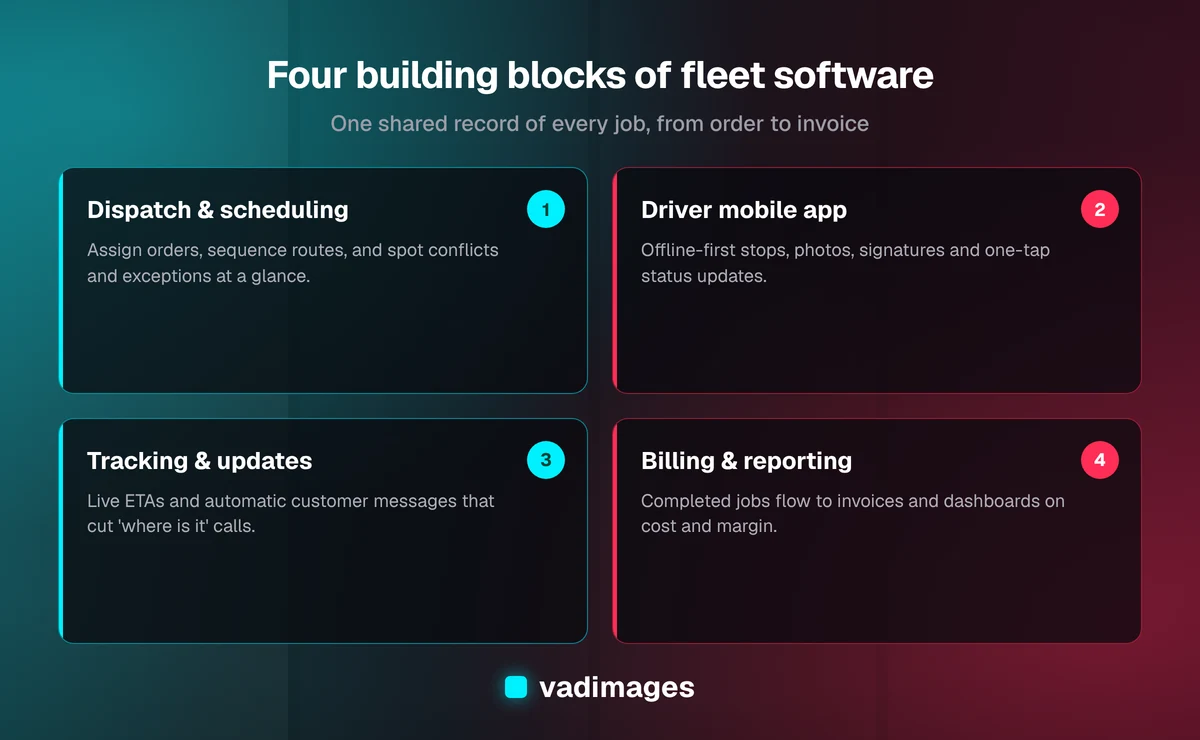
- Dispatch and scheduling. The command center: orders come in, get assigned to drivers or vehicles, and get sequenced into routes. A good dispatch screen shows capacity, conflicts, and exceptions at a glance instead of making a dispatcher hunt for them.
- A driver mobile app. The field end of the system: today's stops, turn-by-turn handoff to the navigation app the driver already prefers, checklists, photos, signatures, and status updates with one tap.
- Live tracking and customer updates. Location from phones or existing telematics, turned into useful information: estimated arrival times, automatic "your delivery is next" messages, and a tracking link that cuts down on "where is my order" calls.
- Billing and reporting. Completed jobs flow straight into invoicing and your accounting system, with the data captured along the way — stops, wait time, mileage, accessorial charges — turned into reports you can actually act on.
The value is less in any single piece than in the fact that they share one record of the job. When a driver marks a delivery complete with a photo and signature, the customer is notified, the dispatcher's board updates, and the invoice line is ready — without anybody copying anything.
Dispatch, routing, and the limits of automation
Route optimization gets a lot of attention, and it is genuinely useful. But it is worth being clear-eyed about what automation should and should not do in a smaller fleet. Optimization engines are good at the math of sequencing many stops across several vehicles under time windows and capacity limits. They are much less good at knowing that one customer's dock is always blocked before ten, or that a particular driver is the only one certified for a certain kind of install.
For most small and mid-size operators, the best design is assisted dispatch: the system proposes routes and assignments, flags conflicts, and lets an experienced dispatcher adjust with drag-and-drop before publishing to drivers. That keeps human judgment where it matters while removing the tedious part of the job. It is also far cheaper to build well than a fully automated planner, and you can always layer in a commercial routing engine through its API rather than writing optimization algorithms from scratch.
The other half of dispatch is exceptions. Late pickups, refused deliveries, a truck that will not start — these are where the day is won or lost. A well-built system surfaces exceptions immediately and makes it easy to reassign work, notify the customer, and record what happened for billing.
The driver app is where adoption is won or lost
You can build an excellent back office and still fail if drivers will not use the app. Drivers are busy, often working in poor connectivity, frequently wearing gloves, and rightly impatient with anything that slows them down. The design rules we follow are simple and non-negotiable:
- Offline first. The app has to keep working in a basement loading dock or a rural dead zone, then sync when the signal returns. This is an engineering decision you make at the start, not a feature you bolt on later.
- Big targets, few steps. Completing a stop should take a handful of taps: arrive, capture proof, done. Every extra screen is friction multiplied across hundreds of stops a week.
- Proof of delivery that holds up. Photos, signatures, timestamps, and location captured automatically, so disputes are settled with evidence rather than memory.
- Respect the tools drivers already use. Hand off to their preferred navigation app instead of forcing a new one.
For safety, the app should also stay out of the way while the vehicle is moving and make it easy to comply with your distracted-driving policies. The best test of a driver app is boring: a new driver can learn it in their first shift without a manual.
Integrations: telematics, ELDs, accounting, and customers
Logistics software rarely lives alone, and integrations are usually where the real return comes from. Most fleets already have telematics devices or electronic logging devices in their trucks, an accounting system, and a handful of large customers who send orders by email, spreadsheet, portal, or EDI. Custom software is at its best when it becomes the hub that connects these pieces.
Typical integrations include pulling vehicle location and hours data from your existing telematics provider rather than reinventing GPS tracking; pushing completed jobs and invoices into your accounting platform; accepting orders automatically from customer systems instead of retyping them; and sending notifications by text or email through established messaging services. Each integration has its own quirks — rate limits, data formats, authentication — so it is worth confirming early which of your current vendors offer a usable API. That single question often decides what is easy, what is hard, and what is worth doing first.
A good integration layer also protects you. If you switch telematics providers in three years, a cleanly separated integration means you replace one connector, not your whole system. We cover more of this thinking on our solutions page.
Data you can finally trust
Once jobs, drivers, vehicles, and invoices live in one system, a quieter benefit appears: you can answer questions that used to require a week of spreadsheet archaeology. Which lanes or customers are profitable after fuel, time, and wait charges? Which stops consistently run long? How much detention time are you absorbing without billing for it? Where are vehicles sitting idle?
You do not need a giant analytics project to get there. A handful of well-chosen dashboards built on clean, consistent data beats a sprawling business-intelligence setup fed by messy exports. Start with the three or four numbers you would check every Monday morning if they were easy to get, and build those first.
What a sensible first phase looks like
The biggest risk in logistics software development is trying to build everything at once. Fleets run every day; you cannot pause operations for a six-month rollout, and a big-bang switchover is how projects fail. The safer path is a phased plan where each phase delivers something your team uses in real work.
Here is how we typically structure it, following our standard process:
- Discovery. We ride along, sit with dispatch, and map how a job actually moves from order to invoice — including the workarounds nobody wrote down.
- Scoping and a milestone plan. We pick the single most painful handoff and define a first release around it, often the driver app plus a simple dispatch board, with clear milestones and a fixed scope.
- Build with weekly demos. You see working software every week, and a small group of drivers and a dispatcher test it on real routes before everyone switches over.
- Launch and support. We roll out in stages, run old and new side by side where needed, and then extend the system — tracking, billing integration, reporting — one phase at a time.
This approach keeps risk contained and lets real usage shape what comes next. Often the second phase looks different from what anyone guessed in discovery, and that is a feature, not a failure.
What logistics software development costs
Budgets vary widely with scope, so we would rather explain the drivers than quote a number out of context. A focused first release — for example, a driver app with proof of delivery and a basic dispatch board — sits at the smaller end. A connected platform with tracking, customer notifications, multiple integrations, and reporting is a larger investment best delivered in phases. The main cost drivers are the number of integrations, offline and mobile requirements, the complexity of your pricing and billing rules, and how many user roles need their own views.
At Vadimages, projects start at $5,000 and can be structured as fixed-scope milestones or an ongoing retainer, which suits fleets that want to keep improving their system over time. Our pricing page explains how we scope and price work. The more useful comparison is not against zero, though — it is against what the current gaps cost you in dispatcher hours, unbilled accessorials, disputed deliveries, and customer calls.
Getting started
If your operation runs on a patchwork of apps, spreadsheets, and phone calls, you do not need to replace everything to see a real improvement. Start by writing down the one handoff that causes the most rework or the most customer frustration. That is usually the right place for custom software to begin, and it gives you a concrete, testable first phase instead of a vague transformation project.
Vadimages is a custom software studio based in Vancouver, Washington, working with businesses across the Portland and SW Washington area and throughout the US. We build custom software that fits the way your fleet actually works, and you can read more about the sectors we serve on our industries page. If you would like a straight conversation about where custom logistics software could help — and where an off-the-shelf tool would serve you better — get in touch and we will take a look.