
Picture a Wednesday morning in late August. A patient opens your practice’s website to reschedule a visit, types a question into the little chat bubble in the corner — and gets an error instead of an answer. Your intake assistant, the one that has quietly handled “where do I upload my insurance card” and “can I move my appointment to Friday” for months, has gone dark. If that assistant was built on OpenAI’s Assistants API, this is not hypothetical: the Assistants API shuts down on August 26, 2026, and every call it depends on stops working that day. For US clinics, telehealth startups, and hospital groups that layered AI onto their patient portals, the clock is real and it is short.
What is actually being switched off
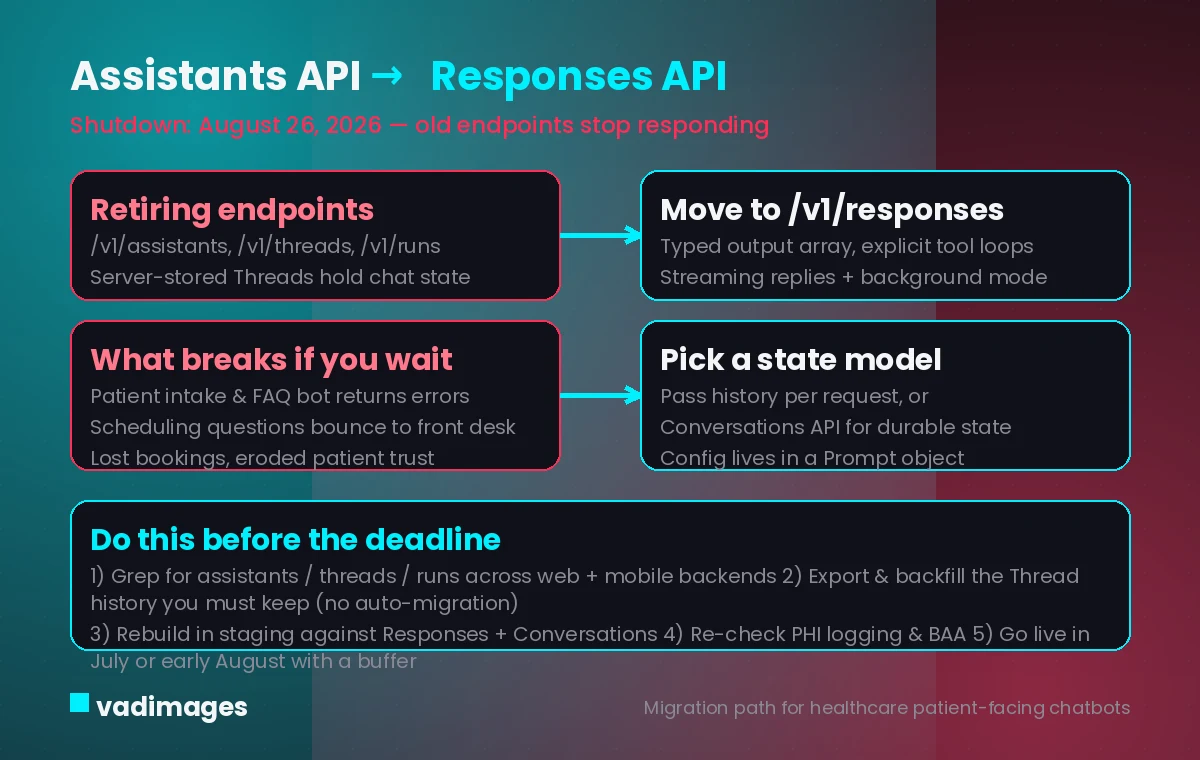
OpenAI has deprecated the Assistants API — the beta interface built around Assistants, Threads, and Runs — and set a hard shutdown date of August 26, 2026. After that date, requests to endpoints such as /v1/assistants, /v1/threads, and /v1/runs will fail rather than return data. The replacement is the newer Responses API, which OpenAI says now has feature parity with everything the Assistants API did. Teams running on Microsoft’s Azure OpenAI are on the same clock: the Azure Assistants API is scheduled for retirement on the same day.
The wrinkle that catches most owners off guard is state. The Assistants API stored conversation history for you on the server inside Threads. The Responses API is stateless by default; if you want the model to remember earlier turns, you either pass the history back yourself or store it in the separate Conversations API. OpenAI has said plainly that it will not ship an automatic tool to move old Threads into Conversations — so any patient chat history you need to keep has to be backfilled by hand.
What happens if you do nothing
Inaction has a specific, visible failure mode, and it lands on your patients first. The moment the API goes quiet, the chat widget on your site or in your mobile app starts returning errors or timing out. Appointment questions that used to self-serve now bounce back to your front desk. Intake steps the assistant walked new patients through — insurance details, reason for visit, consent prompts — stall, and some patients simply abandon the booking. For a telehealth service, that is lost revenue on the exact interaction you paid to automate; for a clinic, it is a phone line that lights up on a Monday with questions the website used to absorb.
There is a quieter cost too. A broken AI feature reads as a broken practice. A patient who hits an error at the moment they are trying to share health information loses a little trust, and trust is the whole game in healthcare. Waiting until the last minute also means racing the deadline alongside everyone else, with less room to test against real patient traffic before the switch is forced on you.
What you — and your patients — gain by moving now
The upside is bigger than just keeping the lights on. The Responses API was designed after the Assistants API and is faster and more flexible. Responses can stream tokens as they are generated, so a patient sees the answer begin almost immediately instead of watching a spinner. Background mode handles long-running work — summarizing a lengthy intake, checking several knowledge sources — without the timeouts that plagued the old Runs model. And native support for the Model Context Protocol (MCP) lets your assistant connect to your own scheduling or records tools in a controlled, auditable way rather than through brittle glue code.
For the person on the other side of the screen, that translates to a booking assistant that answers in a heartbeat, remembers what they said two messages ago, and hands off cleanly to a human when the question turns clinical. Migration is also a natural checkpoint to review how protected health information flows through the assistant — what is logged, what is retained, and where — and to tighten it while you are already in the code.
What to do on your own site or app
The migration is a set of concrete swaps, not a ground-up rewrite. Point your requests at /v1/responses instead of the Assistants and Runs endpoints. Read the model output from the new typed output array rather than polling a Run for completion. Move your assistant’s configuration — its instructions, tools, and model — into a reusable Prompt object. Decide how you will carry conversation state: pass prior messages with each request for simple flows, or adopt the Conversations API when you need durable, server-side history. Finally, export any Thread history you are required to retain and backfill it before the shutdown, because that bridge will not build itself.
Your migration quick-win checklist
Use this as a self-check before August 26. If you cannot tick every box, you have just found your work list:
- Find every call site. Search your codebase and serverless functions for “assistants”, “threads”, and “runs” — include mobile app backends and any third-party chat plugin.
- Inventory your assistants. List each assistant, its instructions, its tools, and which patient-facing flow it powers, so nothing slips through.
- Decide your state model. Stateless per request, or Conversations API for durable history — pick one per flow before you touch code.
- Backfill critical history. Export the Threads you must keep for records or continuity now; there is no automatic migration.
- Rebuild in a staging branch. Swap to /v1/responses, move config into Prompts, and test with real sample questions from your front desk.
- Re-check PHI handling. Confirm logging, retention, and your Business Associate Agreement still hold under the new flow.
- Set a go-live date in July or early August. Leave a buffer so you are not debugging on deadline day.
How Vadimages helps
Vadimages builds the patient-facing web and mobile software this change touches: patient portals, scheduling and intake apps, and the chat interfaces embedded in them. When an AI dependency like the Assistants API sunsets, we treat the model provider as a swappable layer behind a clean integration boundary, so moving from Assistants to Responses is a contained change in one service rather than a scramble across your whole site. We rebuild the assistant against the Responses and Conversations APIs, wire it to your scheduling and records systems through well-defined endpoints, port the conversation history you need to keep, and ship the streaming, mobile-friendly chat experience your patients actually feel. The deadline becomes our problem to absorb, and you get a faster, more reliable assistant on the other side.
The bottom line
The Assistants API shutdown on August 26, 2026 is a firm deadline with a clear failure mode: patient-facing chatbots built on it will stop working. The fix — migrating to the Responses API, choosing a state model, and backfilling the history you need — is well understood and very doable if you start now instead of in late August. Treat the summer as your migration window and turn a forced deprecation into a faster, safer patient experience.
This article is for general information and is not legal, medical, or compliance advice; confirm your own HIPAA and vendor obligations before making changes.