
AI document processing is software that reads business documents — invoices, purchase orders, forms, contracts, bills of lading, intake packets — pulls out the fields you care about, checks them, and sends clean data into the systems you already use. It combines OCR (turning a scan or photo into text) with AI models that understand layout and meaning, so the output is not a wall of text but a structured record: vendor, invoice number, line items, totals, due date. For a small or mid-sized business, the practical result is less retyping, fewer keying errors, and faster turnaround on paperwork that currently waits in someone's inbox.
This guide explains how AI document processing works step by step, where it pays off, where it still needs a person in the loop, what it costs to build as of 2026, and how to tell whether your documents are a good fit.
OCR vs. AI document processing: what changed
Classic OCR has existed for decades. It recognizes characters on a page and returns text. That is useful for search, but it does not know that "Net 30" is a payment term or that the number in the bottom right corner is the invoice total. Older automation tools tried to bridge that gap with templates: you drew boxes on a sample document and told the software "the total is always here." Templates work until a supplier changes its layout, and then they break quietly.
Modern AI document processing replaces fixed templates with models that read a document the way a person does — using labels, position, and context together. A model can find the invoice total whether it sits at the bottom, in a table, or next to the word "Amount due." Large language models add a further layer: they can classify a document, summarize a contract clause, or answer a question such as "does this certificate of insurance list us as additional insured?"
The important shift for a business owner is this: you no longer need every document to look the same for automation to work. You still need clear rules about what "correct" looks like, and a way to catch the cases the model is unsure about.
How AI document processing works, step by step
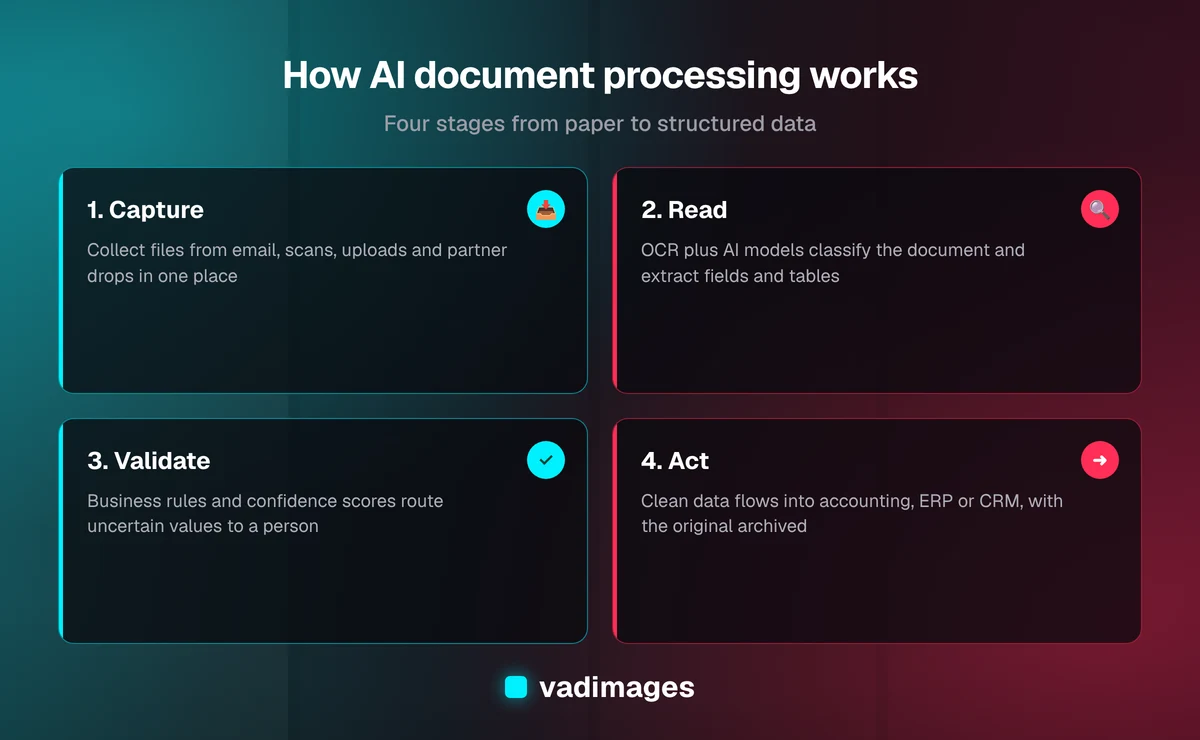
Every reliable pipeline we build follows the same four stages. Skipping one of them is the most common reason a document automation project disappoints.
- Capture. Documents arrive by email attachment, scanner, upload portal, mobile photo, or an SFTP drop from a partner. The pipeline collects them in one place, removes duplicates, and records where each file came from.
- Read. OCR converts images to text, and a document model identifies the document type and extracts the fields and tables you defined — for example, vendor name, PO number, quantities, unit prices, and totals.
- Validate. Business rules check the extracted data: do line items add up to the total, does the PO exist in your system, is the vendor on the approved list, is the date plausible? Each field carries a confidence score, and anything below the threshold or failing a rule goes to a person.
- Act. Clean data flows into your accounting system, ERP, CRM, or database; approvals are routed; the original file is archived with a link to the record it created.
The "insights" part of the title comes after the Act stage. Once documents become rows of structured data, you can answer questions that were impossible when the information sat in PDFs: which suppliers raised prices this quarter, which customers' contracts renew next month, how long invoices wait before approval, which forms are most often incomplete.
Which documents are a good fit
AI document processing pays off when three conditions are true: the documents arrive in meaningful volume, a person currently retypes or checks the same fields every time, and the data ends up in a system that can accept it. Typical good fits for SMBs include:
- Accounts payable: supplier invoices, credit memos, and statements matched against purchase orders and receiving records.
- Sales operations: customer purchase orders that arrive as PDFs and have to be keyed into an order system.
- Logistics: bills of lading, delivery receipts, and packing lists that confirm what shipped and what arrived.
- Customer and patient intake: application forms, onboarding packets, and ID documents, where the goal is a complete record before a person reviews it.
- Compliance paperwork: certificates of insurance, licenses, and W-9s with expiration dates someone must track.
- Contracts: pulling renewal dates, notice periods, pricing terms, and parties into a searchable register.
Poor fits are documents that arrive a few times a month, documents where every case needs expert judgment anyway, and processes where the data has nowhere to go. If the extracted fields would only be pasted into a spreadsheet nobody opens, fix the downstream process first.
Build, buy, or combine
You rarely need to train an OCR model from scratch. As of 2026, the major cloud platforms all offer document AI services — Amazon Textract, Google Cloud Document AI, and Azure AI Document Intelligence — with prebuilt models for common documents such as invoices, receipts, and IDs, plus options to train on your own document types. There are also off-the-shelf AP automation products that bundle extraction, approval workflow, and accounting connectors.
Here is how we help clients choose:
- Buy an off-the-shelf tool when your process is standard (for example, invoices into QuickBooks or NetSuite with a simple approval chain) and the vendor's connectors cover your systems.
- Build a custom pipeline on cloud document AI when your documents are industry-specific, your validation rules are unusual, or the data has to land in a custom system, an ERP with no ready connector, or several systems at once.
- Combine both when an off-the-shelf tool handles most of the work but you need a custom integration, review screen, or reporting layer around it.
A custom build is not about reinventing OCR. The value is in the parts no generic product knows: your rules, your exceptions, your system of record, and the screen your team uses to fix the edge cases. That is the same work we do in custom software development and our operations automation and integration solutions.
Accuracy, exceptions, and the human in the loop
No document AI system reads every document perfectly. Blurry phone photos, handwritten notes, stamps over totals, multi-page tables, and unusual layouts all lower confidence. Vendors publish their own accuracy claims, but the only number that matters is the accuracy on your documents, measured on a sample before you commit.
That is why a well-designed pipeline treats exceptions as a feature, not a failure:
- Confidence thresholds decide which fields pass straight through and which need a look.
- A review screen shows the original document next to the extracted fields, with low-confidence values highlighted, so a person can correct them in seconds instead of retyping the whole document.
- Cross-checks against your own data — PO numbers, vendor lists, customer IDs — catch errors a model cannot detect on its own.
- Feedback from corrections is logged so recurring problems (one supplier's layout, one field that is often wrong) can be fixed in rules or model training.
The realistic goal is not "no people." It is that people only touch the documents that need judgment, and they do it with the context already on screen.
Security and privacy considerations
Documents often carry the most sensitive data a business holds: bank details, Social Security numbers, health information, signed contracts. Before any document leaves your systems, settle these questions:
- Where is the document processed and stored, and for how long?
- Does the AI provider use your data to train its models? Most enterprise cloud services let you opt out or exclude it by default — confirm this in the contract, not the marketing page.
- Who can see the review screen, and is every correction logged with a user and timestamp?
- Do you have regulatory obligations (for example HIPAA for health records) that require a signed agreement with the provider?
- How are originals retained and deleted to match your records policy?
These are design decisions, not afterthoughts. Getting them right at the start costs far less than retrofitting access controls later.
From documents to insights
Once extraction is reliable, the data itself becomes useful. Examples of the reporting SMBs add after the first pipeline is live:
- Spend visibility: price changes per supplier and per item, pulled straight from invoice line items.
- Cycle time: how long each document type waits between arrival, review, approval, and posting — and where it gets stuck.
- Contract calendar: renewals, notice deadlines, and price escalators in one view instead of buried in PDFs.
- Compliance alerts: notifications before a subcontractor's insurance certificate or license expires.
- Natural-language questions: with the documents indexed, an AI assistant can answer "what are the payment terms with this supplier?" and link to the source page, so the answer can be checked.
This is where many teams discover the real return: not just faster data entry, but decisions made from data they always had and could never easily see.
What an AI document processing project costs
As of 2026, Vadimages operations automation projects typically run $25,000–$100,000, depending on how many document types and processes are automated and how many systems the data flows into. A focused pipeline that connects document extraction to one existing system sits closer to our system integration range of $15,000–$60,000. You can see how we structure estimates on our pricing page.
On top of the build, plan for running costs: as of 2026, the cloud document AI services charge per page processed, with prices varying by provider and by model type, plus hosting and maintenance. We size those costs against your actual monthly volume during discovery, so there are no surprises after launch.
The main cost drivers are:
- The number of distinct document types and layouts.
- How complex the validation rules are (simple field checks vs. three-way PO matching).
- The number of systems the data must reach, and whether they have usable APIs.
- Whether you need a custom review screen, reporting, or an AI question-and-answer layer.
- Security and compliance requirements.
How to start without overcommitting
The safest path is to start with one document type and prove accuracy on your own files before scaling. A typical plan, following how we work:
- Pick one painful document. Usually the one with the highest volume and the most retyping — supplier invoices or customer POs.
- Collect a real sample. Gather a representative set, including the messy ones: phone photos, faxes, multi-page tables, unusual suppliers.
- Define the fields and rules. Write down exactly which fields matter and what makes each one "correct."
- Test extraction on the sample. Measure field-level accuracy on your documents and decide the confidence thresholds.
- Build the review and integration. Connect the output to your system of record and give your team the review screen.
- Run in parallel, then switch over. Compare automated results with the manual process for a period before retiring the old steps.
- Add the next document type once the first is stable.
You can see how we approach similar operations projects in our case studies, and how requirements differ by sector on our industries pages.
Frequently asked questions
What is the difference between OCR and AI document processing?
OCR turns an image of a page into text. AI document processing goes further: it identifies the document type, extracts specific fields and tables, validates them against business rules, and sends structured data into your systems, flagging uncertain values for a person to review.
Can AI document processing read handwriting?
As of 2026, the major cloud document AI services can read clear handwriting, but accuracy drops on messy writing, stamps, and poor scans. Handwritten fields should usually carry lower confidence and go to a reviewer more often, so test them on your own sample first.
Do all of our documents need the same layout?
No. Modern document models use labels and context rather than fixed templates, so they handle different supplier or customer layouts. Very unusual or low-volume layouts may still need extra rules or training, which is why a sample test comes before the build.
How much does AI document processing cost for a small business?
As of 2026, a Vadimages operations automation project typically costs $25,000–$100,000, and a focused integration of document extraction into one system typically costs $15,000–$60,000. Per-page cloud processing fees and maintenance are added on top and are sized to your monthly volume.
Will AI document processing replace our data entry staff?
In most SMBs it changes the job rather than removing it. Routine documents pass through automatically, and staff spend their time on exceptions, supplier issues, and approvals — work that needs judgment and that was previously crowded out by retyping.
Have a stack of documents your team retypes every week? Send us a few anonymized samples, the system the data should end up in, and your rough monthly volume. Our Vancouver, WA team will tell you honestly whether AI document processing fits and what a first pipeline would cost. Contact Vadimages to get started.


