
Zapier vs custom integration is the choice between connecting your business apps with a no-code automation platform that you rent by the task, and connecting them with code written for your systems that you own. Zapier is the right answer when you are proving a workflow, moving modest volume, and can live with a step occasionally failing. A custom integration is the right answer when the workflow carries revenue or customer data, runs at volume, needs logic Zapier handles awkwardly, or has become so important that nobody can explain what happens when it breaks. Most small and mid-sized businesses should start on Zapier and graduate one workflow at a time, not all at once.
As of 2026, a custom integration built by Vadimages typically costs $15,000 to $60,000 and takes 2–6 weeks for a single integration, or 6–12 weeks for a multi-system sync. Zapier costs little to start but bills by plan tier and task volume, so its cost rises with usage. The sections below cover the signs a workflow has outgrown no-code and how to move it safely.
What Zapier is good at
Zapier, and similar platforms such as Make and n8n, let a non-developer connect two or more SaaS apps with a trigger and a series of actions: when a form is submitted, create a contact in the CRM, post a message in Slack, and add a row to a spreadsheet. As of 2026, Zapier is priced by plan tier and by the number of tasks (completed action steps) your account runs each month, which means cost grows with usage.
As of 2026, Zapier's usage-based model works well for four kinds of work:
- Speed to first result. A simple two-app workflow can be running the same afternoon, with no procurement and no developer.
- Prototyping a process. You learn what the workflow really needs before you spend money building it properly.
- Long-tail connections. Low-volume, low-stakes tasks, like posting a new review into a team channel, rarely justify custom code.
- Ownership by operations staff. The person who understands the process can change it without filing a ticket.
If a Zap runs a few hundred times a month, moves non-sensitive data, and costs you nothing more than a minor annoyance when it fails, there is no reason to replace it. Graduating is not about Zapier being bad. It is about a specific workflow becoming too important for the tool it was born in.
What a custom integration is
A custom integration is software written specifically to move data between your systems, such as Salesforce or HubSpot (CRM), NetSuite (ERP), QuickBooks (accounting), Shopify (ecommerce), ShipStation (shipping) or your own internal database. It talks to each system's API directly, runs on infrastructure you control (usually a small cloud service), and contains your business rules in code that can be tested, versioned and reviewed.
The practical differences from a no-code workflow are:
- You own it. The code and the logic belong to your business, so there is no per-task bill that rises as you grow.
- It handles failure deliberately. Retries, queues, duplicate detection and alerts are designed in, rather than discovered after a missed order.
- It can do real logic. Matching records across systems, merging partial updates, handling pagination and rate limits, and transforming data between formats are normal work for code.
- It is auditable. Every sync can be logged, so you can answer "what happened to this order?" with evidence.
The trade-off is upfront cost and a dependency on someone who can maintain the code. That is why the decision should be made workflow by workflow. Our solutions overview covers where integrations fit alongside other custom work.
Seven signs a workflow has outgrown Zapier
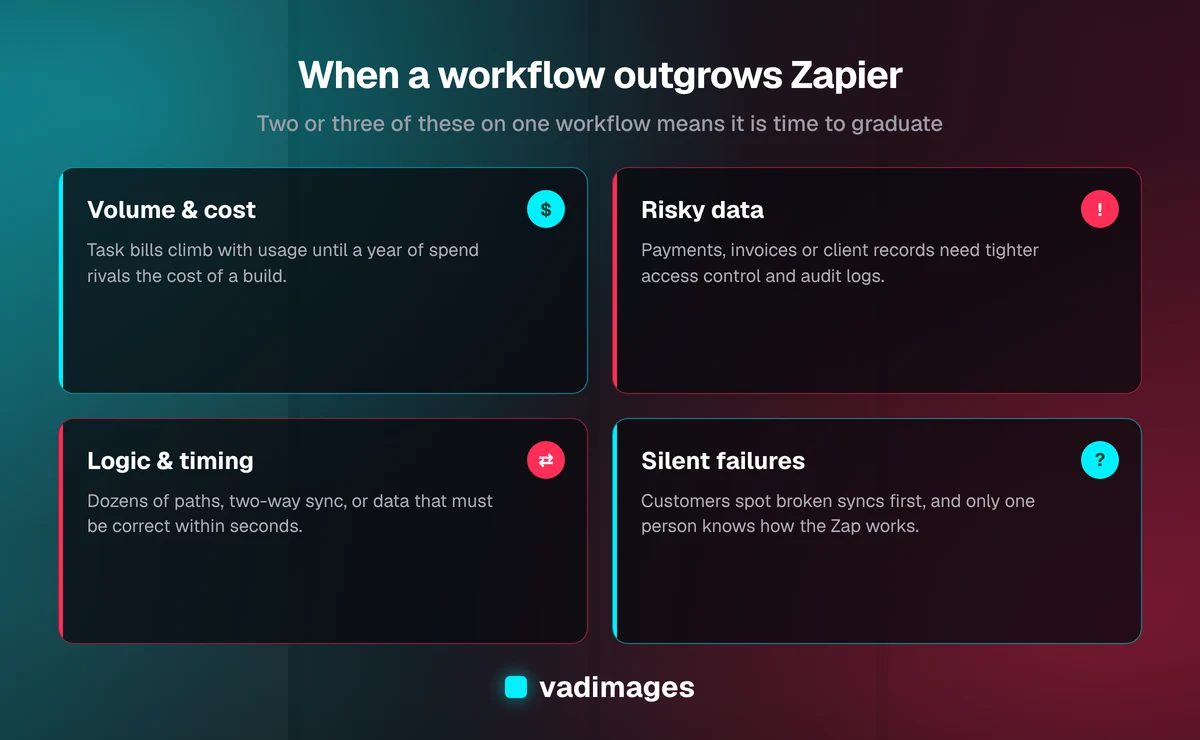
A Zapier workflow has outgrown no-code when it shows two or three of these seven signs: rising task costs, silent failures, money or sensitive data, complex logic, time-critical sync, missing connector fields, or a single person who understands it.
1. Your task bill keeps climbing with volume
Because no-code platforms charge by usage, a workflow that runs thousands of times a month, or a multi-step Zap that consumes several tasks per run, can move you into higher plan tiers. Compare twelve months of that spend, plus the staff time spent fixing failures, against the one-time cost of a custom build and its hosting. When the ongoing number approaches the build cost within a year or two, the economics have flipped.
2. Failures are silent or discovered by customers
A Zap that fails can send an error email that lands in an unread inbox. If you have ever learned about a broken sync because a customer asked where their order or appointment confirmation went, the workflow needs monitoring and retries that alert a named person, not a shared inbox.
3. The workflow touches money or sensitive data
Invoices, payments, payroll inputs, patient or client records and anything regulated deserve tighter control over where data travels and who can see it. Routing that data through a third-party automation account, often connected with an admin user's credentials, adds another vendor to your security review and makes access harder to audit.
4. The logic has outgrown the builder
When a Zap has a dozen paths, nested filters, lookup tables, formatter steps and a code step someone pasted from a forum, it has become software without the safeguards of software. Typical signs are matching records across systems by fuzzy rules, handling partial updates, or syncing in both directions without creating loops or duplicates.
5. Timing matters
As of 2026, Zapier's polling triggers check for new data on an interval that depends on your plan tier. If inventory, pricing or availability has to be correct within seconds, for example to stop overselling stock, you need event-driven sync using webhooks and a queue that you control.
6. The connector does not expose what you need
Pre-built connectors expose a subset of each app's API. When the field, object or endpoint you need is missing, teams start chaining workarounds such as exporting to a spreadsheet and re-importing. A custom integration can use the full API, including bulk endpoints that move large batches efficiently.
7. Only one person understands it
If the workflow lives in one employee's account and in their head, it is a business continuity risk. When that person leaves or is on vacation, nobody can safely change it. Code with documentation, tests and version history removes that single point of failure.
Zapier vs custom integration at a glance
- Upfront cost: Zapier is close to zero; a custom integration is a project budget.
- Ongoing cost: Zapier scales with tasks and plan tier; custom scales with hosting and maintenance, which are usually modest and do not rise per run.
- Time to launch: Zapier is hours or days; a custom integration typically takes 2–6 weeks for one integration and 6–12 weeks for multi-system orchestration.
- Error handling: as of 2026, Zapier offers built-in replay and error notifications; custom gives you whatever retries, queues and alerts you design.
- Complex logic: Zapier becomes fragile as paths multiply; custom handles it as ordinary code with tests.
- Data control: Zapier passes data through a third party; custom keeps it within infrastructure you choose.
- Who can change it: Zapier can be edited by operations staff; custom needs a developer, but changes are reviewed and reversible.
What a custom integration costs
As of 2026, Vadimages integration projects typically run $15,000 to $60,000, depending on the number of systems involved, data volume and how much transformation logic sits between them. A one-way sync between two well-documented APIs sits near the low end. Two-way sync across an ERP, CRM and ecommerce store, with historical data backfill and reconciliation reports, sits near the high end. When the project is less about connecting apps and more about automating a whole multi-step process, it is closer to operations automation, which typically runs $25,000 to $100,000 as of 2026. Full ranges are on our pricing page.
Ongoing costs are hosting, which for a small integration service is usually a small monthly line, and maintenance when a vendor changes or retires an API. Budget for that maintenance: third-party APIs do change, and a good integration is built so those changes are contained in one place.
To decide whether the numbers work, add up three things for the workflow you are considering: twelve months of platform spend attributable to it, the hours your team spends fixing or re-running it, and the cost of the errors it causes, such as refunds, missed bookings or manual reconciliation. Compare that annual figure with the build cost. If the build pays for itself within roughly two years and removes a real risk, it is usually worth doing.
How to graduate without breaking anything
Moving a live workflow is a migration, not a rewrite. Vadimages follows this seven-step sequence to move a workflow off Zapier:
- Inventory your Zaps. List every active workflow with its trigger, apps, monthly runs, owner and what breaks if it stops. This usually reveals duplicates and Zaps nobody uses any more.
- Pick one workflow to graduate. Choose the one with the highest combined cost, risk and failure rate. Leave the low-stakes Zaps where they are.
- Write down the real rules. Document field mappings, edge cases, what counts as a duplicate, and what should happen on failure. Most of the value of the project is in this step.
- Build with monitoring from day one. Logging, retries, an alert to a named person, and a simple status view should ship with the first version.
- Run in parallel. Let the new integration run in a shadow or read-only mode alongside the Zap, then compare the outputs before switching over.
- Cut over and keep a rollback. Turn off the Zap but leave it saved for a few weeks, so you can switch back if something unexpected appears.
- Hand over documentation. Your team should know what the integration does, where its logs are, and who to call.
Vadimages' discovery, build and handover process is described on how we work, and examples of integration and automation projects in our case studies.
A hybrid approach often wins
Graduating does not mean deleting your Zapier account. A common, sensible setup is a custom integration for the two or three workflows that carry revenue and customer data, with Zapier still handling notifications, internal convenience tasks and experiments. Some businesses also expose a small custom API or webhook endpoint that Zapier can call, so operations staff keep the flexibility to build new automations while the critical data path stays in code.
The goal is the right tool per workflow: rented no-code where speed and flexibility matter most, owned code where reliability, cost at scale and data control matter most. If the integration is part of a larger system, such as a customer portal or internal operations tool, it is often cheaper to build it as part of that custom software project rather than separately. Vadimages builds integrations for ecommerce, logistics, professional services, healthcare and fintech businesses, where the same sync points recur: CRM, accounting, scheduling and inventory.
Frequently asked questions
Is Zapier bad for a growing business?
No. Zapier is an excellent way to launch and prove workflows quickly. It becomes the wrong tool only for specific workflows that run at high volume, carry sensitive or financial data, need complex logic, or must be reliable to the minute. Most growing businesses keep using it for lower-stakes tasks.
How long does it take to replace a Zap with a custom integration?
A focused integration between two systems typically takes 2–6 weeks, including documenting the rules, building, a parallel run and cutover. Multi-system, two-way syncs with historical data typically take 6–12 weeks. The parallel run is worth the extra time because it catches mismatches before customers do.
How much does a custom integration cost compared with Zapier?
As of 2026, Vadimages integration projects typically cost $15,000 to $60,000 upfront, plus modest hosting and occasional maintenance. Zapier costs little to start but charges by plan and task volume. Compare a year of platform spend, staff fix-up time and error costs for the workflow against the build cost to see which is cheaper over two years.
Can we keep using Zapier after building a custom integration?
Yes, and many businesses should. Move the critical workflows into code and keep Zapier for notifications, experiments and low-volume tasks. A custom webhook endpoint can even let Zapier trigger your integration safely.
What should we prepare before talking to a developer?
Bring a list of your active Zaps with monthly run counts, the apps involved, what each workflow is supposed to do, and examples of recent failures. That inventory makes scoping faster and the estimate more accurate.
Talk to us about your integrations
Vadimages is a software development studio in Vancouver, Washington, building custom integrations, automation and web applications for US small and mid-sized businesses, with transparent pricing and projects starting at $5,000. If a Zap has become mission-critical, send us your workflow inventory and we will tell you honestly which workflows to graduate and which to leave alone. Contact Vadimages to start the conversation.