
To get an accurate software quote, give the developer a written description of the workflow you want to change, the people and systems it touches, the outcome you need, and your budget range. Then ask for an estimate that lists its scope, its assumptions, and what is excluded. An accurate software quote is a price range tied to a written scope, where every assumption behind the number is stated, so you can see exactly what you are paying for and what would change the price. Most quotes go wrong because one of those pieces is missing, not because the developer got the arithmetic wrong.
This guide is for US small and mid-sized business owners and operations leads who are about to ask one or more firms to price a website, an internal tool, an integration, or a custom platform. It covers what to prepare, what a good quote contains, how to compare quotes that look nothing alike, and the warning signs that a number will not hold.
Why software quotes are so often wrong
Software is priced by effort, and effort depends on details that are rarely visible in a first conversation. "We need a customer portal" can mean a login page with three reports, or a system with role-based permissions, document uploads, billing, and a two-way sync with your ERP. Both are honestly called a portal. One is a few weeks of work; the other is a few months.
When a request is vague, every firm fills the gaps with its own guesses. A cautious firm prices the large version and looks expensive. An optimistic firm prices the small version and looks cheap, then issues change orders once the real requirements appear. Neither quote is accurate, and you cannot tell which is closer to reality, because they are not pricing the same thing.
The common sources of drift are predictable:
- Unstated integrations. Connecting to QuickBooks, a CRM, a payment processor, or an old database is often the most expensive part of a project, and it is the part buyers most often forget to mention.
- Unstated users and roles. One type of user is simple. Staff, managers, customers, and partners who each see different data multiply the screens, rules, and testing.
- Data migration. Moving years of records out of spreadsheets or a legacy system, and cleaning them on the way, is real work that is easy to leave out.
- Edge cases. Refunds, cancellations, partial shipments, approvals that get rejected — the exceptions take longer to build than the happy path.
- Non-functional requirements. Compliance, audit trails, uptime expectations, and security reviews all add effort that a feature list does not show.
What to prepare before you ask for a quote
You do not need a technical specification. You need a short brief, one to three pages, that answers the questions every estimator will ask. A brief like this gets you a better number and makes several quotes comparable, because every firm is pricing the same description.
1. The problem and the outcome
Describe what is broken today and what "fixed" looks like, in business terms. "Our dispatcher re-types every work order from email into a spreadsheet, and jobs get missed" is far more useful than "we need a dispatch app." Name the outcome you will measure, such as fewer missed jobs, faster invoicing, or less re-keying, so the firm can propose the smallest build that achieves it.
2. The workflow, step by step
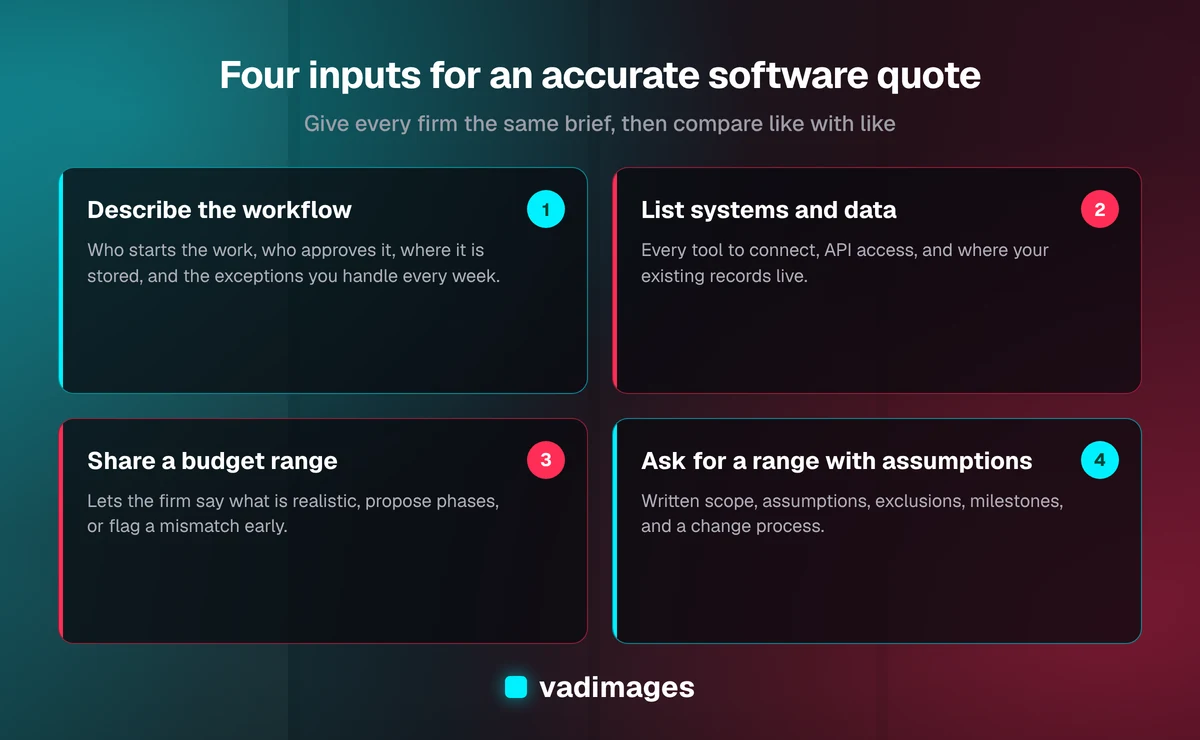
Write down how the work moves today: who starts it, what information they collect, who approves it, where it is stored, and what happens at the end. A numbered list or a photo of a whiteboard sketch is enough. Include the exceptions you deal with every week.
3. Users and permissions
List each type of person who will use the system, roughly how many there are, and what each one should and should not be able to see or change.
4. Systems and data
Name every tool the new software has to read from or write to — accounting, CRM, ecommerce, email, payment, scheduling — and say whether you have admin access and API credentials. Note where your existing data lives and roughly how much of it there is.
5. Constraints
Include deadlines that are real (a season, a contract renewal, a system being shut off), any compliance requirements, and who on your side can answer questions and approve work.
6. Your budget range
Sharing a budget range is not a negotiating mistake. It lets a firm tell you what is realistic for that money, propose a phased plan, or tell you early that the scope does not fit. Without it, you get a quote for whatever the estimator imagined.
What an accurate software quote contains
A quote you can rely on is more than a number. When it arrives, check that it includes each of the following:
- A written scope. The features, screens, integrations, and user roles included, described plainly enough that you could check them off at launch.
- Assumptions. What the estimate takes for granted: that an API exists and is documented, that you will supply content, that data arrives in a usable format, that there are three user roles rather than six.
- Exclusions. What is explicitly not included, such as data clean-up, third-party license fees, hosting, or ongoing support.
- A range, not a single figure, for anything that still has open questions, with a note on what moves the price toward the top or bottom of the range.
- Milestones and acceptance criteria. What gets delivered at each stage, how you will confirm it works, and when you pay.
- A timeline that depends on stated inputs, such as how quickly you can give feedback.
- A change process. How new requests are priced and approved once work starts.
If a quote has a number but none of the above, it is a guess with a logo on it. Ask for the missing parts before you compare it with anything else.
Ballpark, estimate, or fixed price: know which one you have
Firms use these words loosely, so it helps to know the difference.
- A ballpark comes from a short call. It tells you whether the project costs closer to $15,000 or $150,000, which is useful for deciding whether to proceed, but it is not a commitment.
- An estimate range comes from a written brief and some follow-up questions. It is tied to a scope and its assumptions, and it is what most buyers need to approve a budget.
- A fixed price is only safe once the scope is detailed enough that both sides agree on what "done" means. Firms that give a fixed price without that detail either pad it heavily or recover the difference through change orders.
For anything beyond a simple website, the most reliable path to a firm number is a short paid discovery phase. In our delivery process, discovery maps the current workflow, documents requirements and constraints, assesses risk, and recommends an architecture. Scoping then turns that into a milestone plan with acceptance criteria and an estimate range. You can take that plan to any developer; it is yours.
Typical price ranges to sanity-check a quote
Published ranges help you spot a quote that is far out of line. As of 2026, these are Vadimages' typical ranges by project type, from our pricing page:
- Websites: WordPress or Shopify sites from $4,000; custom Next.js sites typically $8,000–$35,000.
- System integrations: typically $15,000–$60,000, depending on the number of systems, data volume, and transformation logic.
- Operations automation: typically $25,000–$100,000, depending on the number of processes automated.
- Internal tools: typically $30,000–$75,000, more for multiple roles and integrations.
- Custom business systems and SaaS MVPs: typically $50,000–$150,000.
- Legacy system replacements: typically $75,000–$200,000 or more.
If one quote is a fraction of the others for the same brief, it is usually pricing a smaller scope. Ask that firm to list exactly what it left out. If one is far above the rest, ask what risk it is pricing in; sometimes it has spotted something the others missed. The solutions pages describe what each type of project typically includes.
How to compare quotes from different firms
Comparing totals alone is how buyers end up choosing the quote that understood the least. Compare them this way instead:
- Line up the scopes. Put each quote's included features and integrations side by side. Mark anything one firm included and another did not.
- Read the assumptions. Two quotes can share a scope but rest on very different assumptions about your data, your APIs, or your availability.
- Check the exclusions. Add back the cost of anything excluded that you will still need, such as migration, hosting, or support.
- Look at the payment structure. Milestone payments tied to working, accepted deliverables carry less risk for you than a large upfront deposit.
- Ask about ownership. Confirm you will own the code, the data, and the accounts it runs on.
- Ask what happens after launch. Bug-fix windows, maintenance plans, and the cost of small changes all affect what the project really costs over its life.
Then ask each firm the same question: "What is the biggest risk in this project, and how does your plan handle it?" A firm that has thought about your project will answer specifically. A vague answer is a sign the quote was vague too.
Red flags that a quote will not hold
- A fixed price after a 15-minute call for anything more complex than a brochure website.
- No questions asked. A firm that does not ask about your integrations, users, or data has not estimated them.
- No written assumptions or exclusions. Anything unwritten becomes a dispute later.
- An hourly rate with no scope or cap. Hourly billing is not dishonest, but without a scope and an estimate range it moves all of the risk to you.
- Most of the money due before anything is delivered.
- Vague ownership terms, or code hosted in accounts you cannot access.
How to keep the final cost close to the quote
An accurate quote is only half of the job; the other half is staying inside it. A few habits make the biggest difference. Name one decision-maker on your side who can answer questions within a day or two. Review the weekly demos and raise problems early, when they are cheap to fix. Put new ideas on a list for a later phase instead of slipping them into the current one. And agree up front how change requests are priced, so a new idea becomes a clear decision rather than a surprise invoice.
Phasing also helps. Building the smallest version that delivers the main outcome first, then adding to it, keeps each estimate small enough to be accurate. Our case studies show how projects are typically broken into phases, and the custom software pages explain what each type of build involves.
Frequently asked questions
How long does it take to get an accurate software quote?
A ballpark figure can come from a single call. An estimate range tied to a written scope usually takes a few days of follow-up questions after you send a brief. For complex systems, a discovery and scoping phase of roughly one to two weeks produces a milestone plan with an estimate range you can rely on.
Should I tell a developer my budget?
Yes. Sharing a budget range lets the firm tell you what is realistic for that amount, suggest a phased plan, or say early that the scope does not fit. It does not mean the firm will simply quote your maximum; a good firm prices the scope and tells you if it comes in under your range.
Why do software quotes for the same project vary so much?
Quotes vary mainly because each firm is filling gaps in the request with different assumptions about integrations, users, data migration, and edge cases. Giving every firm the same written brief, and asking each one to list its assumptions and exclusions, narrows the spread and shows you which differences are real.
Is a fixed-price software quote better than an estimate?
A fixed price is only better when the scope is detailed enough for both sides to agree on what "done" means. Without that detail, a fixed price is either padded for risk or followed by change orders. A scoped estimate range with milestone payments is usually the fairer choice until discovery is complete.
How much does custom software cost for a small business?
As of 2026, Vadimages website projects start at $4,000, integrations typically run $15,000–$60,000, internal tools $30,000–$75,000, and custom business systems or SaaS MVPs $50,000–$150,000. The final number depends on the number of workflows, user roles, integrations, and the data you need to migrate.
Ready to price your project properly? Send us a short description of the workflow you want to fix, the systems it touches, and your budget range. Our Vancouver, WA team will come back with questions, then a written estimate that lists its scope, assumptions, and exclusions. Contact Vadimages to get started.


