
Web hosting explained in one line: web hosting is the rented computer, network, and software that stores your website's files and data and delivers them to every visitor who types your address. The right setup for a small or mid-sized business depends on what the site actually does. A brochure or marketing site is usually best served by static hosting behind a content delivery network (CDN); a WordPress site belongs on managed WordPress hosting; and a web application with logins, a database, and custom logic needs a cloud platform or managed cloud hosting. Cheap shared hosting is rarely the right answer for a business that depends on its site for leads or sales.
This guide explains what hosting is made of, compares the main types in plain English, and gives you a short checklist for choosing, so you can have a sensible conversation with any developer or provider without guessing.
What web hosting actually includes
When people say "hosting," they often mean several separate things bundled together. Pulling them apart is the fastest way to understand what you are paying for and what can go wrong.
- The domain name (for example, yourcompany.com) is registered with a domain registrar. It is not hosting, but it points to your hosting. Keep the registrar account in your company's name, not a former vendor's.
- DNS is the address book that tells the internet which server answers for your domain and where your email goes. A mistake here can take down your website and your email at the same time.
- The server or platform is where your site's code runs and its files live. This is what most people mean by "the host."
- The database stores anything that changes: form submissions, products, user accounts, blog posts in a CMS.
- The CDN keeps copies of your pages and images on servers around the world, so a visitor in Seattle and a visitor in Miami both get a fast response.
- SSL/TLS certificates make the padlock appear in the browser and encrypt traffic. Most modern hosts issue and renew them automatically.
- Backups, monitoring, and updates are the operational layer. They are what separates "the site is online" from "the site will still be online after something goes wrong."
A good hosting setup handles every layer on that list on purpose. A poor one handles the server and leaves the rest to chance.
The main types of web hosting
There are five setups a US small business is likely to be offered. Each is a trade-off between cost, control, and how much work someone has to do to keep it healthy.
1. Shared hosting
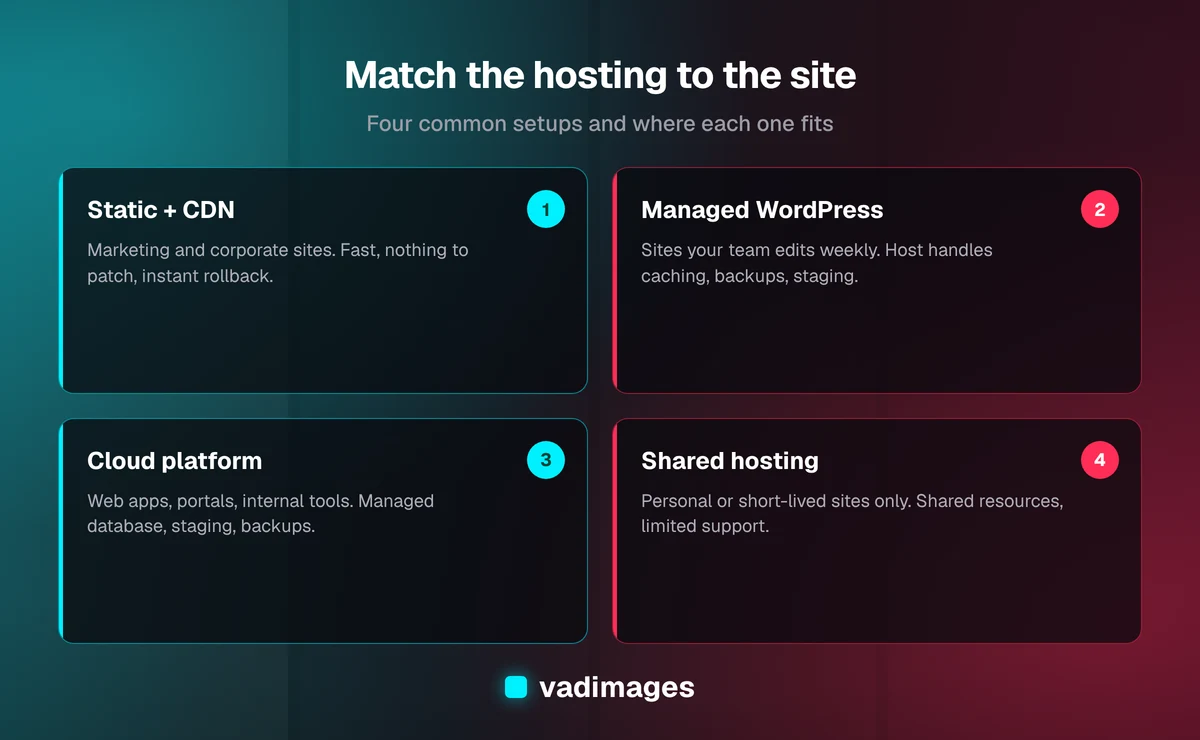
Shared hosting puts your site on one server alongside many other customers' sites, all drawing from the same processor, memory, and disk. It is the cheapest option and the one most often bundled with a domain purchase. The trade-off is that a busy or compromised neighbor can slow your site down, performance tuning is limited, and support tends to be generic. Shared hosting is fine for a personal site or a short-lived campaign page. For a business site that generates leads, it is usually a false economy.
2. Managed WordPress hosting
Managed WordPress hosting is a platform built only for WordPress. The provider handles server tuning, caching, core updates, daily backups, staging sites, and malware scanning. If your marketing team edits a WordPress site every week, this is usually the right home for it. It costs more than shared hosting, and it limits what you can install, but those limits exist to keep the site fast and secure. You still need someone responsible for plugin and theme updates, which is where most WordPress problems start.
3. VPS and dedicated servers
A virtual private server (VPS) gives you a guaranteed slice of a machine; a dedicated server gives you the whole machine. You get full control over the operating system and software. You also get full responsibility for security patches, firewall rules, backups, and recovery. A VPS makes sense when a developer or IT partner is actively maintaining it. An unmanaged VPS that nobody has logged into for a year is one of the riskiest things a small business can own.
4. Cloud platforms (AWS, Google Cloud, Azure)
Large cloud providers rent computing, storage, and databases by usage. They can scale from a single small service to very large systems, and they offer managed databases, file storage, queues, and serverless functions that would be expensive to run yourself. The catch is complexity: the bill depends on how the system is designed, and misconfigured storage or access settings are a common source of data exposure. Cloud platforms are the right foundation for custom web applications, client portals, and internal tools, provided someone who understands them sets them up and documents them.
5. Static and edge hosting (Cloudflare Pages, Vercel, Netlify)
Modern marketing sites are often built as pre-rendered pages that can be served directly from a CDN, with no server to patch and no database to attack. Platforms such as Cloudflare Pages, Vercel, and Netlify deploy the site automatically every time the code changes, keep every previous version so a bad change can be rolled back in seconds, and issue SSL certificates without anyone touching them. For a marketing or corporate site, this setup is typically faster, more secure, and cheaper to run than a traditional server. Dynamic features such as contact forms are handled by small serverless functions or connected services. The vadimages.com site you are reading is itself a static site deployed this way.
How to match the hosting setup to your site
The single most useful question is not "which host is best?" but "what does this site do?" Use this as a starting point:
- Marketing or corporate site with a contact form: static or edge hosting behind a CDN. Fast, low maintenance, very little to break.
- Content-heavy site your team edits in WordPress: managed WordPress hosting, or a headless CMS feeding a static front end if speed and security matter most.
- Online store: a hosted commerce platform for standard catalogs, or a headless storefront on edge hosting when you need custom checkout or catalog logic.
- Web application, client portal, or internal tool: a managed cloud platform with a managed database, separate staging and production environments, and automated backups. See our custom software page for how these systems are typically built.
- Anything handling health, payment, or regulated data: a cloud setup chosen for compliance, with the right agreements in place (for example, a business associate agreement for HIPAA), access logging, and encryption. Our industries pages describe what this looks like by sector.
What to check before you choose a host
Whatever setup you land on, run through these questions. Each one maps to a common, avoidable failure.
- Who owns the accounts? The domain, DNS, hosting, and any cloud accounts should be registered to your company, with at least two people from your side able to log in. Your developer should be added as a user, not be the owner.
- Where are the backups, and has anyone restored one? A backup that has never been test-restored is a hope, not a plan. Ask how often backups run, how long they are kept, and whether they are stored somewhere separate from the live site.
- How are updates handled? For WordPress and servers, someone must apply security updates on a schedule. For static hosting, there is far less to update, which is part of the appeal.
- Is there a staging environment? Changes should be tested somewhere other than the live site before customers see them.
- What happens when the site goes down at 2 a.m.? Uptime monitoring should alert a named person, not just send an email to an inbox nobody reads.
- What does support actually cover? Most hosts support their infrastructure, not your code or plugins. Know which problems the host will fix and which ones you need a developer for.
- How easy is it to leave? You should be able to export your site, database, and files without the provider's help. Avoid setups where the only copy of your site lives inside a proprietary builder.
What hosting really costs
The hosting bill itself is rarely the expensive part. For a typical small business marketing site, the monthly hosting fee is small next to the cost of recovering from an outage or a hacked site. The real costs sit around the bill: the hours needed to keep software updated, the risk of an unpatched plugin or server, and the lost leads while a site is slow or offline.
That is why we judge hosting by total cost of ownership, not the monthly price on the provider's page. A slightly more expensive managed or edge setup that removes patching work and gives you one-click rollback is often cheaper over a year than the bargain plan. For reference, as of 2026 a new marketing website built by Vadimages typically costs $8,000 to $35,000, and our projects start at $5,000. Hosting setup, DNS, analytics, and launch checks are part of every website project rather than an add-on. Ongoing support retainers, for clients who want us to keep watching the site after launch, typically start at $2,000 per month as of 2026. Full details are on our pricing page.
Common hosting mistakes small businesses make
- Letting a former vendor own the domain or hosting account. When the relationship ends, getting access back can take weeks.
- Hosting email and the website on the same cheap plan. When the server has a problem, both go down. Business email belongs with a dedicated email provider.
- Choosing a host by the introductory price. Many plans renew at a higher rate after the first term. Read the renewal price, not the promotional one.
- Running a web application on shared hosting. Apps with logins and databases need isolation, proper backups, and room to grow.
- Skipping monitoring. Many businesses learn their site is down from a customer. Simple uptime checks prevent that.
How Vadimages handles hosting
For marketing and corporate websites, we usually build with Next.js and deploy as a static site on an edge platform such as Cloudflare Pages or Vercel, so there is no server to patch and every release can be rolled back. For web applications and portals, we deploy to managed cloud infrastructure (AWS, Cloudflare, or Vercel, depending on the system) with separate staging and production, managed databases, and automated backups. Every account is set up in the client's name, and every setup is documented so your team or another provider can take over. You can read more about the process on our how we work page, browse the types of builds on our solutions page, or see finished projects in our case studies.
Frequently asked questions
What is the difference between a domain and web hosting?
A domain is your address on the internet, such as yourcompany.com, and it is registered with a domain registrar. Web hosting is the computer and software that store your site and deliver it to visitors. The domain's DNS settings point the address to the host. You can buy both from one company, but they are separate services and can be moved independently.
Is shared hosting good enough for a small business website?
For a simple personal site or short campaign, shared hosting can work. For a business site that brings in leads or sales, it is usually not the best value: performance depends on other customers on the same server, and security and support are limited. Static hosting behind a CDN or managed WordPress hosting gives a faster, safer result for most small business websites.
What is the best hosting for a WordPress site?
Managed WordPress hosting is the right default for a WordPress site that your team edits regularly, because the provider handles caching, core updates, backups, and staging. You still need someone responsible for keeping plugins and themes updated. If speed and security are the priority, a headless setup, with WordPress as the editor and a static front end on edge hosting, is worth considering.
Can I move my website to a different host later?
Yes, as long as you own your domain and can export your site's code, database, and files. Moves are straightforward when the site is built on standard technology and documented, and difficult when the site lives inside a proprietary page builder. A well-planned migration is tested on the new host first, then switched over by updating DNS, with minimal downtime.
Does Vadimages host websites?
We deploy to established platforms such as Cloudflare Pages, Vercel, and AWS, with the accounts set up in your company's name. That way you own your accounts and can keep working with us or move to another provider. We can stay on as your support team through a monthly retainer, or hand everything over with documentation.
Get a hosting setup that fits your business
If you are not sure whether your current hosting fits your site, or you are planning a new website or web application and want the hosting decided properly from day one, we can help. Vadimages is a web development studio in Vancouver, Washington, working with small and mid-sized businesses across the US. Contact us for a straightforward recommendation and a transparent quote.