

Cybersecurity trends for 2027 are the shifts in how attackers operate and how businesses are expected to defend themselves going into 2027. For a US small or mid-sized business, five trends matter most: AI-assisted phishing and voice fraud, the move from passwords to passkeys and phishing-resistant sign-in, attacks that come through vendors and software dependencies, ransomware that steals data before it encrypts it, and rising expectations from customers, insurers and regulators that you can prove your controls work. None of these needs an enterprise security budget to address, but each one needs a decision from the owner, not just the IT person.
This guide is written by Vadimages' engineering team, a custom software studio in Vancouver, WA, for owners and operations leads at US small and mid-sized businesses. We build and maintain web apps, internal tools and integrations, so we see these trends from the inside of the systems small businesses run every day. What follows is a forecast and a practical checklist, not a vendor pitch: where we describe what is likely to happen in 2027, we say so.
Why cybersecurity looks different for small businesses in 2027
Cybersecurity for a small business in 2027 is less about buying a single product and more about closing the gaps between the tools you already use. A typical SMB runs on many connected cloud services: Microsoft 365 or Google Workspace, QuickBooks Online, a CRM such as HubSpot, Shopify or a custom web app, a payroll provider, and a handful of integrations that move data between them. Each connection is a door. Attackers rarely break the strong parts of these platforms; they log in with a stolen password, trick a person into approving a payment, or reach your data through a smaller vendor that has access to it.
Two forces are pushing SMB cybersecurity in this direction going into 2027. First, generative AI tools have lowered the cost of writing convincing, personalized scam messages in good English, which removes one of the easiest warning signs employees were trained to spot. Second, the large platforms have become harder to attack directly, so criminals focus on the people and the small connected pieces around them. The result is that the most useful security work for an SMB is about identity, process and visibility, not exotic technology.
The five cybersecurity trends that matter most
1. AI-assisted phishing, invoice fraud and voice cloning
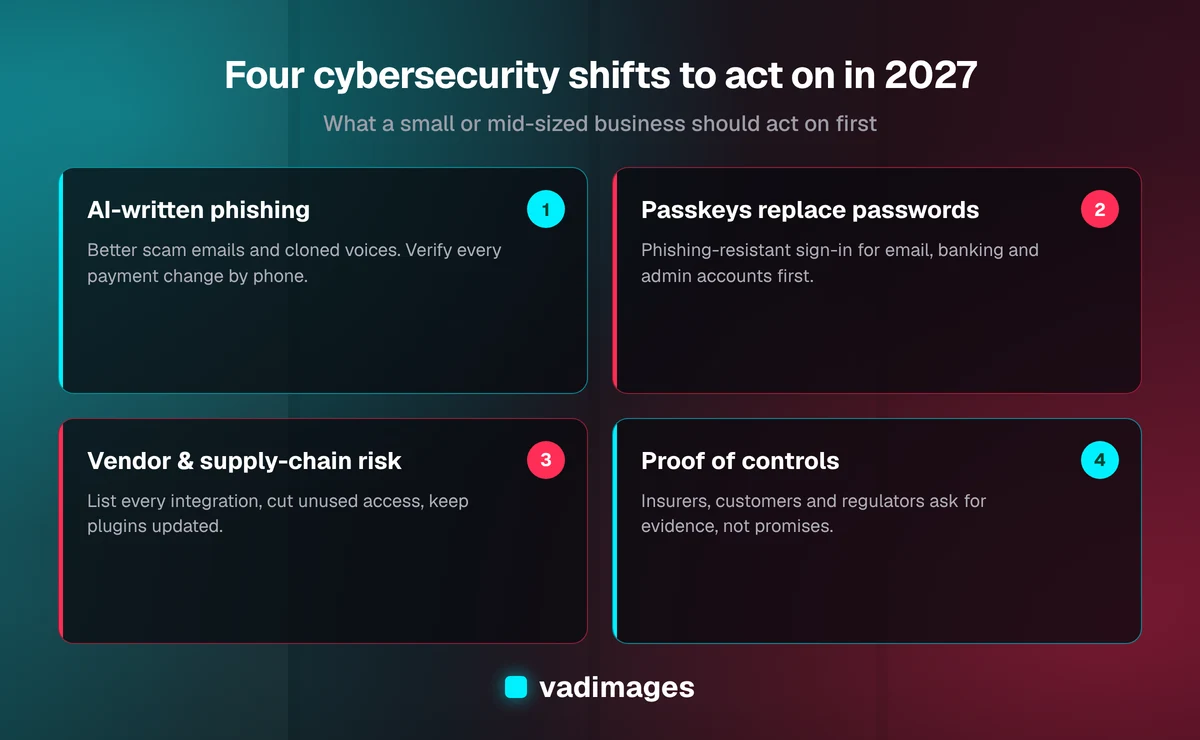
AI-assisted phishing is the use of generative AI to write targeted scam emails, texts and even cloned voice messages that impersonate a boss, a vendor or a bank. The classic version is business email compromise: an email that looks like it comes from your supplier asks you to update their bank details before the next invoice. The FBI's Internet Crime Complaint Center (IC3) has listed business email compromise among the costliest categories of reported cybercrime in its annual reports for years. In 2027 we expect these messages to be better written, better timed and more often followed up with a phone call in a familiar-sounding voice.
The defense is a process, not a filter. Any change to payment details, any urgent wire request and any request to buy gift cards should be confirmed through a second channel using contact details you already have on file, never the ones in the message. Write that rule down, tell your team it applies to the owner too, and make it easy to follow inside your accounting workflow.
2. Passkeys and phishing-resistant sign-in replace passwords
Passkeys are a sign-in method based on the FIDO Alliance and W3C WebAuthn standards that replace passwords with a cryptographic key stored on your phone, laptop or a hardware security key. Because a passkey only works on the real website it was created for, it cannot be typed into a fake login page, which is why CISA calls this kind of sign-in "phishing-resistant." As of 2026, Apple, Google and Microsoft all support passkeys in their operating systems and browsers, and many business apps now offer them.
For an SMB, the practical step in 2027 is to turn on multi-factor authentication everywhere, then move administrator accounts, email and banking to passkeys or hardware keys first. Codes sent by SMS are better than nothing but can be intercepted or redirected through SIM-swap fraud. If you run a customer-facing web app, adding passkey sign-in for your own users is now a reasonable feature request rather than an experiment.
3. Vendor and software supply-chain risk
Software supply-chain risk is the chance that an attacker reaches your systems through a vendor, a plugin or a code library you depend on, instead of attacking you directly. For a small business this usually looks like an outdated WordPress plugin, a forgotten integration that still holds an API key with full access, or a SaaS vendor that suffers a breach and exposes your customer data. US federal guidance has moved in the same direction: CISA's Secure by Design initiative asks software makers to ship products that are safe by default, and the NIST Cybersecurity Framework 2.0, released in 2024, added a "Govern" function that explicitly covers supply-chain risk management.
What to do: keep a simple list of every vendor and integration that can touch your data, what access it has, and who at your company owns it. Remove what you no longer use. Give integrations the least access they need, rotate their keys when staff leave, and keep plugins and dependencies updated on a schedule. This is ordinary maintenance work, and it is the part most often skipped.
4. Ransomware shifts to data theft and extortion
Modern ransomware is less about locking files and more about stealing data first and threatening to publish it, a pattern often called double extortion. CISA's #StopRansomware advisories describe this approach across many active groups. Good backups still matter, because they let you recover without paying, but backups alone do not stop the extortion threat once data has left your network.
The practical response to data-stealing ransomware has three parts. Keep backups that are separate from your main accounts and test a restore at least once a quarter. Reduce how much sensitive data you keep, because data you have deleted cannot be stolen. And turn on logging and alerts in your core systems so that an unusual login or a large export is noticed in hours, not weeks.
5. Proof of controls: insurers, customers and regulators
The quietest trend is the most expensive to ignore: more parties now ask you to prove your security, not just describe it. Cyber insurance applications commonly ask whether you use multi-factor authentication, endpoint protection and offline backups. Larger customers send security questionnaires before they sign. As of 2026, regulators have tightened specific rules: the FTC's amended Safeguards Rule requires many non-bank financial businesses, such as auto dealers, tax preparers and mortgage brokers, to run a written information security program and to report certain breaches to the FTC; PCI DSS v4.0 requirements became fully effective in March 2025 for businesses that handle card data; and HIPAA continues to apply to healthcare providers and their business associates.
In 2027 we expect insurer, customer and regulator security questions to get more specific and the answers to need evidence: screenshots of MFA settings, a dated incident response plan, a vendor list, and records showing that updates were applied. Businesses that keep this evidence as part of normal operations will spend far less time on renewals and sales questionnaires than those that rebuild it from memory each year.
What these trends mean for your own software
If your business runs a custom web app, customer portal or internal tool, the 2027 cybersecurity trends in this guide apply to that software as much as to your email. A custom application that was secure when it launched can drift out of date as its frameworks, libraries and hosting change. Issues to check for in an existing system include outdated dependencies, shared admin logins, no audit log of who changed what, API keys stored in the code, and no tested way to restore the database.
Vadimages' engineering team recommends treating these as baseline features of any new system rather than extras: role-based access with individual accounts, multi-factor or passkey sign-in for staff, an audit trail for sensitive actions, secrets kept out of the codebase, automated dependency updates, and backups with a documented restore. You can read how this fits into delivery on our how we work page. For older systems that cannot be patched safely any longer, a planned legacy system replacement is often cheaper than living with the risk.
A practical 2027 cybersecurity checklist for SMBs
This 2027 cybersecurity checklist puts the five trends into the order Vadimages recommends for a small or mid-sized business. Most items take hours, not months, and several cost nothing beyond staff time.
- Turn on MFA everywhere, starting with email, banking, payroll, accounting and any admin account; move those accounts to passkeys or hardware keys where the service supports them.
- Write a payment-verification rule: every change to bank details or urgent payment request is confirmed by phone using a number already on file.
- List your vendors and integrations, with what data each can reach and who owns it; remove anything unused and rotate old API keys.
- Set an update schedule for laptops, phones, website plugins and the dependencies in any custom software you run.
- Separate and test your backups, including a full restore at least once a quarter.
- Turn on logging and alerts for unusual logins and large data exports in Microsoft 365, Google Workspace and your core apps.
- Write a one-page incident plan: who to call, how to reach your insurer, and how to take systems offline.
- Keep evidence as you go, so insurance renewals and customer security questionnaires take an afternoon instead of a week.
How much does it cost to keep business software secure?
Keeping a business website or web app secure is mostly an ongoing cost, not a one-time project. As of 2026, Vadimages' website maintenance and support plans run $500 to $2,000 per month on an annual plan, covering updates, security patches, backups, monitoring and monthly hours for changes. Fixing deeper issues in a custom system, such as adding proper roles, audit logs or passkey sign-in, is scoped as a project; our new custom projects start at $5,000, and full replacements of legacy systems typically run $75,000 to $200,000 or more as of 2026. You can see how we price work on our pricing page, and examples of systems we have delivered in our case studies.
Industry also changes the scope. A clinic handling patient data, a lender subject to the FTC Safeguards Rule, and an online store processing cards each carry different obligations; our industry pages for healthcare, fintech, ecommerce, logistics and professional services explain what we typically build for healthcare, fintech, ecommerce, logistics and professional-services teams.
Frequently asked questions
What is the biggest cybersecurity threat to small businesses in 2027?
For most small businesses, the biggest threat in 2027 is likely to remain social engineering: phishing and business email compromise, now made more convincing by AI-written messages and cloned voices. The FBI's IC3 has ranked business email compromise among the costliest reported cybercrimes for years, and it is best countered with multi-factor authentication, passkeys and a strict rule to verify payment changes by phone.
Do small businesses really need passkeys?
Small businesses do not need passkeys everywhere at once, but they should use them, or hardware security keys, for email, banking and administrator accounts. Passkeys are based on the FIDO and WebAuthn standards and cannot be entered into a fake login page, which makes them phishing-resistant in a way that passwords and SMS codes are not.
Is cloud software safer than software we host ourselves?
Cloud software from a major provider is usually better protected at the infrastructure level than a server in your office, but it is not automatically safe. Common causes of cloud incidents include stolen credentials, misconfigured sharing settings and over-permissioned integrations, all of which remain your responsibility under the shared-responsibility model that providers such as Microsoft, Google and AWS describe.
How often should custom business software be updated for security?
Custom business software should have its dependencies checked for security updates at least monthly, with critical patches applied within days of release. Automated dependency alerts, a staging environment to test updates, and a maintenance plan that includes this work keep a custom app from drifting into the outdated state that attackers look for.
Talk to us about securing your business software
If you are not sure how your website, customer portal or internal tools measure up against these 2027 trends, we can review them with you and give you a plain-English list of what to fix first, with a price range for each step. Contact Vadimages to start the conversation.


