

Database scaling strategies are the methods you use to keep a database fast and reliable as your data, users, and traffic grow: tuning queries and indexes, adding caching, moving to a bigger server, splitting reads onto replicas, archiving old data, and, only at real scale, partitioning or sharding. For most small and mid-sized businesses, the right time to act is when you see measurable slowdowns on the screens people use every day, and the right order is cheapest fix first. As of 2026, the first three steps usually solve the problem without a rebuild.
This guide is for owners and operations leads who run a custom app, portal, or internal tool and are starting to hear "the system is slow again." It explains, in plain English, how to tell whether the database is really the bottleneck, which fixes to try in which order, and when a bigger change is worth the money. We write it from our work in Vancouver, WA, building and maintaining custom business software for US companies.
When does a database need scaling?
A database needs scaling when it can no longer answer the questions your app asks quickly enough at the volume you now have. That rarely happens overnight. It usually shows up as a slow creep: a report that took two seconds now takes twenty, the order screen hangs at month-end, or the app slows down every morning when the whole team logs in.
The common warning signs are:
- Slow pages tied to data, not design. Lists, searches, dashboards, and reports get slower as the tables behind them grow.
- Peak-time slowdowns. Performance is fine at 7 a.m. and poor at 10 a.m., or fine most of the month and poor at close.
- Timeouts and lock errors. Users see errors when two people edit the same records, or background jobs fail when they run during business hours.
- A server that stays near its limits. CPU, memory, or disk activity on the database server is high for long stretches, not just in short spikes.
- Storage running out. The disk fills faster than expected because logs, files, or history tables keep growing.
One important caution: a slow app is not always a slow database. The bottleneck can be the application code, a third-party API, oversized images, or the network. Before you spend money on database work, measure where the time actually goes.
Step one: measure before you change anything
Every database engine your developers are likely to use, including PostgreSQL, MySQL, and Microsoft SQL Server, can log slow queries and show how it plans to run a query. Managed cloud databases add dashboards on top. A short measurement pass answers three questions: which queries are slow, how often they run, and whether the server itself is short on CPU, memory, or disk speed.
The output should be a ranked list, not a feeling. In our experience, a small number of queries usually accounts for most of the pain, so fixing the top few often makes the whole app feel faster. If nobody on your side can produce that list, that is the first thing to ask your development partner for.
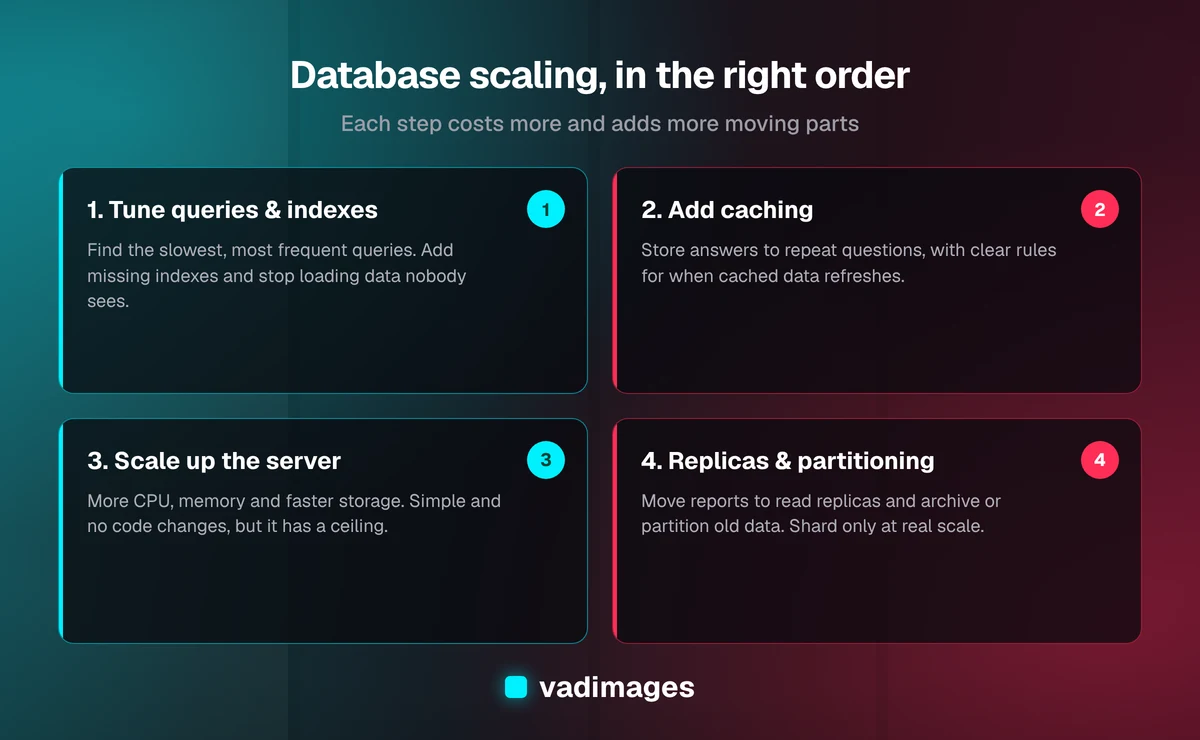
Database scaling strategies, from cheapest to most involved
The strategies below are listed in the order we normally try them. Each step is more expensive and adds more moving parts than the one before it, so it pays to exhaust the earlier steps first.
1. Tune queries and indexes
An index works like the index at the back of a book: it lets the database jump to the right rows instead of reading the whole table. Missing indexes are one of the most common causes of slow pages in business apps, because tables that were small at launch grow large over the years. Adding the right index, rewriting a query that loads far more data than the screen shows, or fixing code that runs one query per row instead of one query per page can turn a slow screen into a fast one.
This work is low-risk and inexpensive compared with everything else on this list. It is also where we start on almost every performance engagement.
2. Add caching
Caching means storing the answer to a frequent question so the database does not have to work it out again. A dashboard that shows yesterday's totals does not need to recalculate them every time someone opens it. Tools like Redis, or the caching built into your web framework and hosting platform, can hold those answers for seconds, minutes, or hours.
The trade-off is freshness. You need a clear rule for when cached data expires or is refreshed, so users never act on stale numbers where it matters, such as inventory or account balances.
3. Scale up the server (vertical scaling)
Vertical scaling means giving the database a bigger machine: more CPU, more memory, faster storage. On a managed cloud database this can be a settings change and a short maintenance window. It is simple, it requires no code changes, and it buys time.
It also has limits. Bigger instances cost more each month, and there is a ceiling to how big one server can get. If the real problem is a bad query, a bigger server only makes the bad query run slightly faster at a higher price. That is why tuning comes first.
4. Split reads onto replicas
Many business apps read far more data than they write. A read replica is a copy of the main database that stays in sync and handles read-only work such as reports, searches, and exports. The main database is then free to handle saves and updates.
Replicas add some complexity. Data on a replica can lag the main database by a moment, so the app has to send anything that must be up to the second, like a confirmation screen right after a save, to the main database. Your developers also need to route queries correctly and monitor the replicas.
5. Archive and partition old data
Most businesses rarely touch data that is several years old, yet it sits in the same tables as today's orders and slows down every search. Archiving moves old records to separate storage that is still available for audits and history. Partitioning splits one large table into smaller pieces, for example by year or month, so the database only scans the pieces it needs.
Before archiving anything, check your retention obligations. Tax, healthcare, and financial records often have legal retention periods, so the plan should come from your accountant or compliance lead as well as your developers.
6. Shard or change the architecture
Sharding means splitting data across several separate databases, for example one per region or per group of customers. It is how very large platforms scale writes, and it adds significant complexity to development, reporting, and operations. Most SMB systems never need it. If someone recommends sharding before the earlier steps have been tried and measured, ask for the data behind that recommendation.
Sometimes the honest answer is that the database is fine and the system around it has outgrown its design. In that case, scaling becomes part of a broader legacy system replacement or modernization plan rather than a database project.
How to choose the right strategy
A practical way to decide is to match the symptom to the fix:
- A few specific screens are slow: tune queries and indexes.
- The same data is requested over and over: add caching.
- The whole server is busy and queries are already tuned: scale up.
- Reports and exports slow down everyday work: add a read replica or move reporting elsewhere.
- Tables hold years of rarely used history: archive or partition.
- You have exhausted all of the above and still grow fast: consider sharding or a redesign.
Two other factors matter. First, how fast you are growing: a business adding a few customers a month needs a different plan from one onboarding a large client next quarter. Second, what the system is worth to you: if the app runs order intake or billing, downtime and slowness cost real money, and a stronger setup is easier to justify.
How to scale without downtime or data loss
Database changes are where careful process pays off. Whatever strategy you choose, the work should follow a few rules:
- Back up first and test the restore. A backup you have never restored is a hope, not a plan.
- Test on a copy. Try index changes, migrations, and new settings on a staging database with realistic data before production.
- Change one thing at a time. If you add an index, a cache, and a bigger server on the same night, you will not know which one helped, or which one broke something.
- Schedule around your business. Avoid month-end, payroll days, and peak seasons for anything that needs a maintenance window.
- Measure again afterward. Compare the slow-query list and server metrics with the numbers from before, and write down what changed.
This is the same step-by-step approach we describe in how we work: small, reversible changes with a clear before-and-after.
What database scaling costs
Cost depends far more on which step you need than on the size of your business. As of 2026, query tuning, indexing, and caching on an existing app are often handled as focused work inside an ongoing maintenance and support plan, which runs $500 to $2,000 per month on an annual plan. Scaling up a managed cloud database mainly raises your monthly hosting bill rather than your development bill.
Larger changes, such as introducing replicas with query routing, partitioning big tables, or redesigning how a system stores data, are scoped as projects. When that work is part of replacing an aging system, it falls within our legacy replacement range of $75,000 to $200,000+ as of 2026. Our projects start at $5,000, and you can see how we price work on our pricing page. A short performance audit is usually the cheapest way to find out which bucket you are in.
Common mistakes to avoid
- Buying a bigger server first. It hides the real problem and raises your monthly costs.
- Switching database engines to fix speed. Moving from one mainstream engine to another is a large migration and rarely fixes a slow query on its own.
- Running heavy reports on the live database at peak hours. Schedule them, cache them, or move them to a replica.
- Ignoring monitoring. Without alerts on slow queries and server load, you find out about problems from frustrated staff or customers.
- Deleting old data without a retention policy. Archive deliberately, with sign-off from whoever owns compliance.
If you want to see how this plays out across different businesses, our case studies and industries pages show the kinds of systems we build and support.
Frequently asked questions
What is the first database scaling strategy to try?
Measure, then tune queries and indexes. Find the slowest and most frequent queries, add missing indexes, and fix code that loads more data than it needs. It is the cheapest, lowest-risk step and often solves the problem on its own.
What is the difference between vertical and horizontal scaling?
Vertical scaling gives one database server more CPU, memory, or faster storage. Horizontal scaling spreads the work across several servers, for example with read replicas or sharding. Vertical scaling is simpler; horizontal scaling goes further but adds complexity.
How do I know whether the database is the real bottleneck?
Look at the slow-query log and the database server's CPU, memory, and disk metrics during a slow period. If pages are slow while the database is idle and its queries are fast, the bottleneck is likely in the application code, an external API, or the front end instead.
Do small businesses ever need sharding?
Rarely. Most small and mid-sized business systems scale well with tuning, caching, a larger server, read replicas, and archiving. Sharding is worth considering only after those steps have been tried and measured and write volume is still the limit.
Can a database be scaled without downtime?
Often, yes. Many index changes, replica setups, and caching layers can be added with little or no downtime when they are tested on a copy first. Some changes, such as resizing certain servers or large migrations, need a short planned maintenance window outside business hours.
Is your system starting to slow down?
If your team is waiting on screens, reports, or month-end jobs, we can measure where the time goes and give you a plain-English plan, cheapest fix first. Contact Vadimages to talk through your system and what it needs to handle next year.


