
If you run a consulting firm, agency, or any professional-services website on WordPress and you use the HubSpot plugin for your lead forms, popups, and live chat, this week’s security disclosure deserves ten minutes of your attention. A vulnerability tracked as CVE-2026-57736 meant that, on older versions of the plugin, a low-privileged WordPress user could read your site’s plaintext HubSpot OAuth refresh token — the credential that connects your site to your CRM. That is the digital equivalent of leaving the key to your entire contact database taped under the welcome mat. The good news: HubSpot has shipped a fix, and updating takes a couple of minutes. Here is exactly what happened, what is at stake for a US professional-services business, and what to do today.
What actually changed
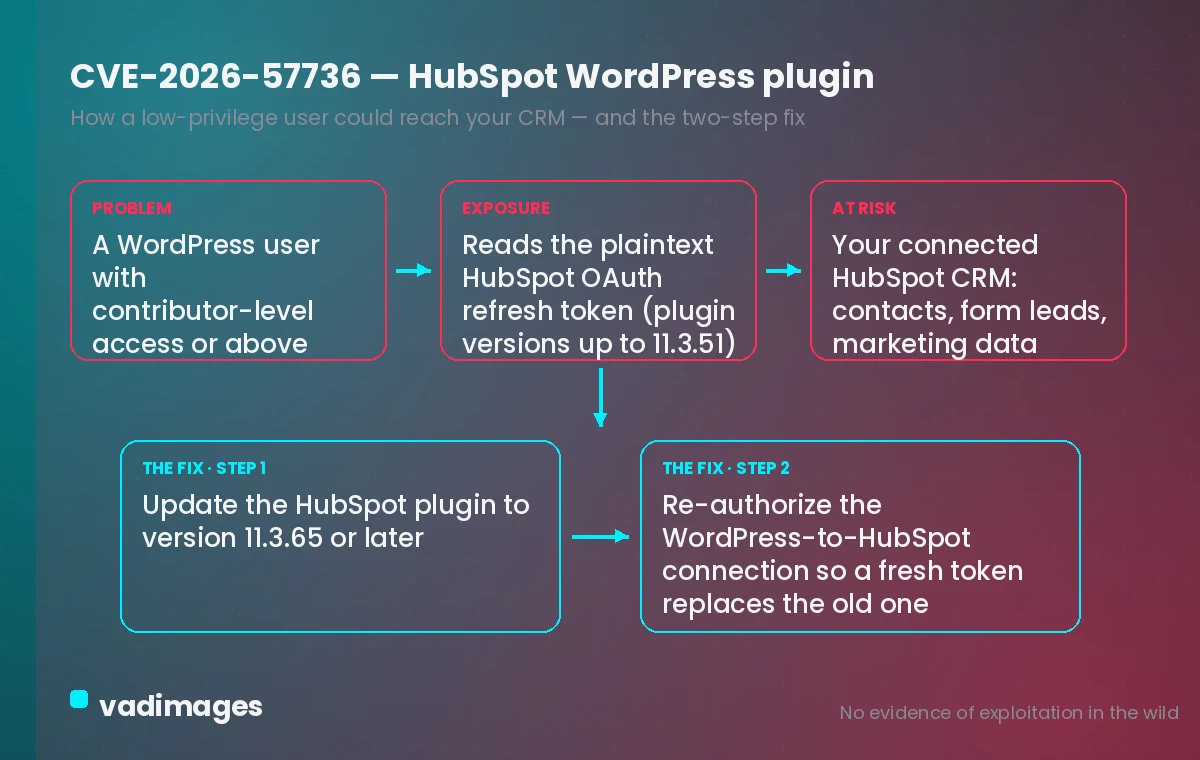
On July 2, 2026, HubSpot became aware of a publicly disclosed flaw in its “HubSpot All-In-One Marketing – Forms, Popups, Live Chat” WordPress plugin (the plugin whose install slug is “leadin”). The issue, assigned CVE-2026-57736 and categorized under CWE-201 (Insertion of Sensitive Information Into Sent Data), affects plugin versions up to and including 11.3.51. In those versions, an authenticated WordPress user with contributor-level access or above could retrieve the site’s plaintext HubSpot OAuth refresh token. Public trackers rate it a medium-to-high severity issue, around CVSS 7.4.
Why does a refresh token matter so much? It is the long-lived credential your WordPress site uses to talk to your connected HubSpot portal without re-authenticating. Whoever holds it can request fresh access tokens and reach the data that connection is authorized for — think contact records, form submissions, and marketing data. On a typical professional-services site, that connection is the pipeline: every “Request a consultation” form fill and every chat lead flows through it.
HubSpot moved quickly. Version 11.3.62 (July 9, 2026) migrated the OAuth token exchange to a server-side v2 endpoint, and builds 11.3.64 and 11.3.65 (July 10, 2026) removed the deprecated refresh-token route entirely and tightened token handling. In its preliminary investigation, HubSpot reported no evidence of exploitation in the wild — but “no evidence yet” is not the same as “safe if you never update.”
What happens if you do nothing
The uncomfortable part of a “low-privilege” disclosure is that most firms hand out contributor and author accounts freely. The freelance copywriter drafting your blog, the marketing intern, the SEO contractor, the fractional CMO — any of them may sit at contributor level or above. On a vulnerable version, any one of those accounts (or any attacker who phishes one) could read the token that unlocks your CRM connection. From there the risk is not a defaced homepage; it is quiet exfiltration of your prospect and client list.
For a professional-services business, that list is the business. It is years of relationships, deal context, and contact details that competitors would love and that your clients trusted you to protect. A leak can mean targeted phishing against your clients, reputational damage, breach-notification obligations under state privacy laws such as California’s CCPA/CPRA, and the kind of trust erosion that is far more expensive than any patch. Doing nothing leaves a known, publicly documented hole open on the one integration that touches your most sensitive data.
What you gain by acting
Patch today and the immediate win is obvious: the token-exposure path is closed. But frame it the way your clients would. When someone fills out your contact form to book a strategy call, they are handing you their name, company, and problem in confidence. Closing this gap means that trust is honored — their information stays inside your CRM and out of the wrong hands. A firm that can say “we patch known issues within days” is a firm that looks buttoned-up to the exact enterprise buyers who run vendor-security reviews before they sign.
There is a performance dividend too. The current plugin build moves token exchange server-side, which is the more modern, more resilient pattern — fewer moving parts on the client, cleaner behavior for the visitors filling out your forms. Staying current on this plugin is not just defense; it keeps your lead-capture experience fast and reliable for the people you most want to convert.
What to do on your own site
The core fix is short. Log in to your WordPress dashboard, open Plugins, find “HubSpot All-In-One Marketing – Forms, Popups, Live Chat,” and update it to version 11.3.65 or later. If you have auto-updates enabled, confirm the installed version actually shows 11.3.65+ — do not assume. Then, because a refresh token may already have been exposed on an old version, treat this as a credential-rotation event: in your HubSpot account, review connected apps and re-authorize the WordPress connection so a fresh token is issued and any previously readable one is retired.
Your quick-win security checklist
Beyond this one plugin, use today’s scare as a prompt to harden the whole site. Run through this in the next hour:
- Confirm the version. Plugins → HubSpot plugin shows 11.3.65 or newer. If not, update now.
- Rotate the connection. Re-authorize the HubSpot ↔ WordPress link so a new OAuth token replaces any old one.
- Audit your users. Review every account at contributor level and above; delete stale freelancer and ex-employee logins and downgrade anyone who doesn’t need publishing rights.
- Turn on least privilege. Give outside contractors the lowest role that lets them do their job — not Author or Editor by default.
- Enable two-factor. Require 2FA for every admin, editor, and author account so a stolen password isn’t enough.
- Set an update rhythm. Check plugins weekly, or enable auto-updates for security releases, and keep a rollback backup before each change.
- Watch the logs. If you have an activity or security-log plugin, scan for unexpected access to plugin settings or the REST API around early July.
How Vadimages helps
Patching a plugin is the easy part; the harder question is whether your most important data should ride entirely on off-the-shelf WordPress plumbing. Vadimages builds the web software that professional-services firms rely on to capture and manage clients — and we build it with this exact class of risk designed out. That includes custom client and lead portals, intake and consultation-booking flows, and internal dashboards where authentication, roles, and API credentials are handled server-side and never exposed to low-privileged accounts. When you do need to connect to HubSpot or another CRM, we build the integration layer so tokens live in secured server environments with scoped permissions, not in a browser-readable plugin setting.
If your firm currently runs lead capture, scheduling, and project tracking through a patchwork of WordPress plugins, we can consolidate the sensitive pieces into a maintainable web app — and pair it with a mobile app when your team needs client data on the go — so a single third-party CVE can never expose your whole pipeline. The result is a site that turns a stressful security bulletin into a non-event: handled, monitored, and built to keep your clients’ trust intact.
Bottom line
CVE-2026-57736 let a low-privileged WordPress user read the HubSpot OAuth refresh token on plugin versions up to 11.3.51 — the key to your CRM. Update the HubSpot plugin to 11.3.65 or later today, re-authorize the connection, and run the checklist above. Then decide whether your client pipeline deserves a purpose-built, security-first foundation rather than a plugin you have to watch for the next bulletin.
This article is general information about a security update, not legal or compliance advice; consult a qualified professional about your specific breach-notification and privacy obligations.