
Website security is one of those things that feels invisible right up until the day it isn't. Your site loads, customers fill out forms, orders come through, and everything looks fine — until a login suddenly stops working, a strange page shows up in your Google results, or your hosting company emails to say your account has been suspended for sending spam. For a small or mid-sized business, that kind of surprise is expensive, stressful, and almost always preventable.
The reassuring part is that protecting a business website is not a mysterious art reserved for large enterprises with dedicated security teams. It comes down to a handful of practical habits and a few well-chosen tools, applied consistently. This guide walks through what website security actually means, how business sites really get compromised, the core protections every company needs, and a checklist you can start working through this month. No jargon and no fear-mongering — just the outcomes that keep your site online and your customers' trust intact.
What website security actually means for a small business
Strip away the technical vocabulary and website security is about protecting three simple things: availability, data, and trust. Availability means your site stays up and does what it's supposed to do — visitors can browse, buy, and get in touch without hitting an error page or a hijacked checkout. Data means the information your site holds, from customer names and email addresses to payment details and internal records, stays private and unaltered. Trust is the quieter one, but it's often the most valuable: a single security incident can undo years of careful reputation-building in an afternoon.
When any one of those three is compromised, the effects ripple outward fast. An unavailable site loses sales and frustrates the customers who were ready to buy. Leaked data creates legal exposure and erodes confidence. And a site that visibly gets hacked — defaced, redirecting to sketchy pages, or flagged with a browser warning — tells every prospect that you don't have your house in order. Good security is really just the practice of defending all three at once, day after day, so the business behind the website can keep running.
How business websites actually get compromised
Most site compromises are not the work of a targeted, movie-style hacker who has singled out your company. The overwhelming majority are automated: bots crawl the web around the clock, probing millions of sites for known weaknesses and walking straight in wherever they find one. That's actually good news, because it means the fixes are well understood. Here are the entry points that account for the vast majority of real-world incidents:
- Outdated software. An unpatched content management system, theme, or plugin is the single most common way sites get breached. Once a vulnerability is published, automated scanners start hunting for sites that haven't updated — often within hours.
- Weak or reused passwords. Admin accounts protected by password123, or by a password that was already exposed in someone else's data breach, are trivial for bots to guess through automated login attempts.
- Phished credentials. A convincing email tricks a staff member into typing their login into a fake page, handing an attacker the keys without touching your server at all.
- Unprotected forms and inputs. Contact forms, search boxes, and file uploads that don't validate what they receive can be used to inject malicious code or overwhelm the site.
- Insecure hosting and missing encryption. A cheap, poorly maintained server — or a site still served over plain http instead of encrypted https — leaves data exposed in transit and the environment easy to tamper with.
- Risky third-party code. Every external script, widget, or integration you add is a door into your site. If one of those vendors is compromised, your site can inherit the problem.
Notice the pattern: almost none of these require sophistication to exploit, and almost all of them are preventable with routine care. That's the encouraging reality behind website security — the same short list of habits closes the doors that attackers actually use.
The core protections every business website needs
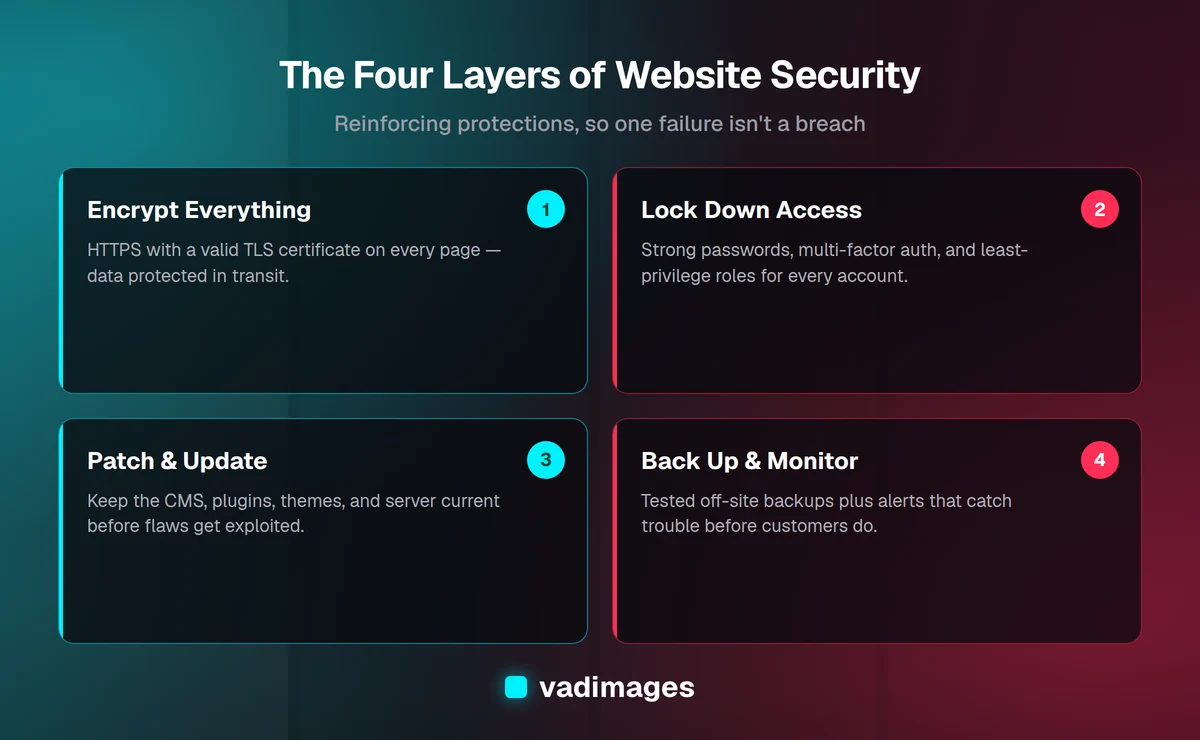
You don't need dozens of tools to be meaningfully secure. You need a few layers that reinforce each other, so that if one fails, another still stands between an attacker and your business. Think of it as four layers built on top of one another:
- Encrypt everything. Serve every page over HTTPS with a valid TLS certificate — not just the checkout or login page, but the entire site. This scrambles data in transit, protects visitors on public networks, and removes the "Not secure" warning modern browsers show on unencrypted pages. It's also a baseline expectation for search ranking and customer trust.
- Lock down access. Use strong, unique passwords, turn on multi-factor authentication for every admin account, and give each person only the level of access they actually need. A content editor shouldn't have the keys to the server, and a former contractor's account shouldn't still be active.
- Patch and update. Keep the platform, plugins, themes, and underlying server software current. Most breaches exploit flaws that were fixed months earlier — the businesses that got hit simply hadn't applied the update yet.
- Back up and monitor. Automated, off-site backups mean a bad day becomes a one-hour restore instead of a lost website. Monitoring — uptime checks, malware scanning, and alerts on unexpected changes — means you find out about trouble before your customers do.
A web application firewall (WAF) sits nicely on top of these, filtering out obviously malicious traffic before it ever reaches your site. But the four layers above are the foundation. Get them right and you've closed off the routes that the automated attacks depend on.
A website security checklist you can act on this month
Security improves fastest when it's broken into concrete steps rather than treated as one giant project. If you did nothing else this month, working through the list below would put your site ahead of most of its peers:
- Confirm HTTPS is active on every page and that the certificate auto-renews, so it never lapses unnoticed.
- Turn on multi-factor authentication for every administrator and editor account.
- Audit who has access, remove accounts that are no longer needed, and reset any password that might have been reused elsewhere.
- Update the CMS, plugins, themes, and server software — then set a recurring schedule so it keeps happening.
- Verify that automated backups are running, stored somewhere separate from the live site, and can actually be restored (an untested backup is only a hope).
- Add uptime and malware monitoring so you're alerted the moment something changes.
- Review the third-party scripts and integrations on your site and remove any you no longer use.
None of these steps requires deep engineering knowledge to start, and each one measurably reduces your risk. The businesses that avoid incidents are rarely the ones with the biggest budgets — they're the ones that did the boring, consistent work above before anything went wrong.
The real cost of treating security as an afterthought
It's tempting to put website security in the "we'll get to it" pile, especially when the site seems to be running fine. The problem is that the cost of a breach almost never lands as a single, tidy line item. It shows up as lost revenue while the site is down, hours of your team's time spent on cleanup instead of customers, and emergency fees to a specialist brought in to fix an urgent mess.
Then there's the damage you can't invoice for. A hacked site is frequently blacklisted by search engines or flagged by browsers, which quietly strangles the organic traffic you spent years earning. Customers who see a warning on your site — or worse, who have their data exposed — don't always come back. And depending on your industry and the data you handle, a breach can carry real compliance and legal consequences. Set against those numbers, the modest ongoing cost of doing security properly is one of the clearest returns on investment a business website offers.
Security and maintenance are really the same job
Here's the shift in thinking that helps most: website security isn't a one-time purchase, it's a maintenance habit. Threats evolve, new vulnerabilities are disclosed constantly, and the plugin that was perfectly safe last quarter can become a liability the moment a flaw is found in it. A site secured once and then left alone slowly drifts back into risk without anyone noticing — usually right up until the day it breaks.
That's why security belongs inside a broader ongoing maintenance routine rather than living as a separate emergency fund. Regular updates, backup verification, monitoring reviews, and the occasional deeper audit are the same activities that keep a site fast, reliable, and compatible with the browsers and devices your customers actually use. Treating maintenance and security as one discipline means you're not choosing between a site that performs and a site that's protected — you get both from the same steady effort.
Where a development partner fits in
Plenty of the checklist above is within reach of an in-house team, and we'd always encourage you to own the basics. But there's a point where security benefits from people who do this every day — especially if your site is custom-built, handles sensitive data, or is central to how you make money. That's where working with a partner earns its keep: not to sell you fear, but to make sure the protections are configured correctly, tested, and quietly maintained so you can think about your business instead of your firewall.
At Vadimages, security is built into how we design and support the systems we deliver, whether that's a marketing site, a custom software platform, or an internal tool your team relies on. We build with secure defaults, help you close the gaps on an existing site, and offer ongoing support so the maintenance actually happens instead of slipping down the to-do list. Our solutions span the full range of business needs, and because different sectors face different risks, we tailor the approach to your industry. You can see how that plays out in real projects on our case studies page, and our transparent pricing starts at $5,000 — so you always know what you're investing before we begin.
How to get started
Website security rewards momentum more than perfection. Start with the highest-impact steps — encryption everywhere, multi-factor authentication, current software, and tested backups — and build the rest into a routine you can sustain. Every layer you add makes your business a harder, less appealing target, and the automated attacks that cause most real damage move on to easier prey.
If you'd like a clear-eyed look at where your site stands today and a practical plan to close the gaps, get in touch. We'll help you protect what you've built — the availability, the data, and the trust — so your website keeps working for your business instead of becoming a source of surprises.